GoodTime Product Updates: What’s New From May 2023

Get excited: our team is always hard at work in making GoodTime the best it can be, and we’re here to share the latest product updates from May 2023. Expect some exciting GoodTime Hire automation features, enhancements to Flexible Scheduling, and new GoodTime Meet company admin controls. Buckle up, let’s review!

Watch the Full Product Updates Walkthrough

Want the entire scoop on our latest and greatest product updates? Check out May’s product update webinar below. Keep scrolling to read the biggest highlights.

GoodTime Hire Updates

We’ve amped up the logic behind GoodTime’s algorithm, introduced additional features to help large enterprises hire with greater efficiency, and more.

More Time Slots

The processing power and logic of GoodTime’s algorithm got a major boost. Now, GoodTime’s Flexible Scheduling produces more time slot options than ever before. That means more flexibility, faster interview scheduling, and reduced time-to-hire.
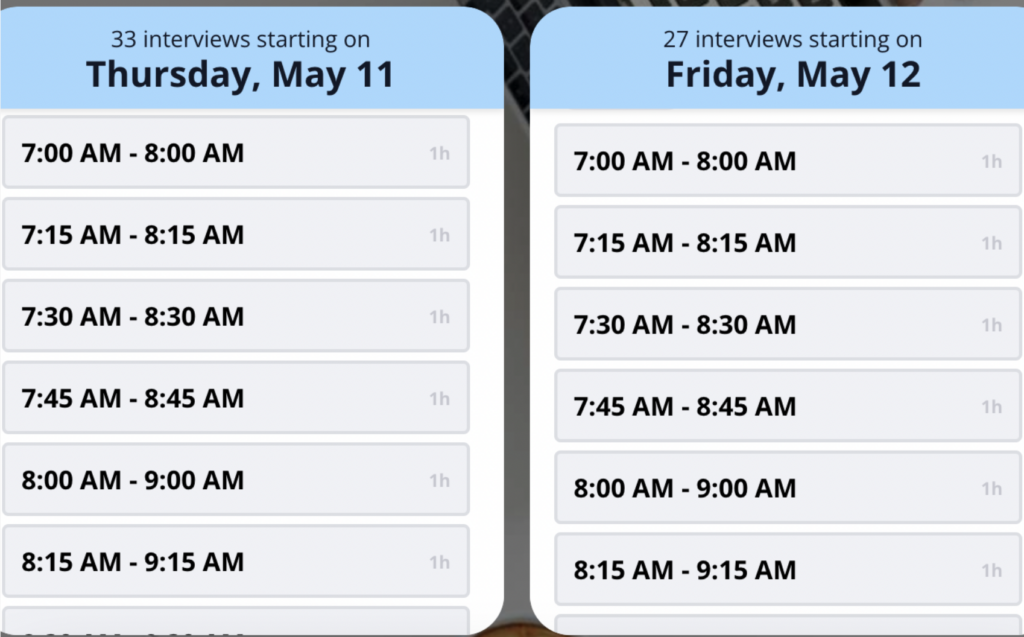
GoodTime Hire's new time slots feature

Optimization for Large Tags

We’ve now revamped the way tags operate. Interviewers who are low on interviews and closer in time zone get prioritized until enough times are found. Candidates now get time slots that are most suitable for their time zone and all interviewers get a chance to contribute. 
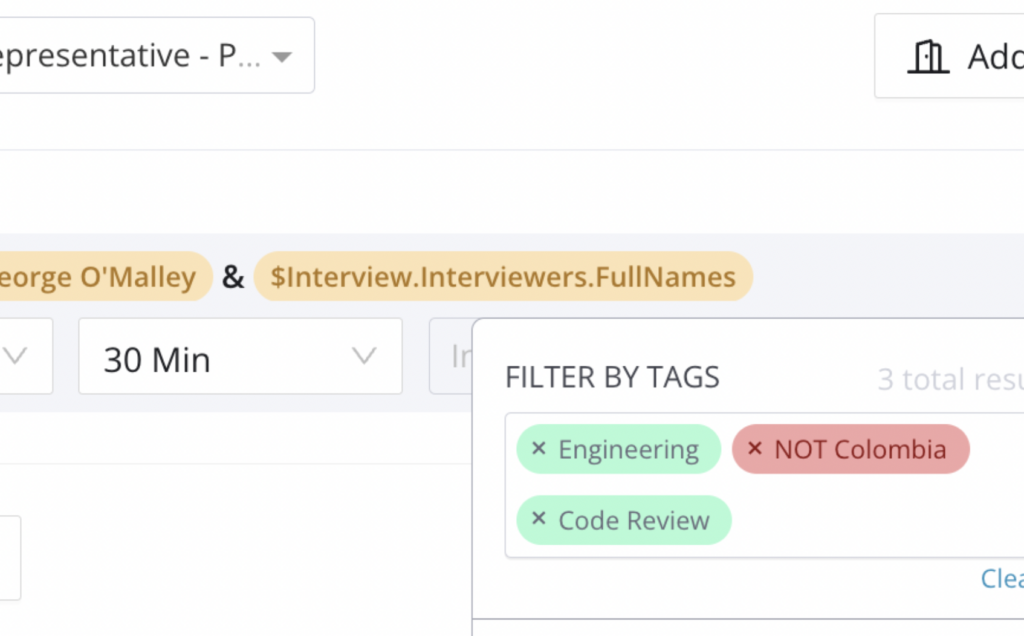
GoodTime Hire's optimization for large tags feature

Multiple Calendar Tenants Support

Large enterprises often have a number of subsidiaries or business units that are on separate domains and calendar services. Talent teams can now serve multiple subsidiaries within the corporation, as GoodTime supports calendar visibility across various calendar tenants.
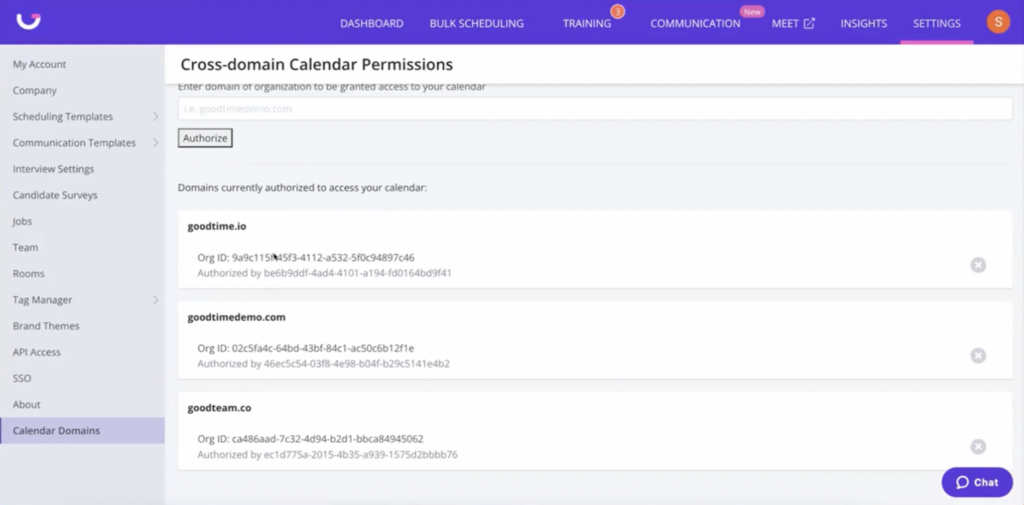
GoodTime Hire's multiple calendar tenants support feature

Other Notable Updates

  • Auto Load Time Slots: Days and times now automatically open as the candidate uses their Request Availability link
  • Time Zone Mandatory for Onsite Interviews: When you make an interview or template “onsite” it is now mandatory to set a time zone. This prevents the suggestion of inappropriate times.
  • More Accurate Assignment of Candidate Time Zone: GoodTime now reassesses the time zone of each candidate every time they open the Request Availability link. This keeps details more up-to-date than ever for accurate scheduling.

GoodTime Hire for High Volume Updates

We’ve introduced a new automation feature, implemented additional support for emailing in bulk, and more.

Workflow Automation

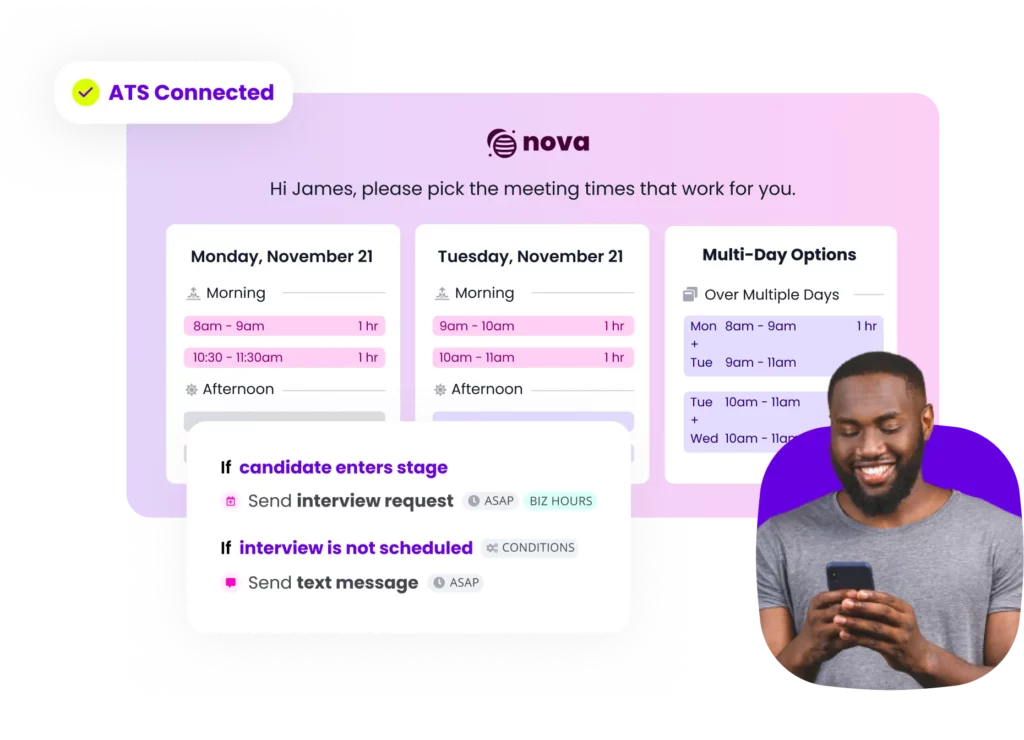
Automate as little or as much of your recruiting process with Hire for High Volume’s newest feature, Workflow Automation. You can automate tasks such as sending an interview request as soon as a candidate enters a stage.
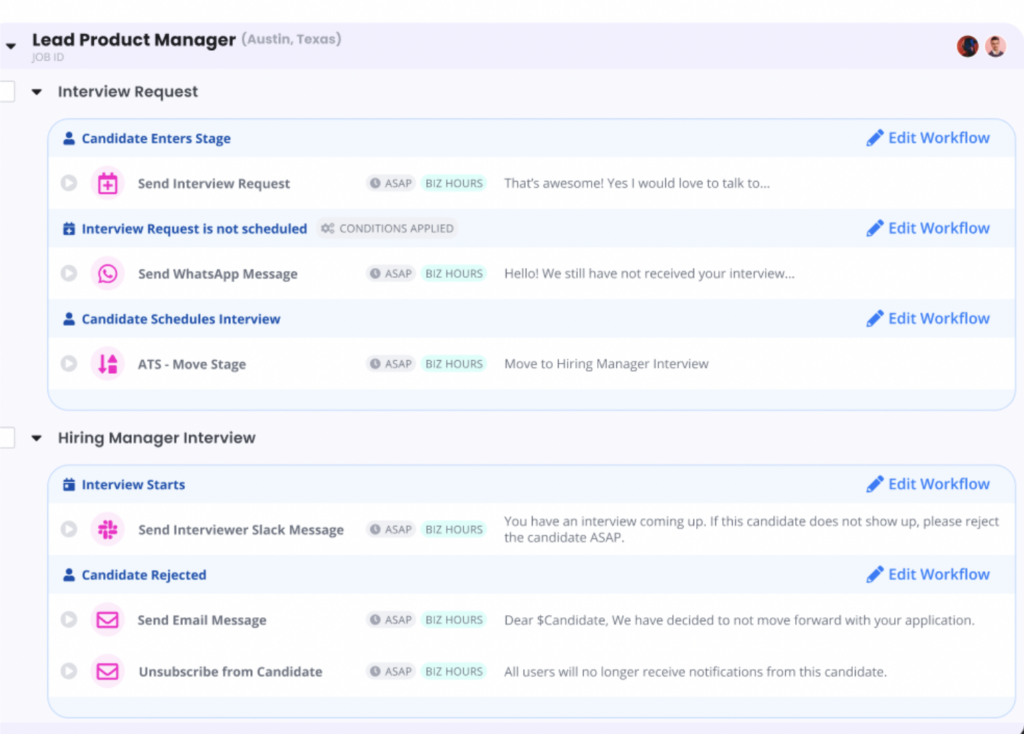
GoodTime Hire for High Volume's workflow automation feature

Trigger Actions in Business Hours

Workflow Automation also allows you to trigger actions to only occur during business hours. For instance, set communication with your candidates to only occur during Monday-Friday, 9 a.m.-5 p.m.
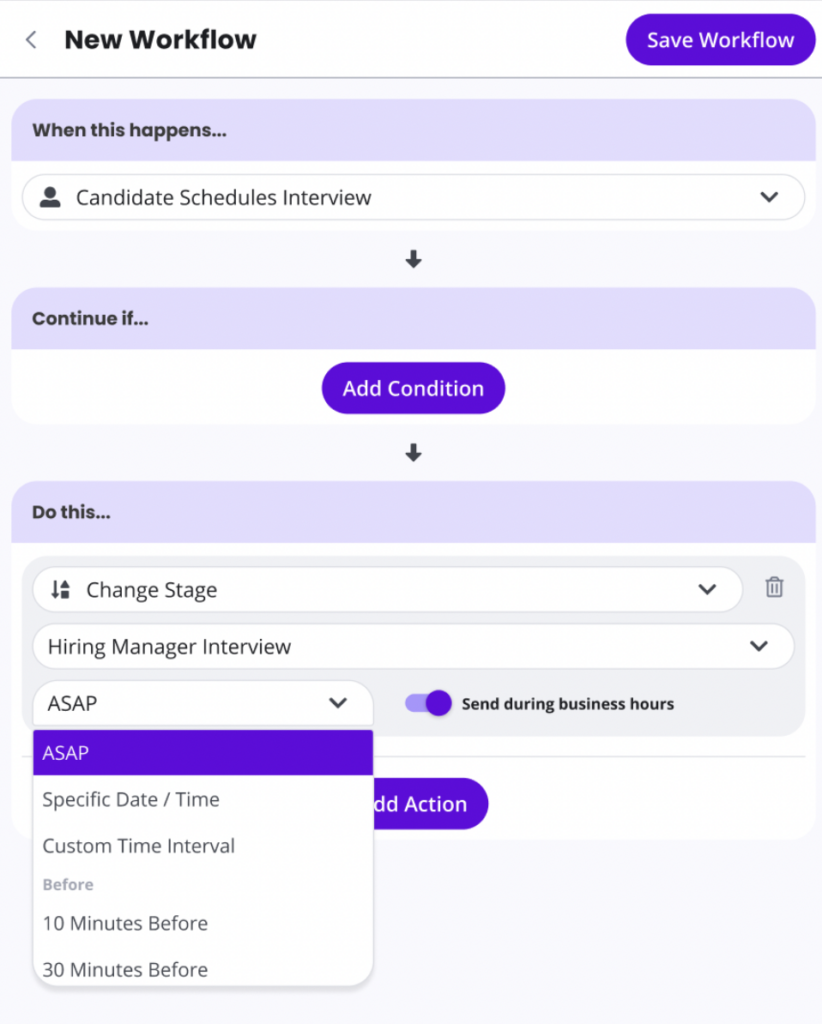
Another one of GoodTime Hire for High Volume's workflow automation features

Bulk Email Support and Chrome Extension

Quickly send 1:1 emails to candidates via the Chrome extension or dozens of emails to dozens of candidates at once through our new Bulk Email feature.
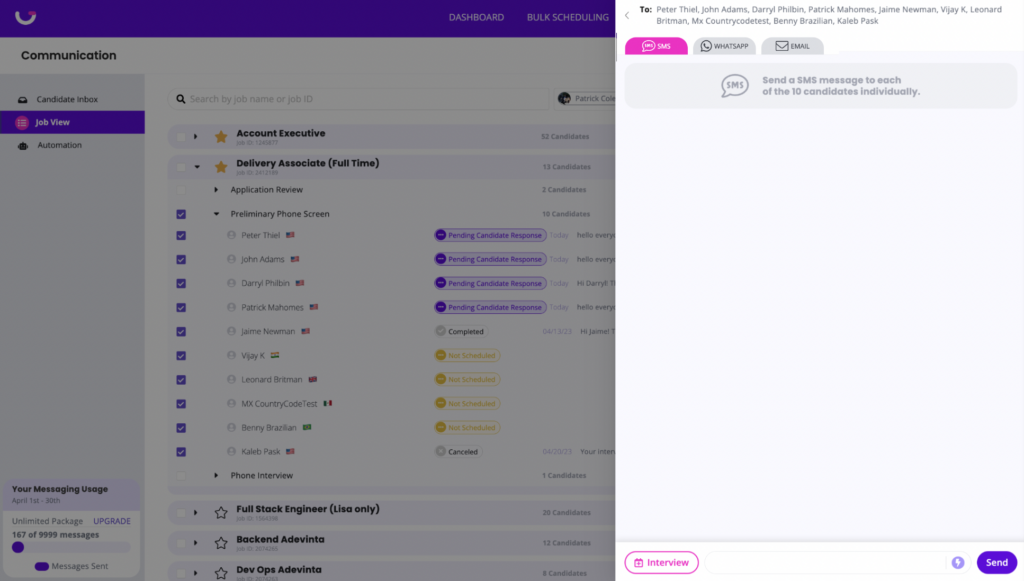
GoodTime Hire for High Volume's bulk email support feature

Other Notable Updates

  • Updating Phone Numbers Before Workflow Automation: We’ll ensure candidates receive your messages by updating their phone numbers
  • Multiple Reminders Delivered: Candidates receive reminders 24 hours before an interview and one hour before an interview
  • Display Icons for No Phone Number/Invalid Phone Number: See in the Job View page when a candidate has no phone number versus an invalid phone number

GoodTime Meet Updates

Company admins, feast your eyes on some new updates just for you. Plus: enjoy a new interface for taking a quick peek at your calendar. 

Company Agenda Templates

Company admins can create agenda templates to share with the entire company. Maintain consistency and save your team’s time.
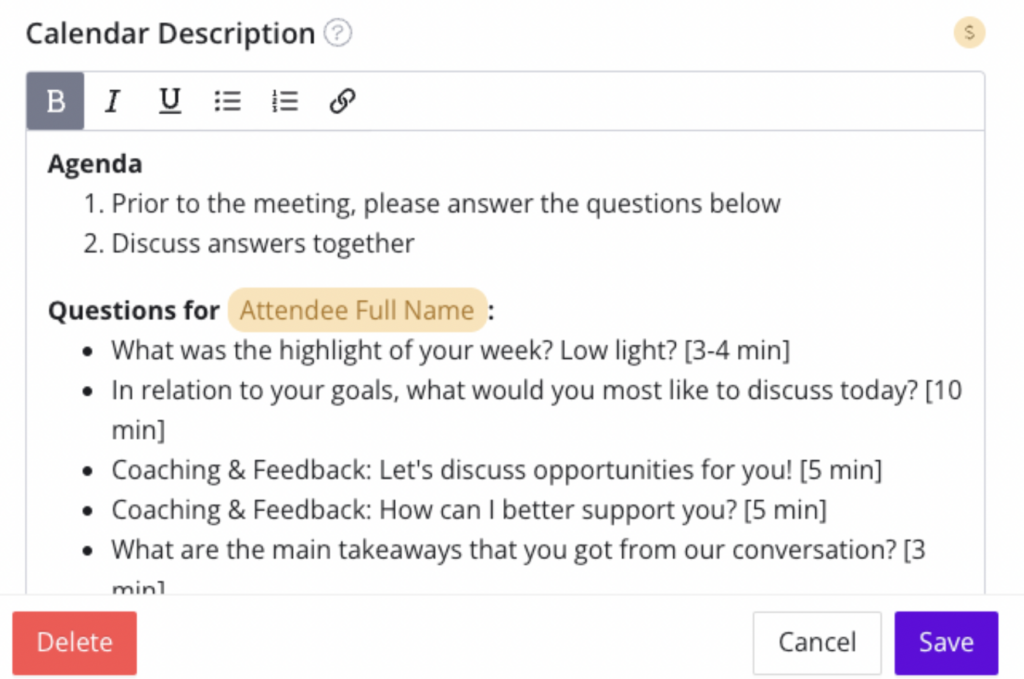
GoodTime Meet's company agenda templates feature

Company Branding

Company admins can set branding default images and colors used by the entire company. Ensure all employees use the same branding when sharing Meet scheduling links.
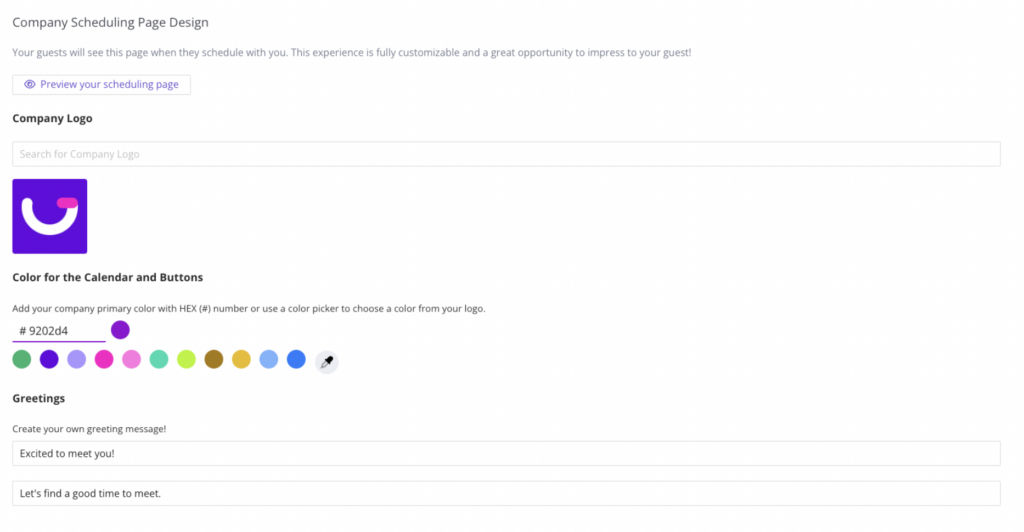
GoodTime Meet's company branding feature

Calendar Quick View

View the most important details on your calendar events in a fresh new interface. Join meetings in a single click, quickly update RSVPs, reschedule meetings, and get back into action without wasting time.
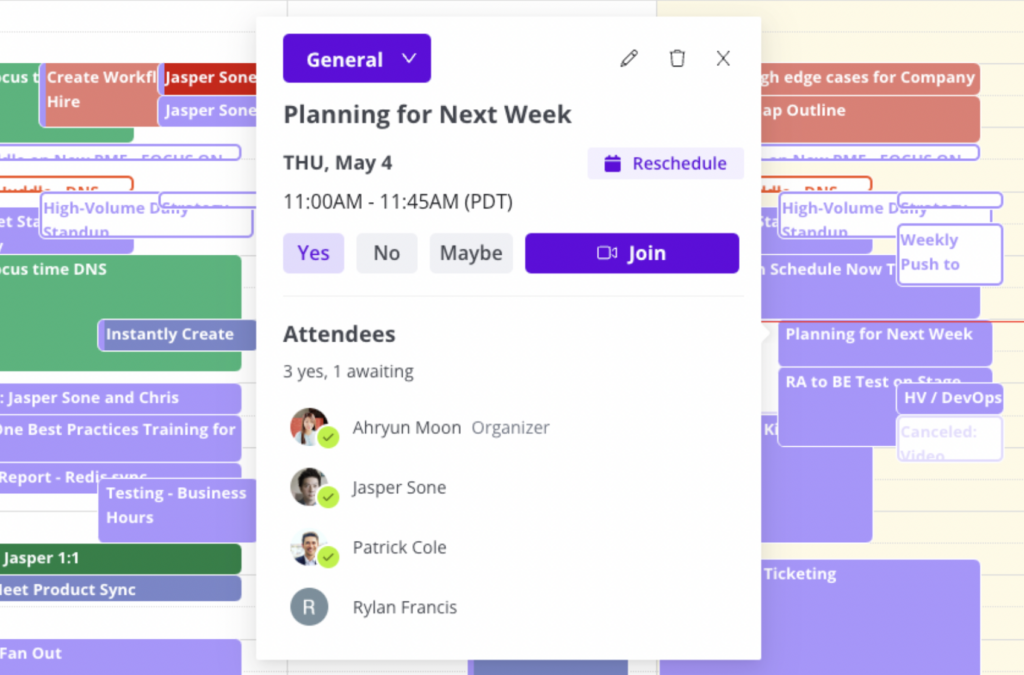
GoodTime Meet's calendar quick view feature

Other Notable Updates

  • Meet Calendar Performance Updates: We’ve made several performance updates to decrease loading times for calendar pages
  • Meet Calendar Event Edit Updates: Add more capabilities to the calendar event edit page such as adding rooms, rescheduling, marking events as public/private, changing the calendar written to, and much more.

Not Part of the GoodTime Family Yet?

It’s time to change that. With GoodTime, you can get better outcomes from your company’s most important meetings. For interviews, GoodTime Hire helps you schedule 40% faster, hire 50% more efficiently, and 5x team productivity. (Seriously.) For every other meeting, GoodTime Meet provides beautifully-branded scheduling links to schedule internal and external meetings faster than ever.

Learn more about how Hire can transform your interview scheduling.

Learn more about how Hire for High Volume can revolutionize your high-volume hiring.

Learn more about how Meet can revamp your meeting scheduling.

Work Smarter, Not Harder: The Benefits of HR Automation

​​Blog written by Lever – Lever, an Employ Inc. brand, is a leading Talent Acquisition Suite that makes it easy for talent teams to reach their hiring goals and to connect companies with top talent.

Less paperwork, stress, and headaches, plus more free time to spend on tasks that really matter: that’s the high-level benefit of leveraging human resources (HR) automation.

Zoom in a bit further, though, and you’ll see that HR automation software not only leads to fewer manual HR processes (including those owned by the talent acquisition arm of your HR function) but also an opportunity to address and optimize other key workforce tasks.

The Burden of Manual Processes

Human resources management encompasses a number of important initiatives: from executing the entire employee onboarding process, to aiding people managers with employee training, to helping the C-suite enhance the employee experience.

On the recruiting and hiring side of the HR department, HR automation tools play a pivotal role in talent acquisition success. Notably, these solutions eliminate time-consuming, manual labor—like scheduling interviews with candidates—to help teams save major time and money.

Consider the non-automated process of connecting with both job seekers and hiring team members who will take part on a given interview panel and speak with a prospect:

  • The talent specialist who is running the recruitment process must work their you-know-what off just to identify and engage candidates of interest. A not-so-small task—and one that, as you well know, takes a lot of time and effort.
  • After finally identifying a small group of top-tier talent who seem like optimal fits for an available position and screening them, it’s time to advance them to the interview process. And that means coordinating a lot of schedules.
  • Once interviewers are selected (ideally, by using software that helps you load-balance interview panel participation), you need access to find available slots on all panelists’ calendars and send out the official invite to the candidate

This may not seem like an arduous task on its face.

However, if anyone knows how frustrating it can often be to find that magical 30- or 60-minute time slot during which everyone on your interview panel is free (and the pain of having an unorganized interview scheduling process, in general), it’s recruiters.

That’s where HR automation can help (and alleviate stress for talent teams).

Does interview scheduling automation make sense for my team?

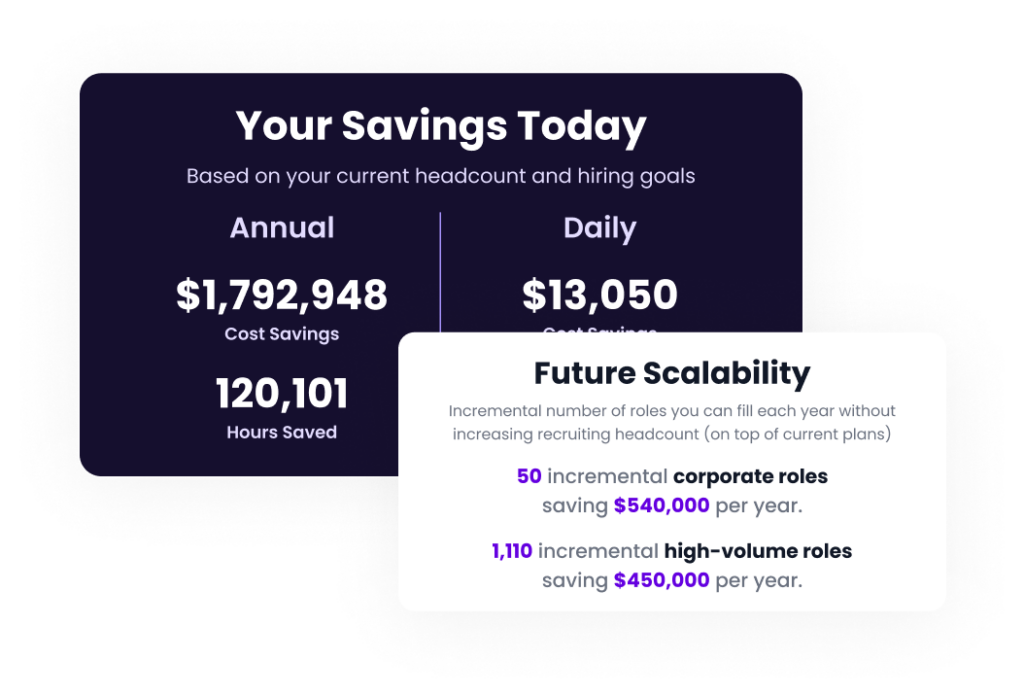
ROI is key. This is not a time to invest in software that won’t bring you immediate value. So let’s eliminate the guesswork with our free ROI calculator.

The Outsized Impact of HR Automation

Leveraging an HR process automation solution that has built-in interview-scheduling functionality to help facilitate the planning of all interviews in a given recruitment cycle means:

  • Members on the recruiting side of your HR staff don’t have to poke and prod interviewers every time they need access to their schedules to set up calls with candidates
  • You can realize quicker recruiting cycles by arranging chats with your active opportunities and, after interviewing each, advance the right candidate to the offer stage
  • More satisfied hiring managers, given you’re able to drive down time-to-hire/fill for their roles
  • The ability to shift gears and focus on other equally essential recruiting-related duties

“The more day-to-day responsibilities talent leaders and specialists automate, the more time they can allocate to other daily activities and long-term objectives,” Lever Sr. Product Marketing Manager Roy Reif shared in their guide on the power of recruitment automation for candidate engagement.

See how the TA team at HelloFresh used the time they saved with HR automation to up-level their candidate experience:

Specific Use Cases for HR Automation in Hiring

Interview scheduling is a highly specific example of HR automation in action.

While it’s important for every talent acquisition specialist on your HR team to utilize automation in the interview process, there are benefits to utilizing recruiting automation technology for other hiring-centric activities.

Archiving and Advancing Job Applicants

Talent teams with LeverTRM, Lever’s native ATS + CRM solution, utilize the platform’s many distinct recruiting automation capabilities to tackle several different tasks—and lessen the need to conduct those tasks manually.

One such task? Automatically “archiving” (i.e., tagging poor-fit prospects with specific designations and marking them as cold opportunities) and advancing applicants, based on defined knockout questions and related criteria (e.g., must have X years of experience and Y certification).

Personalizing Messaging to Job Prospects

Recruiting organizations with LeverTRM can deliver bespoke nurture emails to passive candidates in their pipeline and feature beautifully branded interview scheduling links created via GoodTime within those emails to boost their lead-to-screen conversion rates.

As Lever’s eBook on the (many) pros of talent nurturing explains, “You need a carefully constructed, workflow-based, automated email-nurturing strategy … to stay top of mind with individuals of interest in your talent pool and, ultimately, convert high-quality candidates.”

Setting Up Custom Recruitment Workflows

Custom-tailored interview workflows (e.g., auto-assign panelists in your bullpen of interviewers to calls with candidates) are highly beneficial for your hiring team. But, HR automation workflows can also help with the later stages of a given interview process.

For instance, LeverTRM users set up custom approval chains that automatically alert relevant hiring stakeholders that an action is needed on their part to either approve a new requisition, job posting, or prospective offer to a lead.

Similarly, interview panelists can automatically get “nudged” with notifications and reminders within LeverTRM and/or connected communications tools like Slack to provide timely candidate feedback and scores. (And prevent prospects from exiting the recruiting cycle because it was taking too long).

Delivering Candidate Experience Surveys

The interview process has ended. You’ve either hired or rejected candidates you’ve spoken with during that time. Now, you need to send surveys to each prospect you engaged for an open role to get their thoughts on the recruitment process and meet with your interview panel.

Using LeverTRM, you could auto-deliver CX surveys to all candidates in the days following the end of the recruiting cycle to have them rate your interviewing efforts and offer general feedback in an open-text field — info and insights that can help you improve your candidate experience efforts.

Evaluating the HR Automation Tech Landscape

The sheer number of activities your average recruiter conducts daily is substantial.

That’s why it’s so important for talent specialists to use technologies to streamline much of their day-to-day work, reduce the occurrence of human error, and make speedy but smart hires.

Human resources practitioners at your org who are more focused on your existing workforce and not prospective employees leverage automation for various HR management use cases (e.g., auto-sending exit interview questionnaires to employees during the offboarding process).

Your talent team would be wise to do the same. Use filters, rules, and triggers in your automation tech of choice to streamline daily tasks, make work much simpler (and more enjoyable), and provide an increasingly better candidate experience.

Watch the on-demand webinar featuring experts from Lever and GoodTime to learn how today’s talent acquisition teams improve their quality of hire with leading recruitment tech.

15 Text Recruiting Templates for High-Volume Hiring

High-volume recruiters, get your texting fingers ready. When you need to fill roles fast and efficiently, text recruiting is the way to go. (It’s the digital age—every candidate’s on their phone.) But you know what’s even better? Using text recruiting templates.

Why settle for crafting individual messages when you can templatize every single one, from the initial outreach to the offer letter? To save both time and effort, here are our 15 crucial text recruiting templates.

If you’re interested in even more ways to elevate your hiring, check out our collection of key high-volume recruiting strategies.

Essential Text Recruiting Templates

Want to reach out to an employee referral and avoid the awkwardness? Or maybe you want to reject a candidate while keeping the good vibes going? We’ve got a template for that.

1. Initial Outreach

Introduce yourself to the candidate and gauge their interest in working for your company.

Hi [Candidate’s Name]! This is [Your Name] from [Company Name]. I came across your profile and was impressed by your qualifications. We have a job opening that aligns perfectly with your skills. Would you be interested in discussing this further?

2. Job Opportunity 

Highlight a specific job opportunity and ask to schedule a call.

Hi [Candidate’s Name]! [Your Name] here from [Company Name]. We have a [Job Title] role that matches your expertise. The position involves [brief description]. If you’d like to learn more, let’s schedule a quick call.

3. Employee Referral Outreach

Reach out to a candidate that you’ve sourced via an employee referral. 

Hi [Candidate’s Name]! [Employee’s Name] spoke highly of you and recommended you for a [Job Title] role at [Company Name]. Can we set up a time to chat and discuss the details? 

4. Networking Event Outreach

Connect with potential candidates you met through networking events.

Hi [Candidate’s Name], this is [Your Name]. It was great to meet you at [Networking Event]. I was impressed by our conversation and thought you might be a great fit for a position at [Company Name]. Let’s schedule a call if you’d like to learn more.

5. Application Reminder

Remind the candidate about their partially completed application and encourage them to continue.

Hi [Candidate’s Name], [Your Name] here from [Company Name]. We noticed you started an application for [Job Title]. We’d love to learn more about you and see if you’re a good fit for the role. Please reach out with any questions; we’re here to help!

6. Application Received

Confirm receipt of the candidate’s application.

Hi [Candidate’s Name]! Just a quick message to let you know we received your application for the [Job Title] position at [Company Name]. We appreciate your interest and will be in touch soon if there’s a match. Thanks!

7. Application Status Update

Inform the candidate about the status of their application.

Hi [Candidate’s Name]! I wanted to update you on the status of your application. At this time, we are still in the process of reviewing applications and will be in touch soon with further updates. We appreciate your patience and interest in joining [Company Name].

8. Scheduling the Phone Screening

Schedule an initial phone screening after reviewing a candidate’s application.

Hi [Candidate’s Name]! Thanks for your interest in the [Job Title] position at [Company Name]. I’d love to connect with you for a quick phone screening. Please book a time that works best for you: [Scheduling Link]

9. Scheduling the Next Interview 

After the phone screening, extend an invitation for an interview with the team. 

Hi [Candidate’s Name], we’d love to move you to the next round of interviews with the team. Please book a time that works best for you: [Scheduling Link]

10. Interview Confirmation 

Confirm a candidate’s upcoming interview and offer the option to reschedule if needed.

Hi [Candidate’s Name], we’re looking forward to continuing the conversation with you! Your interview with [Interviewer Name] is scheduled for [Date] at [Time]. Please reach out if you have any questions. You can use this link if you need to reschedule: [Scheduling Link] 

11. Interview Reminder

Remind a candidate of the details for their next interview.

Hi [Candidate’s Name], friendly reminder that your interview with [Interviewer Name] for the [Job Title] role is coming up. We’re excited to speak with you on [Date] at [Time]. Please let us know if you have any questions. You can reschedule if needed here: [Scheduling Link]

12. Job Offer 

Extend a job offer to the candidate and provide details for further discussion.

Hi [Candidate’s Name], great news! We were impressed by your skills and would like to extend a job offer. I’ve attached the details, including the offer letter. Looking forward to hearing your decision!

13. Follow-Up After Job Offer

Check-in with the candidate who hasn’t accepted or rejected your job offer yet. 

Hi [Candidate’s Name]! I wanted to touch base and see if you have any additional questions or if there’s anything else we can provide to help you make your decision. We look forward to hearing from you!

14. Onboarding

Provide essential information and instructions to candidates who have accepted the job offer.

Hi [Candidate’s Name], congratulations once again on accepting our job offer! We’re thrilled to have you join our team. To kickstart the onboarding process, I’ve attached a detailed outline of what to expect. We’re excited to welcome you!

15. Rejection Notice

Inform the candidate that they were not selected to move forward.

Hi [Candidate’s Name], thank you for your interest in [Company Name]. After careful consideration, we have decided to not move forward with your application. We appreciate your time and wish you the best in your job search. Keep an eye on our future opportunities!

Amp Up Your High-Volume Recruiting

Text recruiting and high-volume recruiting go together like peanut butter and jelly. But text recruiting templates is the secret ingredient you’re direly missing.

With these 15 versatile templates, you can save time and engage with mass amounts of candidates more efficiently. And if you want to take your high-volume recruiting game to the next level, we have just the tool for you.

GoodTime gives talent teams advanced automated interview scheduling for high-volume roles through SMS, WhatsApp, and email messaging. Reach out to candidates quickly, schedule interviews effortlessly, and let automation take care of the rest.

See how we can revolutionize your high-volume recruiting.

Human-centric AI to crush your high-volume hiring goals

Engage candidates immediately via SMS and WhatsApp, harness instant bulk scheduling, and automate hiring workflows.

The True Cost of Switching Recruitment Technology Providers

Thinking about replacing your recruitment technology? While a new tool might seem enticing during a sales call, you shouldn’t rush into any decisions. Before moving forward, consider this crucial element: the cost of switching.

We don’t just mean financial costs—we mean all of the switching costs. To help you make an informed decision and avoid potential setbacks, let’s delve into the various factors that contribute to the total cost of changing your recruitment technology. 

(Spoiler alert: You might end up spending much, much more than you bargained for.)

But First: A Note on the Capabilities of Your Tech Stack

Before we explore the cost of switching recruitment technology, we must emphasize how vital it is to evaluate technology with a focus on capabilities and efficiency. 

Some talent leaders seek to spend more on a new tool with additional features that would increase their team’s productivity. On the flip side, other leaders seek to lower expenses through cheaper technology alternatives.

Unfortunately, the latter often results in leaders evaluating a tool that’s lower priced yet comes with fewer features and efficiency improvements. (The rumors are true: you get what you pay for.)

Buying a lower-priced solution with fewer functionalities puts you in a lose-lose situation. When you account for all of the additional switching costs, you’re still spending a significant amount—yet now your technology has fewer capabilities than before. 

What’s more, by having your already stretched-thin team implement new software that is ultimately less efficient, you impede their efforts to hit their goals and risk employee burnout.

In short: don’t fall for the trap of lower upfront software fees. Reflect on the features, impact on efficiency, and hidden costs of switching to ensure you make a smart business decision.

Now, about those switching costs. What are they?

What Are Switching Costs?

The cost of switching refers to all the expenses and efforts involved in transitioning from one product or service to another. Switching costs are divided into two main types: hard costs and soft costs. 

Hard costs encompass the direct financial expenses incurred during the switch, such as licensing fees, onboarding and implementation costs, and training expenses. 

Soft costs include intangible investments such as time, effort, and the short and long-term impacts on productivity. You won’t find soft costs on a software invoice; they’re expenses that people typically don’t consider, yet they seriously add up. 

8 Factors That Impact the Cost of Switching

1. Pricing

Pricing is the most apparent cost when switching recruiting tools. It involves the cost of procuring the new technology, which typically includes an annual or periodic fee. 

Keep in mind that pricing can be deceiving. Initial discounts on new technology are often short-lived before the price is ramped back up. If the software you switched to has fewer capabilities, then you’re locked into a contract with a higher price tag for an inferior tool.

Beyond the cost of your potential new software, evaluate if it would deliver additional business value and revenue through improved capabilities and features. Would any cost savings be eroded by decreases in efficiency due to the loss of critical features?

Before making any decisions, it’s crucial to examine if the switch would yield a significant return on investment (ROI) and provide long-term benefits.

2. Efficiency Gains and Losses

One of the most significant costs of switching HR tech solutions is the loss of key features that your current technology provides. For instance, your existing tool may offer a user-friendly interface, automation, customization options, analytics, and other crucial recruiting features.

If the replacement technology lacks these capabilities—as is often the case when jumping to a lower-priced tool—it may decrease efficiencies, increase day-to-day operational costs, and cost you more than any perceived savings upfront.

Ultimately, when you factor in the significant savings gained through increased efficiencies, a tool with higher upfront costs and more features may actually be the most cost-effective option.

Compare the feature set of your existing technology to what the new technology has and doesn’t have. Are you willing to leave behind the capabilities of your current technology? How would this impact your recruitment goals, both long-term and short-term?

3. Time, Cost, and Effort of Implementation

While you might feel tempted to switch to a lower-priced solution, it’s crucial to remember the substantial time, effort, and money involved in the implementation process. 

Making the switch means not only grappling with the challenges of adopting new technology but also bidding farewell to all the hard work and resources invested in implementing your current system.

When implementing new technology, you must undergo data migration, integration setup, and training—not to mention paying for implementation fees. This is time-consuming, sometimes requiring a dedicated team to ensure a smooth transition. 

4. Workflow Disruptions

Switching technology providers can lead to operational hiccups that impact productivity and revenue generation during the transition period. Employees may need to adapt to new workflows and processes, resulting in a temporary decrease in output and quality of work. 

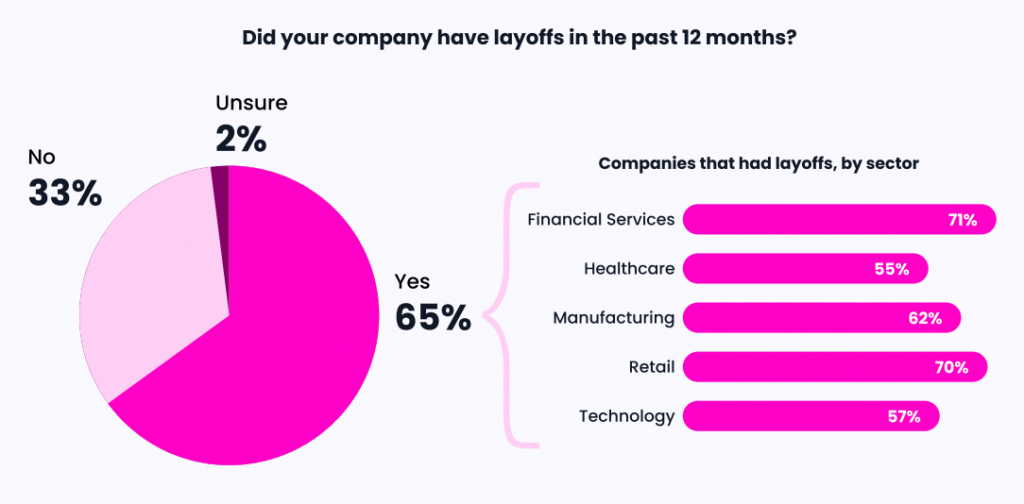
If your talent team is already overburdened, familiarizing themselves with a new tool becomes even more daunting. This is a reality for the majority of teams; according to the 2023 Hiring Insights Report, waves of layoffs impacted 65% of companies last year.

A chart using layoffs data from the 2023 Hiring Insights Report.

Amid these headcount and resource reductions, grappling with change management—without losing sight of hiring objectives—isn’t easy. This ultimately elevates the likelihood and impact of workflow disruptions. 

5. Learning Curve

Familiarizing yourself with a new interface and product features is a tedious process that impacts efficiency. Learning how to use a new product effectively requires dedicated time for training, which places additional demands on talent professionals.

You’ll need to divide your attention between learning the new technology and fulfilling your regular responsibilities on the hiring team. This can slow down productivity, lengthen time-to-value, and affect your ability to meet deadlines and deliver optimal results. 

Depending on the type of technology you acquire, external teams along with key end users, such as hiring managers, might also have to undergo training to use the tool. This could require you to create and disseminate comprehensive learning and development resources. Assess whether you have the time and capacity for the education that the transition phase requires.

6. Data Migration

Migrating data from your current recruitment technology to a new provider is complex and challenging. In some cases, data migration may not be permitted, or possible, or could be fraught with issues such as data integrity concerns or the loss of valuable historical data. 

Investigate the feasibility and implications of data migration before making the switch. Consider what data you would need to transfer, the level of effort, and the impact on ongoing operations. If you risk losing historical data, what is the value of this data to your team and the wider organization?

7. Loss of Integrations

Many recruitment technologies offer integrations with other tools and platforms, enhancing their functionality and efficiency. When switching providers, you risk losing these integrations, which can disrupt workflows and increase costs through manual, time-consuming activities. 

Examining the availability and compatibility of integrations with the new technology is essential to determine the impact on your recruiting process. Evaluate whether or not a potential new provider supports your essential integrations.

8. Future Proofing

Consider not only your talent team’s immediate needs but also their future requirements in an ever-changing economic landscape. It’s crucial to choose a technology that supports your team’s growth and adaptability in the long run.

The capabilities of your new tech should offer scalability for the future so that you can keep pace with the changing landscape while maintaining an efficient operation. If the replacement technology can’t scale as you grow, you risk incurring additional costs down the road due to efficiency bottlenecks that require more headcount, or other new tools, to overcome. 

Overall, a provider that prioritizes innovation, regular product updates, and feature expansions ensures the most long-term value in a shifting job market. 

Don’t Get Stuck With Buyer’s Remorse

The cost of transitioning to a new recruitment technology extends beyond the initial financial investment. Carefully assess all possible switching costs before making a decision.

And while pricing is important, remember: the capabilities of your tech stack are paramount. Strive for a comprehensive solution that elevates the productivity of your team and the effectiveness of your operations, now and well into the future. 

Speaking of advanced recruiting technology: ever heard of GoodTime Hire?

Our fully automated interview scheduling software helps you coordinate faster, hire twice as quickly, and boost team productivity. No simple scheduling tools here.

Discover how GoodTime Hire can help you revolutionize your interview scheduling.

Does interview scheduling automation make sense for my team?

ROI is key. This is not a time to invest in software that won’t bring you immediate value. So let’s eliminate the guesswork with our free ROI calculator.

Remote Candidate Experience: 3 Simple Things You Can Do Today

Remote work is here to stay. That means competition for top talent just took a hard left turn. Now more than ever, hiring leaders are stepping up their game to create a best-in-class remote candidate experience.

Over the past year, economic and social challenges drove many of us to reconsider how we spend our time, revisit our values, and hit the reset button on our lives. Our 2023 Hiring Insights Report found that 25% of hiring leaders found remote and hybrid work to be a major challenge this year.

Many high-performing job candidates who wouldn’t have previously considered remote work as an option now welcome the opportunity to work from anywhere.

That means if candidate experience mattered before…it really matters now. These candidates understand that the way they’re treated as a remote candidate is the way they’ll be treated as a remote employee. Do they have access to the information they need? Are their time and talents valued? Do they feel connected to the company’s people, its mission?

If you lead a remote team, here’s a quick guide to stepping up your game and creating a best-in-class remote candidate experience.

1. Make it easy for candidates to show off

Many of us became remote office pros over the past year. Creating lighting that flatters, troubleshooting our own technology woes, finding that elusive mute button, we’re doing it all. But that’s not the case for everyone. When interviewing candidates virtually, don’t assume they’re already remote work experts. 

Instead, when you’re hiring remotely, go overboard with clarifying the ins and outs of the virtual interview process. Make it easy for candidates to self-schedule their interview at a time they’ll feel their best. Give tips on background, lighting, and audio settings that will set candidates up for success. Take it from Blinkist, a nonfiction book summary service, who’s leading the way in remote candidate experience. 

Before interviews, a Blinkist recruiter sends each candidate an overview of what to expect, along with tips for a successful interview, information on the company’s mission and values, and names of the people they’ll meet throughout the process. As a result, candidates go into interviews confident, prepared, and ready to make their best impression.

Even better, the intention and thought they put into the process enables Blinkist to make a positive lasting impression on all candidates — even those who don’t get the job.

Expert take: The importance of the first call

We spoke with Socotra’s Head of Talent Acquisition, Dubi Ben-Shoham, about the role of candidate experience during a downturn. He shared that even in a so-called “employer’s market”, it’s important to prioritize candidates, and that starts with creating a great impression on your first call.

He shared with us, “Don’t underestimate the importance of having senior recruiters do phone screens. Connecting with a candidate on the first call is such a difference-maker when it comes to the candidate experience of the process. I have a lot of fun with that call. That is why we hit every single one of our hiring goals. Interviewing is stressful. If you can, get rid of the stress right off the bat.”

You can watch the highlights of our conversation with Dubi below.

Learn more about recruiting in a downturn or potential recession.

2. Can’t bring a remote candidate to the office? Take the office to them

Many candidates are most eager to learn about your company culture by touring company headquarters. When bringing everyone to the office isn’t an option, take the office to them.

Share company social media accounts with candidates so they can get to know you, send a video of colleagues introducing themselves, or put together a live employee panel event for post-interview Q&A.

Or, learn from Jet.com and their use of virtual reality to create a “show, don’t tell” experience for candidates. This online retailer’s immersive welcome experience enables candidates to get a full view of the company’s culture, people, and workspace—all through video. From observing a meeting with the CEO, to participating in a company-wide happy hour, this remote candidate experience leaves nothing lacking.

3. Be upfront about your commitment to DE&I

Representation matters before, during, and after the interview process. We built GoodTime to keep tech companies from losing top female tech talent when those women didn’t see females on interview panels. 

Demonstrate that your team is committed to Diversity, Equity, and Inclusion in your hiring process. Build diverse interview panels that prove your commitment to different points of view. Follow Intel, who diversified their interview panels and saw the number of female and people of color new hires jump from 32% to 45% in two years.

The bottom line? It’s beyond time to prioritize remote candidate experience.

Whether your candidate experience is in-person or online, one of the best ways to stand out is to respect your candidate’s time.

GoodTime makes it easy to deliver seamless interview scheduling, automation, and relationship building, helping you attract and impress today’s top-notch talent. 

Learn more about how GoodTime can supercharge your talent acquisition process today.

Automated interview scheduling at warp speed

Lean team? Sky-high goals? No sweat. Secure top talent 50% faster with smart scheduling automation that handles even the trickiest interviews.

A New World: How Manufacturing Recruiters Must Evolve Their Processes

Let’s cut to the chase: manufacturing isn’t known for being on the cutting edge. The sector is typically slower to adapt to changes in the world of hiring. And these days, hiring seems to evolve at the speed of light—leaving most manufacturing recruiters in the dust. 

Recruiters must contend with new work structures, hiring policy standards, and expectations from candidates. AKA: your hiring team’s current way of doing things probably isn’t up to snuff. But don’t stress yet; we’re here to show you the way forward.

After surveying 531 talent acquisition leaders across sectors for our 2023 Hiring Insights Report, we’ve released the report’s manufacturing edition. Based on responses from 106 talent leaders in manufacturing, the report shows how they’re winning talent in the modern world (and much, much more hiring insights).

What challenges will define manufacturing? How will hiring change? And most importantly: how can manufacturing recruiters evolve their processes to overcome whatever is thrown their way? 

We’ve rounded up all of those crucial insights. Read on.

The Difficult Future for Manufacturing Recruiters

Another year, another set of obstacles. According to our survey, respondents expect to get hit by new challenges and shifts in the landscape this year.

If manufacturing recruiters want to overcome these forces, they’ll have to reassess their current processes. But first, what can teams expect in the evolving world of hiring?

Manufacturing’s Biggest Challenges

Limitations of Hiring Technology

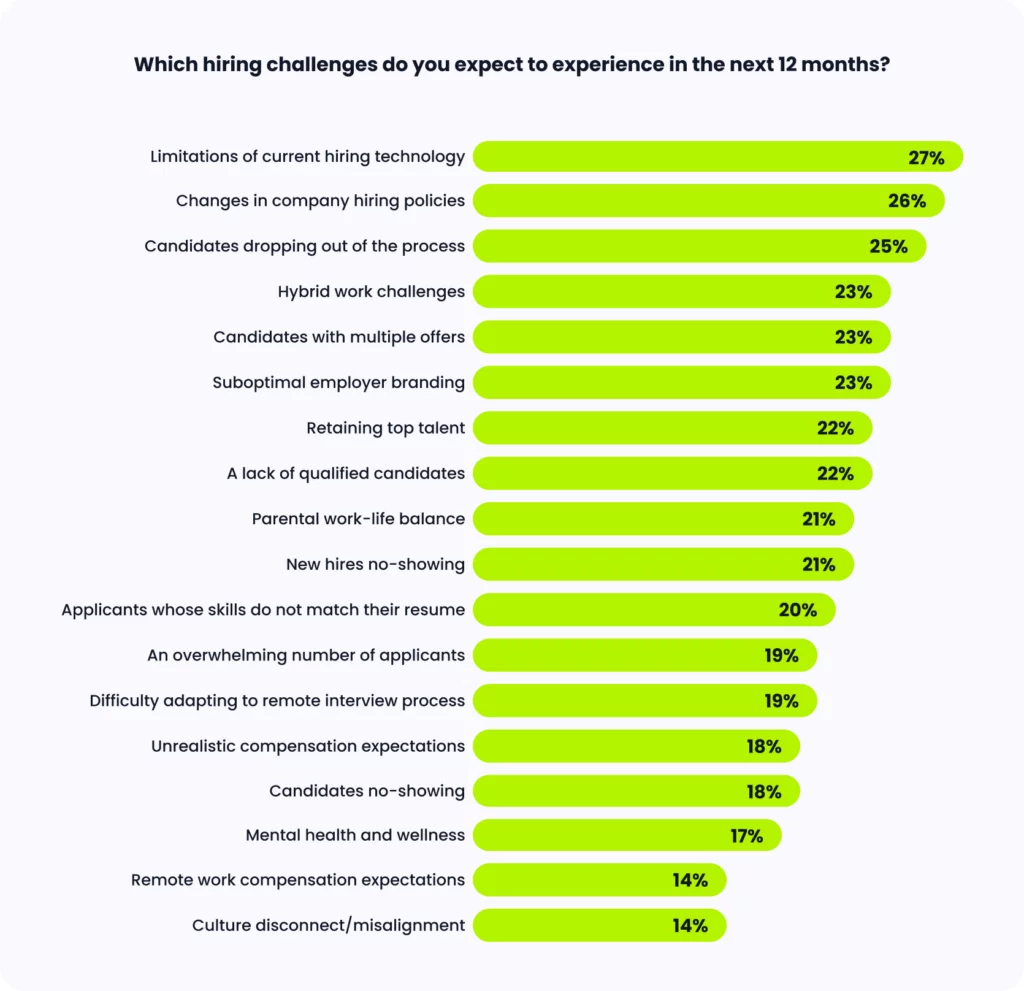
Talent leaders in the manufacturing sector anticipate a major challenge in the coming year:
“limitations of current hiring technology” (27%). This ranked as their top concern. 

Talent teams within manufacturing and beyond have faced considerable turnover and budget cuts. In the aftermath, teams recognize that without the assistance of an airtight tech stack, they will struggle to meet their goals.

Slow, outdated technology acts as a massive roadblock for a high-volume hiring sector like manufacturing, where speed is the name of the game. But with purpose-built manufacturing recruiting software that enables efficiency and productivity, teams can keep candidates engaged and win them over in record time.

Bar chart showing what challenges manufacturing talent teams expect in the future.

Changes in Company Hiring Policies

In today’s shifting hiring landscape, manufacturing companies need to stay agile and adjust their hiring policies accordingly. Talent leaders are well aware of this; they ranked “changes in company hiring policies” as their second biggest upcoming challenge (26%). 

It’s only natural for hiring policies to evolve in response to a transforming landscape, especially in a sector that has already undergone significant changes. Manufacturing no longer resembles what it was years ago. Traditionally viewed as an “in-person sector,” companies are slowly but surely embracing remote and hybrid work models.

This newfound flexibility in work structures gives manufacturers a competitive edge in attracting candidates and aligning with the values of emerging talent in the market. Yet to effectively support remote and hybrid work, hiring and HR teams must establish the right policies.

Does interview scheduling automation make sense for my team?

ROI is key. This is not a time to invest in software that won’t bring you immediate value. So let’s eliminate the guesswork with our free ROI calculator.

Manufacturing’s Biggest Shifts

Competitive or Uncompetitive Landscape? It’s Up for Debate

When it comes to upcoming changes in the hiring landscape, talent leaders have mixed opinions that really highlight the divide. 

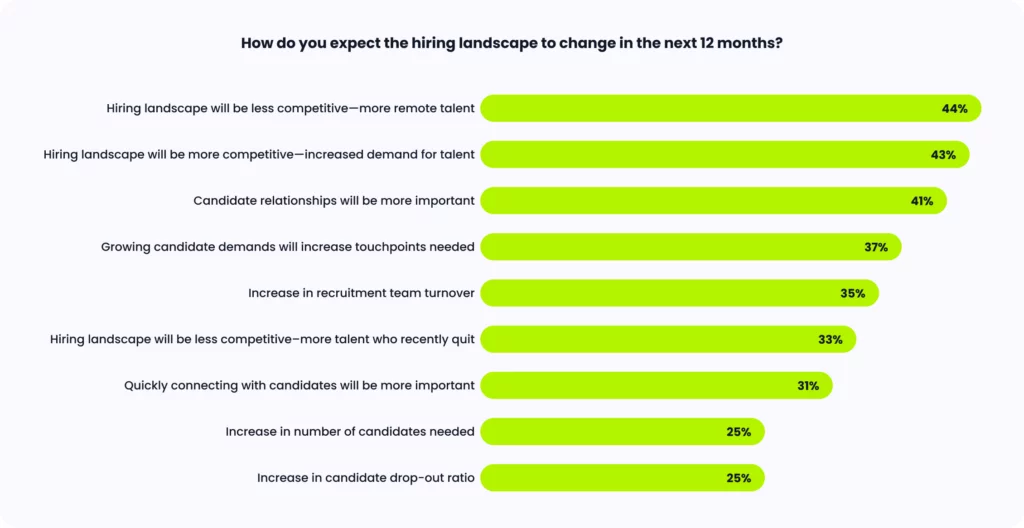
On one hand, 44% believe that the landscape will become less competitive because of the increase in available remote talent. On the other hand, 43% believe that the landscape will actually become more competitive due to the rising demand for talent as a whole amdist a manufacturing labor shortage

With new challenges looming, the future feels quite uncertain to today’s teams.

Bar chart showing how hiring teams expect the landscape to change.

Directors and the C-Suite Say…

When we look at the data broken down by seniority level, we see an intriguing split. Let’s analyze.

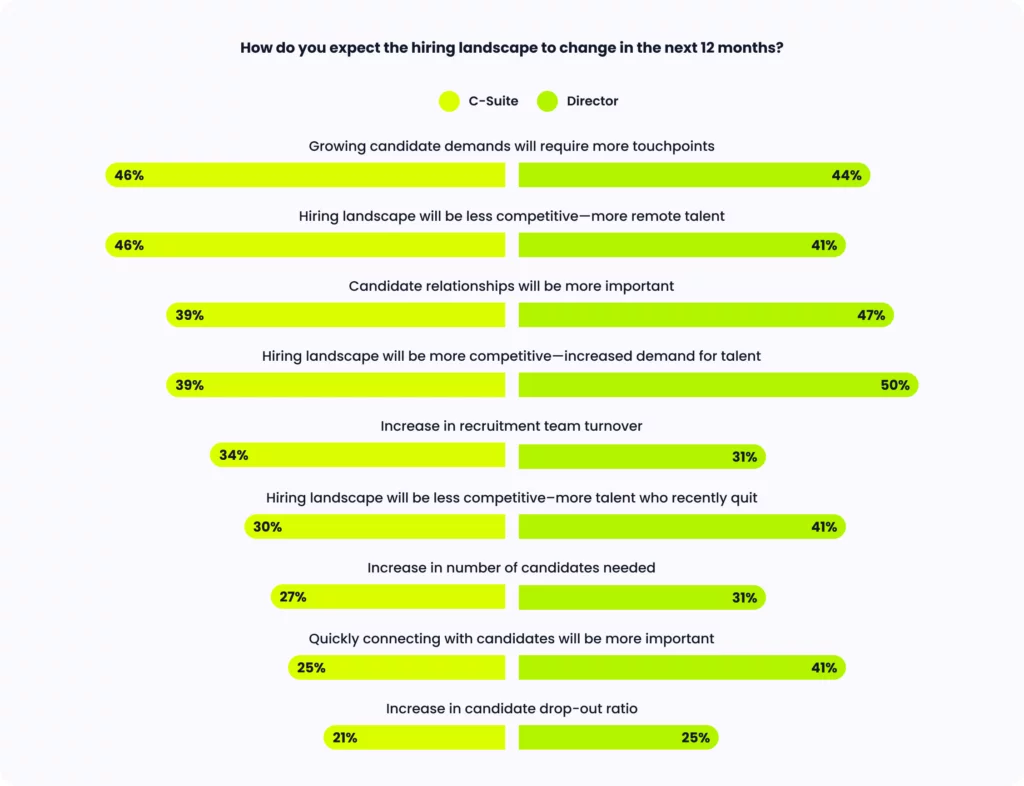
Most directors believe that the landscape will become more competitive because of the growing demand for talent (50%). However, most C-suite executives think that the landscape will become less competitive as remote talent becomes more available (46%).

It’s worth noting that directors have good reason to anticipate increased demand for talent. They understand the ongoing impact of the current skills shortage and the increase in job vacancies resulting from retirements and the sector’s rapid expansion.

C-suite executives are banking on the surge in remote talent to alleviate competition. But here’s the question: Are they ready to embrace remote work within their own organizations? Manufacturing is still new to the concept of flexible work; the C-suite might be more optimistic than directors about their progress in establishing remote structures.

Bar chart showing how directors and the C-suite expect the landscape to change.

How Manufacturing Recruiters Must Respond

We now have a feeling for what’s ahead in the hiring world. So, what’s a recruiter to do? To help inform your strategies moving forward, here’s how talent teams from our report plan on conquering recruitment.

Emphasize Time-to-Hire and Candidate Relationships

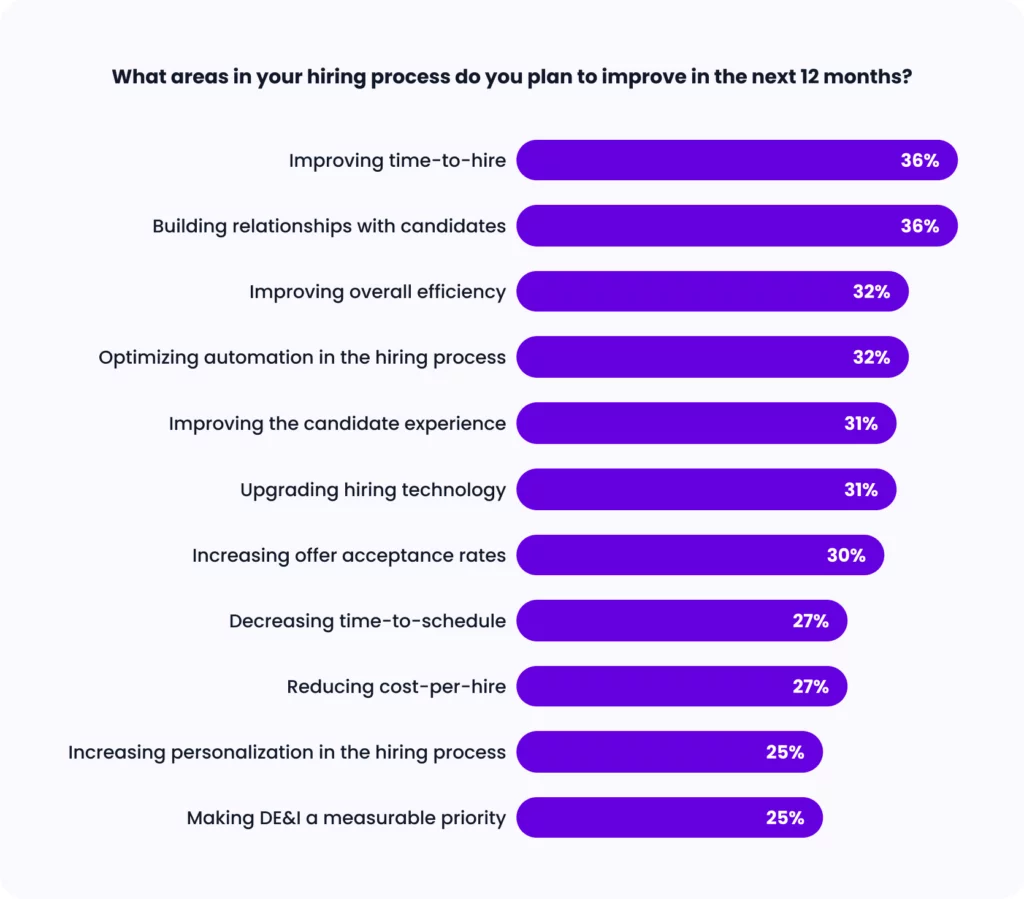
Topping the list at 36% each, talent leaders believe that reducing time-to-hire and fostering candidate relationships are the key areas that they must prioritize in the coming months. By improving these aspects, teams can establish a well-rounded hiring process.

Candidates want a process that moves swiftly, signaling that they are a priority and their time is valued. But speed alone isn’t everything. Candidates also crave the opportunity to establish a genuine connection with the hiring team and get a glimpse into the company’s work culture and its people.

Bar chart showing what TA leaders plan on improving in the future.

Don’t Forget About the Tech Stack

To create this comprehensive candidate experience, teams have another priority in mind: upgrading their tech solutions, which comes in at 31%. Utilizing advanced tech tools would actually help teams improve all of the top five areas they plan to focus on.

An upgraded hiring tech stack streamlines the hiring process for candidates and boosts the efficiency of hiring teams. As a result, teams can dedicate more time to building meaningful connections with potential hires. 

And the big payoff? Ultimately, this effectively addresses talent leaders’ biggest anticipated challenge: the limitations of their current hiring technology.

Manufacturing Recruiters: Want More Insights?

2022 brought a shaky economy, sweeping reductions in force, and a challenging hiring landscape. The pressure is on to attract qualified candidates, deliver an efficient hiring process, and leverage hiring tools that drive success. Are you ready to succeed in 2023? 
To dive deeper into these insights and much, much more, get the manufacturing report today.

5 Reasons Why High-Volume Hiring Teams Miss Their Goals

Ah, high-volume hiring; your inbox is overflowing with resumes, your calendar is jam-packed with interviews, and your stress levels are off the charts. Or, maybe you’re on the opposite end of the spectrum and can’t seem to find enough applicants to fill your endless vacancies. 

Hitting hiring goals amid all of this chaos can quickly become a real challenge—especially with limited time and resources. But luckily, we’re here to help make sense of it all. 

Here are five common reasons why high-volume hiring teams miss their goals, along with key solutions to help you improve your recruitment process.

Reason 1: Slow, Inefficient Communication With Candidates

Let’s face it—maintaining consistent communication is hard. And when you’re trying to coordinate interviews with countless candidates, things can quickly spiral out of control. 

Gaps in communication and slow response times are bad, bad news for a high-volume hiring process. This can cause delays in scheduling interviews, lower response rates from candidates, and missed opportunities with stellar talent.

Pro-Tip: Leverage Email/SMS Templates and Automation

Templatizing your communication—whether that’s through email or text message—and utilizing a healthy dose of automation is the recipe for success. This way, candidates stay informed and engaged throughout the process.

Communication templates eliminate the manual work involved in drafting up a whole new message for every candidate in your pipeline. Even better, tech tools that enable automation reduce the time and effort required to send messages and coordinate with applicants, all while ensuring consistent communication.

Human-centric AI to crush your high-volume hiring goals

Engage candidates immediately via SMS and WhatsApp, harness instant bulk scheduling, and automate hiring workflows.

Reason 2: Limited Time and Resources

Time is of the essence and helpful resources are essential when you’re a high-volume recruiter. Yet of course, these are the two elements that today’s teams lack the most. 

The current hectic economic landscape has dealt a heavy blow to many recruiting teams, slashing budgets in half and reducing headcount in one fell swoop. High-volume hiring was hard before, and it’s even harder now.  Teams must manage multiple candidates and coordinate a variety of interviews with less bandwidth and support to do so. 

Pro-Tip: Streamline the Screening and Scheduling Process

To improve your efficiency and make the most of your resources, consider using technology to fast-track some of the most tedious, manual parts of the hiring process. For many recruiters, this means the resume screening and interview scheduling process.

That’s where your applicant tracking system (ATS) comes in. And if you don’t already have one, it’s time to change things. Here are our ATS recommendations. An ATS helps recruiters quickly filter through large volumes of resumes and identify the most qualified candidates.

But an ATS can’t do it all on its own. An advanced interview scheduling software automates the entire process of getting interviews on the books, from gathering a candidate’s availability to finding the best available interviewers. That way, recruiters have more bandwidth for the most high-value tasks.

Reason 3: Lack of Organizational Planning

High-volume hiring is oftentimes chaotic. And when you’re dealing with hundreds of candidates, it can feel hard to stay organized and on top of everything. But without a solid plan in place, you’re already setting yourself up for failure.

That’s why effective organizational planning is absolutely essential for successful high-volume hiring. Without a well-defined hiring process in place, recruiters may struggle to manage their time effectively, communicate with stakeholders, and make informed hiring decisions. 

Pro-Tip: Align and Define the Stages of the Hiring Process

If you want to amp up your organizational planning, consider creating detailed hiring plans that outline each stage of the hiring process and the specific roles and responsibilities of each stakeholder. 

For example, a hiring plan might include a timeline of each hiring stage, from candidate sourcing to final offer acceptance, as well as the specific actions and tasks required for each stage. By having a clear plan in place, recruiters can manage their time and resources more efficiently, communicate more effectively with stakeholders, and make better hiring decisions. 

Reason 4: Candidates Dropping Out

When you’re managing such a large talent pool, many—or most—applicants that you come across just aren’t going to be the right fit. Yet even if you get a dazzling resume, there’s so many opportunities throughout the hiring process for qualified talent to become disengaged and drop out altogether. 

Having candidates occasionally drop out is expected when you’re a high-volume recruiter. The quick, simple application process sometimes means candidates aren’t as invested in moving forward. However, failing to address the faults in your process makes it that much harder to win qualified talent.

Pro-Tip: Simplify the Hiring Process

We could go on and on about the variety of ways that recruiters can prevent candidates from dropping out. In fact, implementing all of our previously mentioned pro-tips amounts to a better candidate experience and a higher likelihood of securing the best candidates.

However, there’s one tip that we haven’t mentioned yet, and it’s an important one: simplify the hiring process. High-volume recruiting isn’t the place for an overly-complicated process. You want to get talent in the door fast, and candidates want to get to work ASAP. 

Simplifying the hiring process can take many shapes. For instance, recruiting via SMS or WhatsApp allows candidates to quickly go through the hiring process via the device that they have on them at all times: their phone. 

Reason 5: Not Enough Leads in the Funnel

When it comes to high-volume hiring, having a strong recruitment funnel with a pipeline of potential candidates is essential to success. But for some high-volume recruiting teams, generating a consistent flow of leads is a major challenge. 

Without a steady stream of qualified candidates, recruiting efforts can quickly become stalled, and positions may remain unfilled for longer periods of time.

Pro-Tip: Improve Employer Branding

Investing in your employer brand proves that sometimes it’s worth it to play the long game. When candidates have a positive perception of your employer brand, they’re more likely to apply for open positions and recommend your company to their networks. 

So, how do you build up your employer brand? To start, conduct a brand audit to assess your company’s current reputation and identify areas for improvement. This could involve gathering feedback from current and past employees, analyzing online reviews and ratings, and researching how your company is perceived in the job market.

Once you have a better understanding of your company’s brand perception, you can start taking steps to improve it. This could involve investing in employee engagement initiatives, such as offering professional development opportunities or creating a more flexible work environment. 

Transform Your High-Volume Hiring Today

Leveraging advanced hiring technology gives talent teams the best chance to hit their hiring goals and fill high-volume roles faster and more efficiently than ever before.

GoodTime Hire is the high-volume recruiting software that provides talent teams with advanced automated interview scheduling for high-volume roles through SMS, WhatsApp, and email messaging. Quickly reach out to candidates, schedule interviews effortlessly, and let automation take care of the rest.

GoodTime Product Updates: What’s New From April 2023

Get excited: our team is always hard at work in making GoodTime the best it can be, and we’re here to share the latest product updates from April 2023. Plenty of Hire for High Volume updates, new additions to GoodTime Meet, and more releases are coming your way. Buckle up, let’s review!

Watch the Full Product Updates Walkthrough

Want the entire scoop on our latest and greatest product updates? Check out April’s product update webinar below. Keep scrolling to read the biggest highlights.

GoodTime Hire for High Volume Updates

That’s right—Hire for High Volume takes the stage this month. And with this brand-new offering’s most recent updates, there are so many reasons to get pumped up.

Candidate Automation

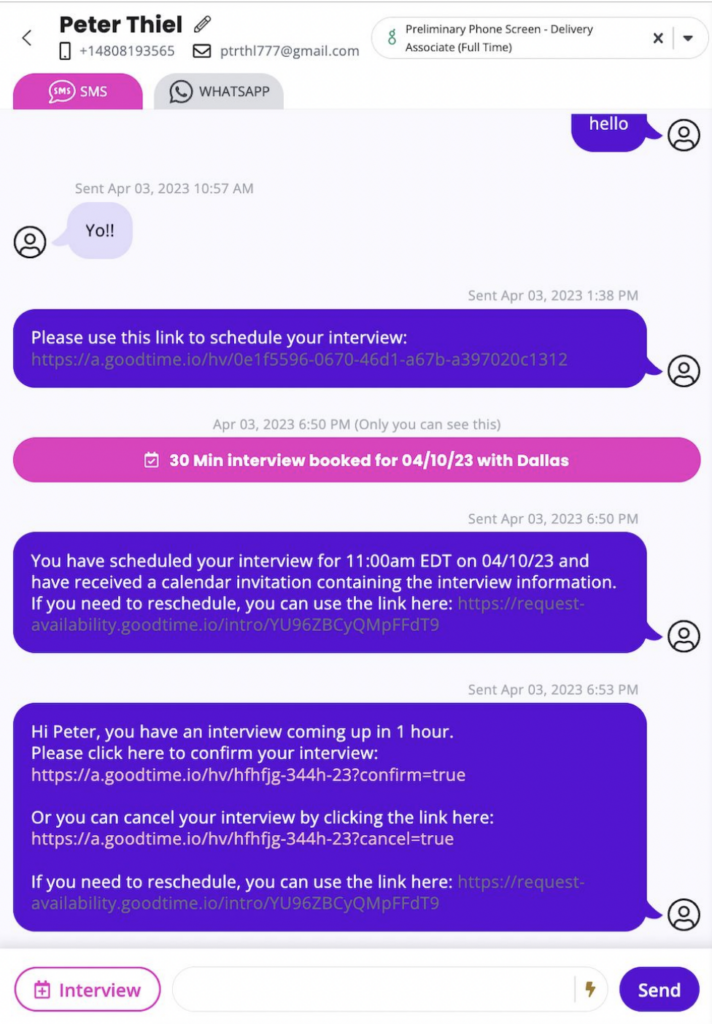
More power to candidates. Our stars of the hiring process can now confirm, decline, or reschedule their own interviews right inside their text messages, decreasing the chance of no-shows. 

Graphic displaying GoodTime Hire's candidate automation capabilities.

Email Communication

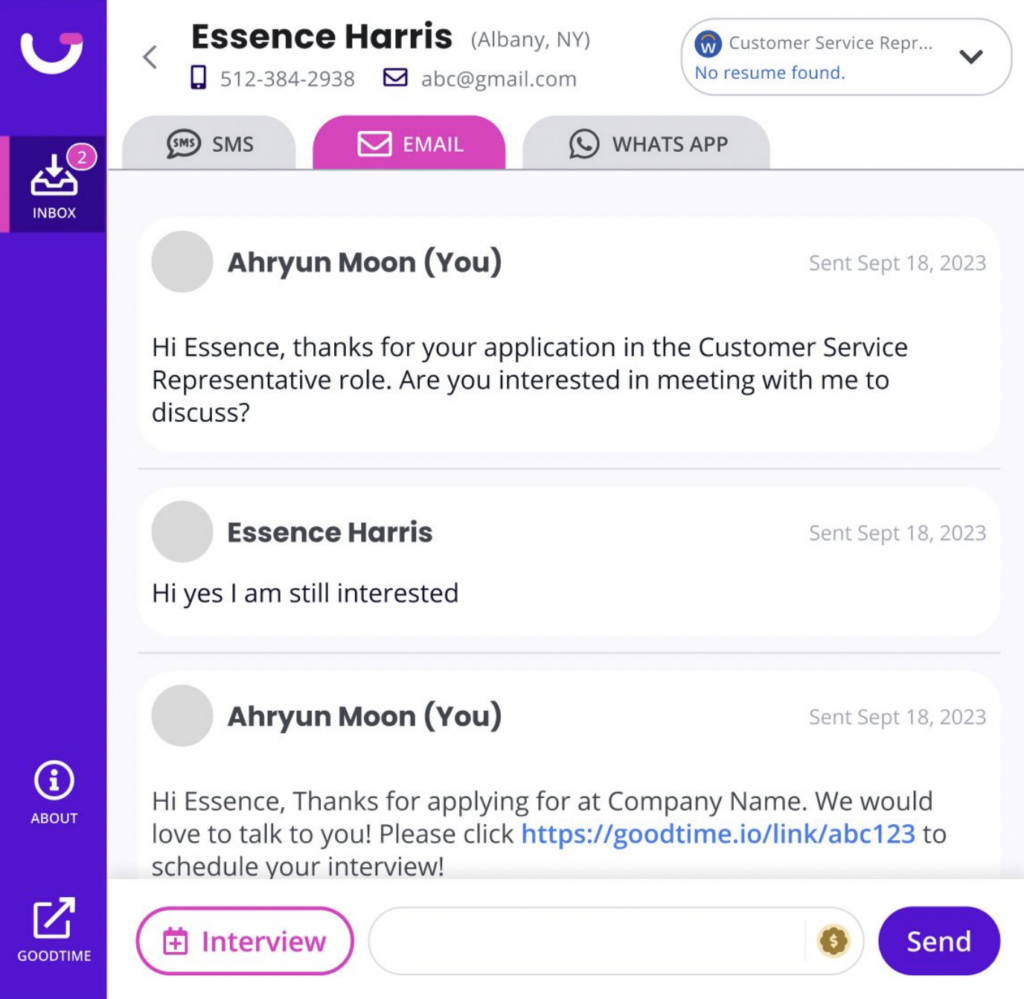
Shoot off a quick email to candidates and get notified in GoodTime when they respond. If your company prefers interviews over video, we also now support scheduling video interviews over MS Teams, Google Meet, and Zoom. 

Graphic displaying GoodTime Hire's email communication capabilities.

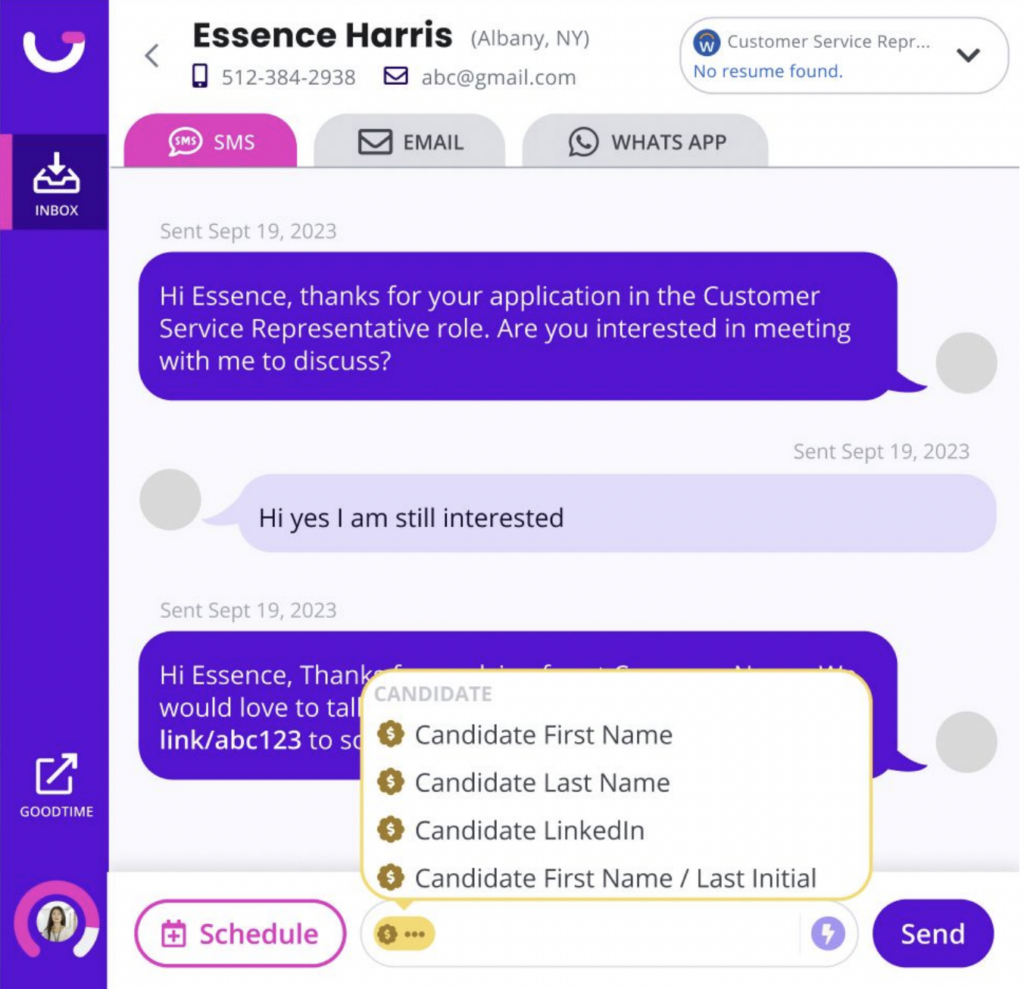
Variable Support

Add some personalization to your recruiting by inserting variables into your calendar invitations and messages. Variables will automatically resolve with the correct data such as the recruiter’s first name, the candidate’s first name, the company’s name, and more. 

Graphic displaying GoodTime Hire's variable support capabilities.

Other Notable Updates

  • System Notifications: Receive notifications inside of the Candidate Inbox and Chrome extension when a user schedules an interview
  • Auto-apply Country Code to Phone Numbers: GoodTime runs an intelligent phone algorithm to apply the correct country code to candidates inside the Job View page
  • Edit Candidate Information: Modify a candidate’s email address, phone number, first name, and last name inside of the messenger
  • Usage-based Packages: Now that our product is out of Early Access, we have multiple packages to meet the needs of different organizations. Every company has access to our Free version as well which limits the number of messages to 25/mo per user.
  • Messages Push to Greenhouse Activity Feed: When a message is sent or received from a candidate, the message content is pushed to the activity feed inside of the Candidate Profile

GoodTime Hire Updates

Hire for High Volume might be the star this month, but there are always new developments on the Corporate side of the house.

Quick Updates

  • Confirmation Email and Require Review: Automation is key. Candidates now receive confirmation emails immediately, even when require review is turned off.
  • Dark Font Colors for Request Availability: For total customizability, you can match a dark font color with light theme colors, or the other way around
  • New Languages: GoodTime now supports the candidate experience in Simplified Chinese, Italian & Swahili

GoodTime Meet Updates

Free up more calendar space in Meet and keep tabs on upcoming meetings. Plus: a lil something for our power users. 

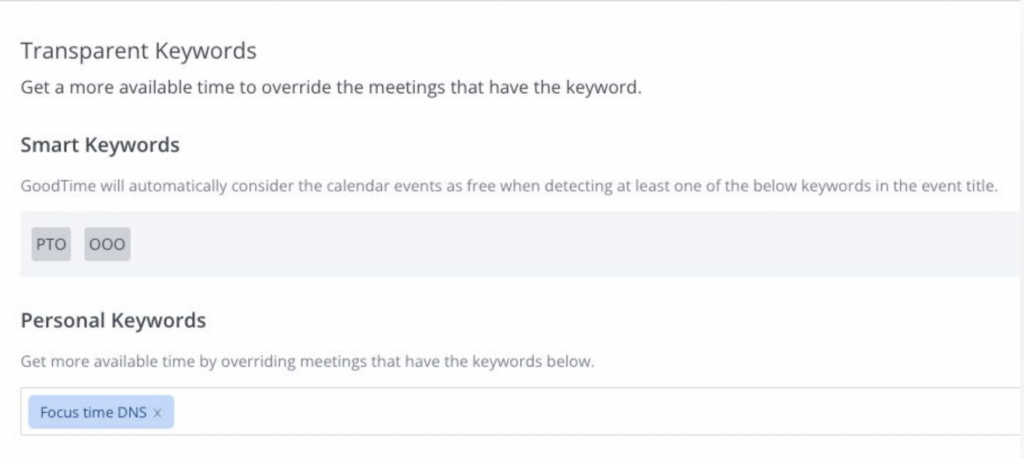
Transparent Keywords

Need more time in your week for meetings? Intelligently schedule over meetings you know you can skip by adding transparent keywords. Alternatively, this allows you to pre-block times on your calendar for your most important meetings.

Graphic displaying GoodTime Meet's transparent keyword capabilities.

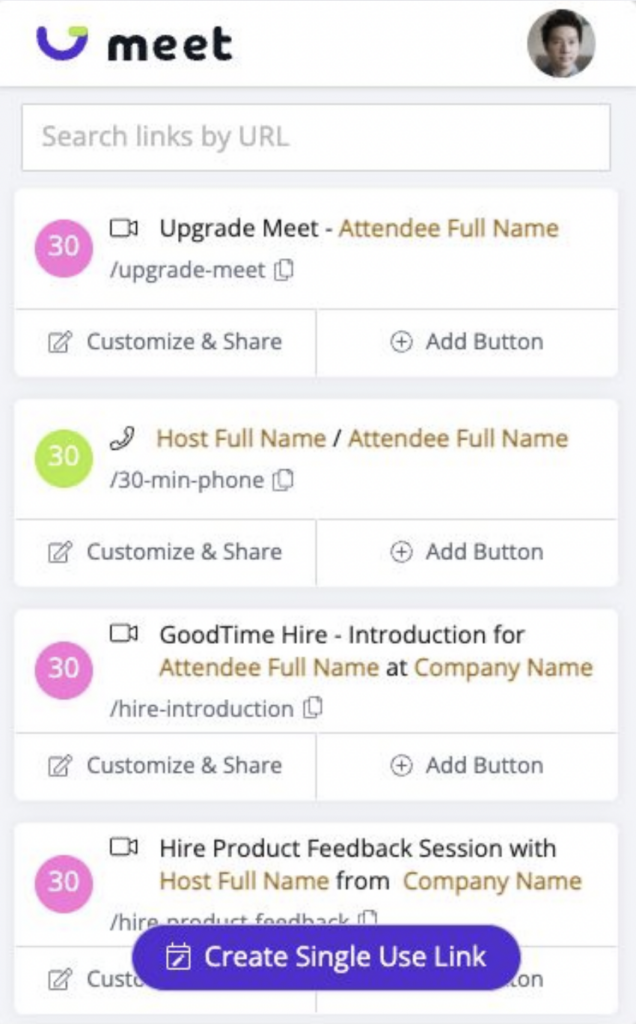
Link Search

Power users with a lot of links, this one’s for you. The link searching feature now available in the GoodTime App and Chrome extension is the fastest way to share the right links.

Graphic displaying GoodTime Meet's link search capabilities.

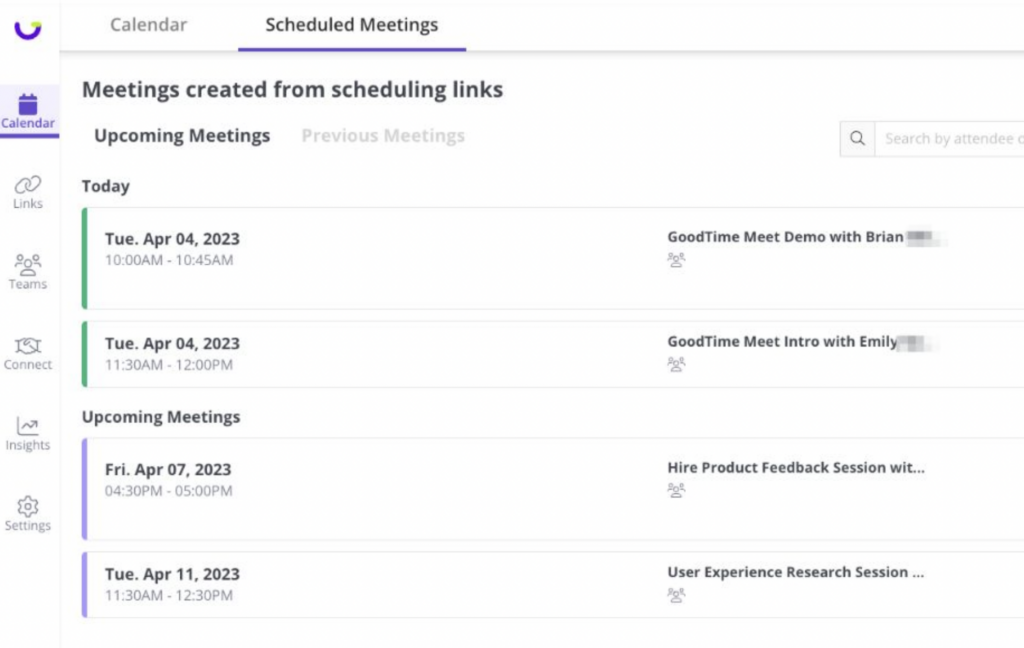
Schedule Meetings

Stay on top of your meetings with a filtered list of upcoming and past meetings that you’ve created using your scheduling links.

Graphic displaying GoodTime Meet's scheduling capabilities.

Other Notable Updates

  • Personal Email Signups: Personal Emails can now be used to create GoodTime Meet accounts (Gmail/Hotmail)
  • Auto-create Unique URLs: No more duplicate email errors. Meet will make unique URLs (that you can still customize).
  • Improve User Search Times: No more endless spinners. Meet can search for your teammates even faster now.
  • Auto-accept Meetings: We’ve added an account level setting to allow you to auto-accept meetings created with your links

Not Part of the GoodTime Family Yet?

It’s time to change that. With GoodTime, you can get better outcomes from your company’s most important meetings. For interviews, GoodTime Hire helps you schedule 40% faster, hire 50% more efficiently, and 5x team productivity. (Seriously.) For every other meeting, GoodTime Meet provides beautifully-branded scheduling links to schedule internal and external meetings faster than ever.

Learn more about how Hire can transform your interview scheduling.

Learn more about how Hire for High Volume can revolutionize your high-volume hiring.

Learn more about how Meet can revamp your meeting scheduling.
How Financial Services Recruiters Can Do More With Less

Fasten your seatbelts, financial services recruiters. It’s been a bumpy ride, and there’s still turbulence ahead. The past year brought economic instability, talent acquisition challenges, and retention difficulties. But that’s just the tip of the iceberg.

With layoffs sweeping through the sector and impacting HR and recruiting departments, teams must now find a way to hit their goals despite reduced budget and headcount. That’s right—they must “do more with less.”

The big question is: how can you maintain a refined and memorable hiring process with fewer resources? Fortunately, we’ve got you covered.

After surveying 531 talent acquisition leaders across sectors for our 2023 Hiring Insights Report, we’ve released the report’s financial services edition. Based on responses from 105 talent leaders in financial services, the report highlights how they’re attracting and retaining talent amid today’s obstacles (and much, much more).

Our report’s data shows that while layoffs and budget cuts hit financial services hard, hiring teams have devised a roadmap to success. If you want to transform “doing more with less” from a burden into a superpower, you’ve come to the right place. Keep reading to learn more.

Unlock finance’s top hiring strategies in 2025

Our study of 105 financial services TA leaders reveals how to hit your hiring goals in a challenging market.

2025 Hiring Insights Report

The Aftermath of Financial Services’ Layoffs

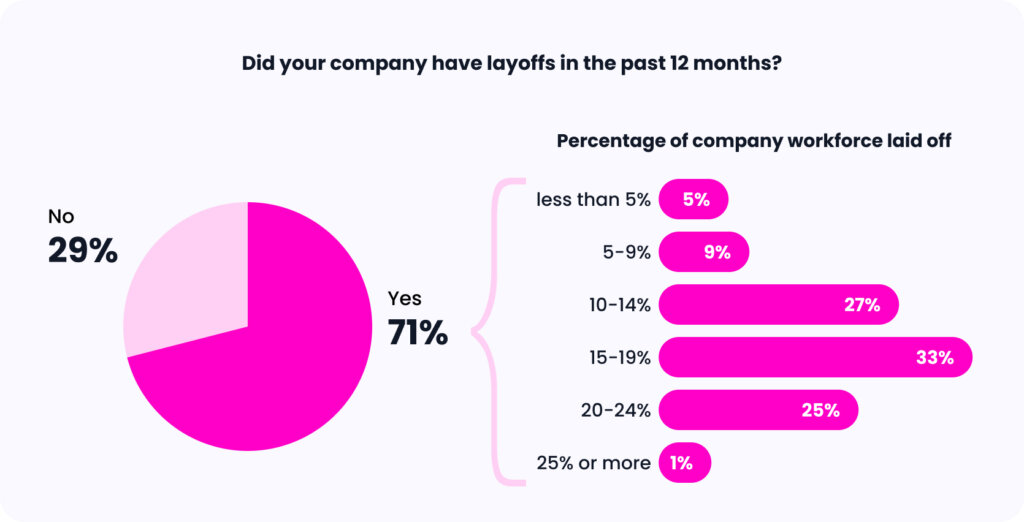
Workforce reductions weren’t kind to the financial services sector. A whopping 71% of financial services companies surveyed reportedly experienced layoffs. In total, 60% of impacted companies reported that job cuts affected 10-19% of their headcount and 26% reported layoffs of over 20% of their workforce.

Charts showing the impact of layoffs on financial services companies.

Even if a company hasn’t laid off employees, most financial services organizations in today’s economic landscape find themselves under some degree of pressure to remain conservative in their spending. This, in turn, means that the vast majority of hiring teams are expected to deliver on their goals without all of the familiar resources and budgets that they use to achieve success.

And if your company isn’t currently hiring due to economic restraints, you can guarantee that hiring will bounce back before you know it. In the meantime, the best course of action is to refine the hiring process and maximize your available resources for present and future hiring success. But how do you do that?

Strategies for Doing More With Less

Hit Goals With Efficiency and Productivity

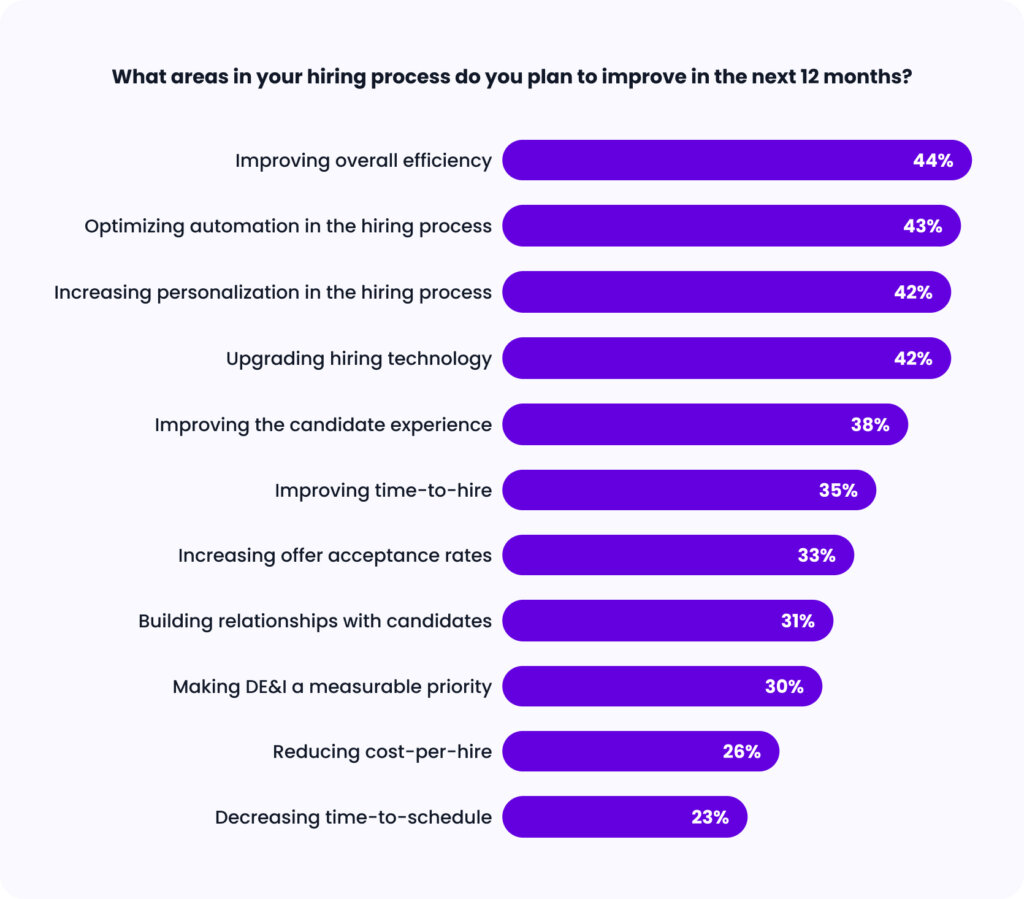
In the thick of the topsy-turvy economy, talent teams at financial services companies plan on reaching for success by emphasizing efficiency and productivity. Specifically, talent leaders have four priorities for the coming months: improving efficiency (44%), optimizing automation (43%), increasing personalization (42%), and upgrading hiring technology (42%)—all interconnected by the theme of driving productivity. 

Bar chart showing what financial services TA leaders plan on improving in the future.

Efficiency and automation are crucial to creating a smooth, fast hiring process with limited resources and bandwidth. Improving personalization takes this process one step further by making candidates feel appreciated. As the cherry on top, upgrading the tech stack allows for an even more effective process. Hiring technology not only streamlines operations without increasing the workload of hiring teams but also enables teams to achieve more without hiring additional staff.

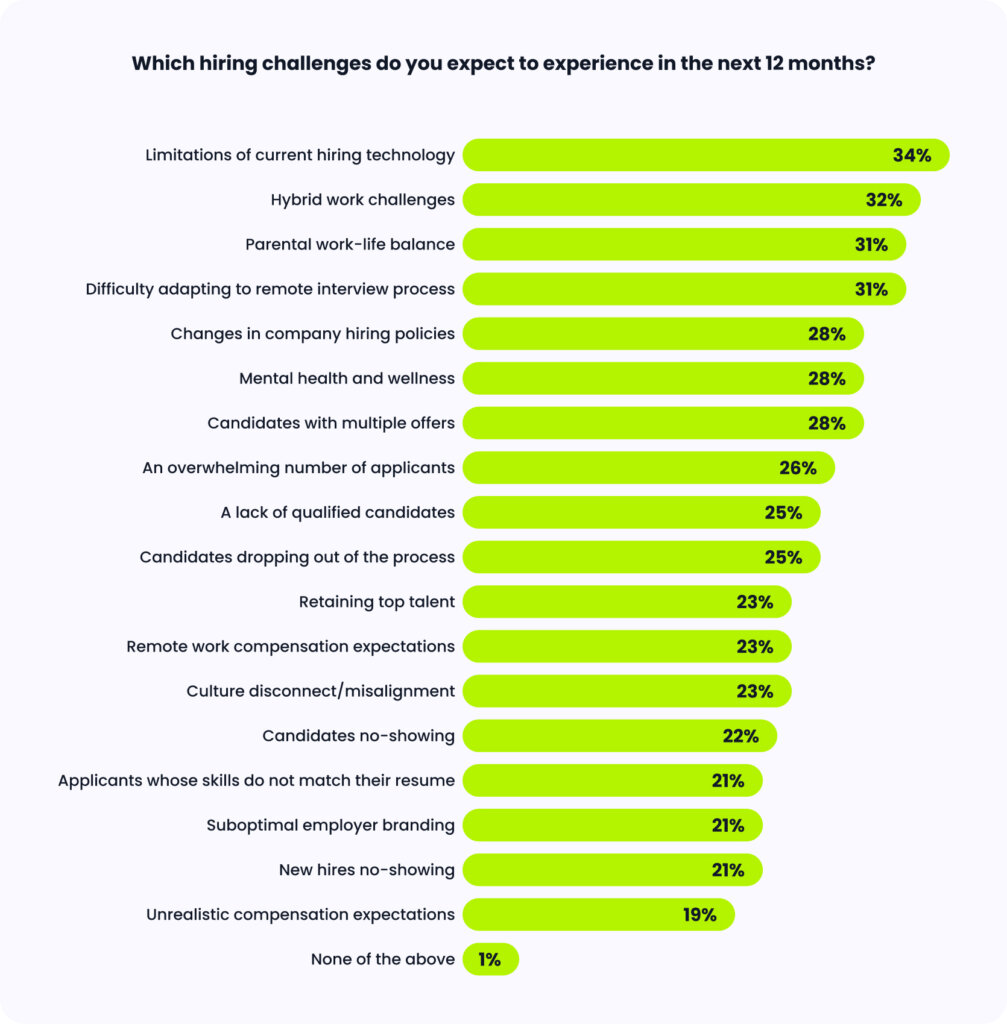
But there’s just one problem. According to our data, “limitations of current hiring technology” is the biggest challenge expected in the next 12 months. In other words, teams’ hiring technology can’t keep pace with their evolving needs. In the future of “doing more with less,” replacing inadequate tech solutions must be a top priority for teams to effectively reach their goals and deliver on the top four areas they look to improve.

Bar chart showing what challenges financial services hiring teams expect in the future.

Make the Most of Every Candidate

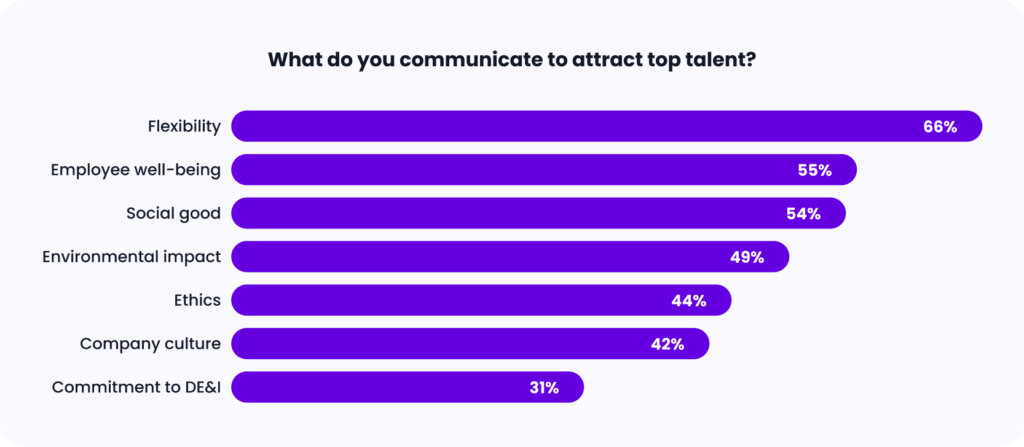
“Doing more with less” doesn’t just mean optimizing the technical side of your hiring operations. It also means identifying innovative ways to meaningfully connect with talent and make the most of every candidate. When asked what they communicate to candidates to form a relationship and win them over, the vast majority of talent leaders (66%) say that they emphasize flexibility.

Bar chart showing what recruiters communicate to attract top candidates.

If talent leaders in financial services wish to secure skilled new hires and retain existing employees, they must consider the desires of talent, and that includes flexibility-based work policies and benefits. This focus on flexibility becomes even more relevant when you consider two of the sector’s biggest challenges on the horizon: hybrid work struggles and remote interviewing complexities.

Giving talent the ability to participate in remote or hybrid work and remote interviewing are both ways that financial services companies can practice what they preach. This goes beyond simply communicating flexibility to talent and instead demonstrates their genuine commitment to flexibility.

Leverage Quality of Hire

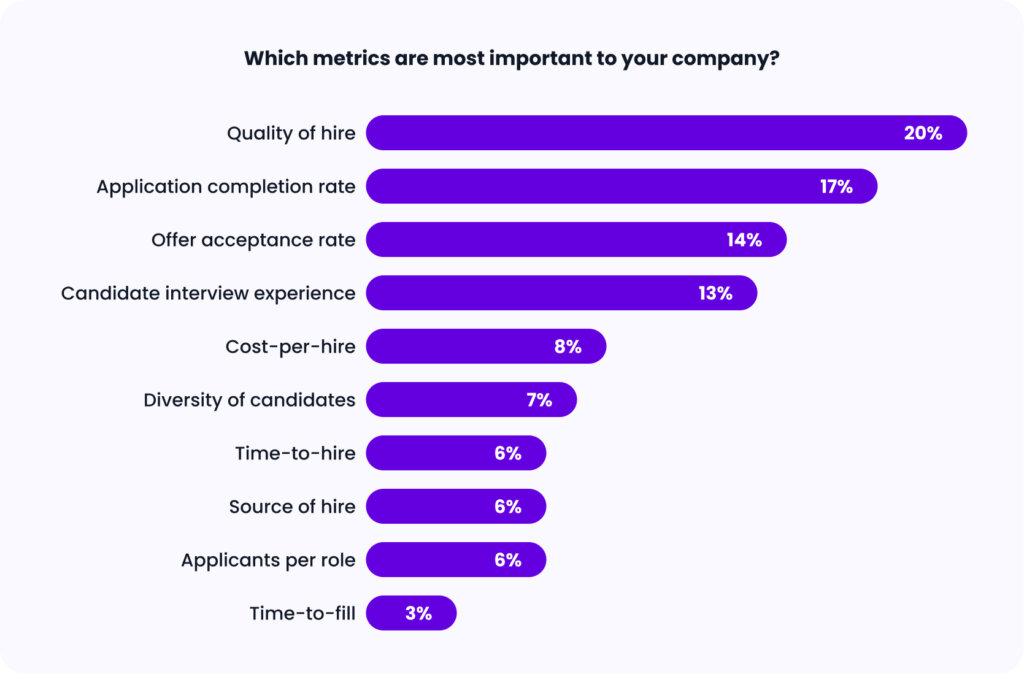
In today’s economy, no one can afford to haphazardly throw things at the wall and hope that some solution sticks. When the going gets tough, there’s always one thing you can rely on to steer you in the right direction: your hiring analytics. Scrutinizing your metrics allows you to locate issues in your hiring process and determine the most suitable solutions without wasting money and resources on fruitless endeavors. 

So, what metric do talent leaders plan to double down on in the coming months? None other than quality of hire (20%). This emphasis is fitting; one of the broad goals for hiring teams is not only to hire quickly but to acquire the best possible talent. This is especially relevant to the financial services sector, where hard-to-find, digital-based skills are needed to match the sector’s shift toward new financial innovations.

Bar chart showing what metric hiring professionals consider the most important.

Met with a declining economy, an increasing number of recruiters at financial services companies turned their focus to quality over quantity in recent months. The secret to assessing the effectiveness of these hiring decisions is to closely monitor the quality of each and every new hire. In the end, a company comprised of the most qualified employees can overcome any obstacle in the landscape.

Hey, Financial Services Recruiters: Want More Insights?

2023 brought a rocky economy, sweeping reductions in force, and a difficult hiring landscape, creating a perfect storm for financial services recruiters this year. The pressure is on to find and attract qualified candidates, deliver an efficient hiring process, and leverage hiring tools that drive teams toward success. Are you ready to conquer 2024? 

To dive deeper into these insights and much, much more, get the financial services report today.

GoodTime Product Updates: What’s New From March 2023

Get excited: our team is always hard at work in making GoodTime the best it can be, and we’re here to share the latest product updates from March 2023. A new communication tab, Candidate Pulse insights, GoodTime Meet updates, and more releases are coming your way. Buckle up, let’s review!

Watch the Full Product Updates Walkthrough

Want the entire scoop on our latest and greatest product updates? Check out March’s product update webinar below. Keep scrolling to read the biggest highlights.

GoodTime Hire Updates

We’ve enabled the ability to delete interview gaps, introduced a new way to benchmark your TA team, and more. Plus: say hello to multi-day drag-and-drop.

Candidate Pulse Benchmarking and Insights

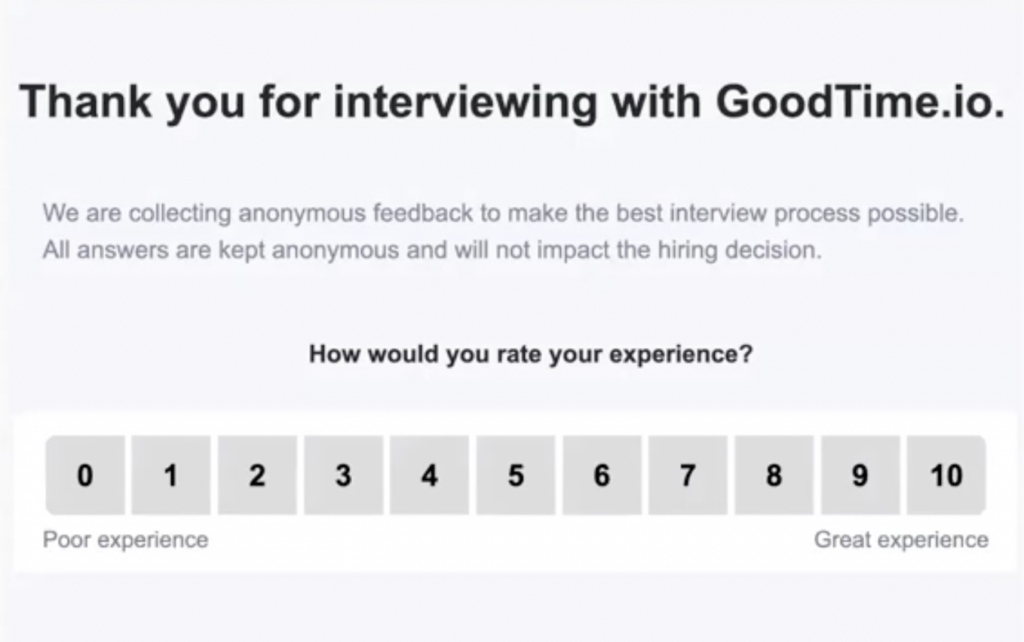
Talent teams, meet Candidate Pulse. This functionality offers insights to benchmark your TA org internally and against industry-wide standards. Candidate Pulse collects feedback from candidates and makes it completely effortless to track performance by virtually any dimension in your organization.

Graphic displaying GoodTime Hire's Candidate Pulse survey.

Multi-day Drag-and-Drop

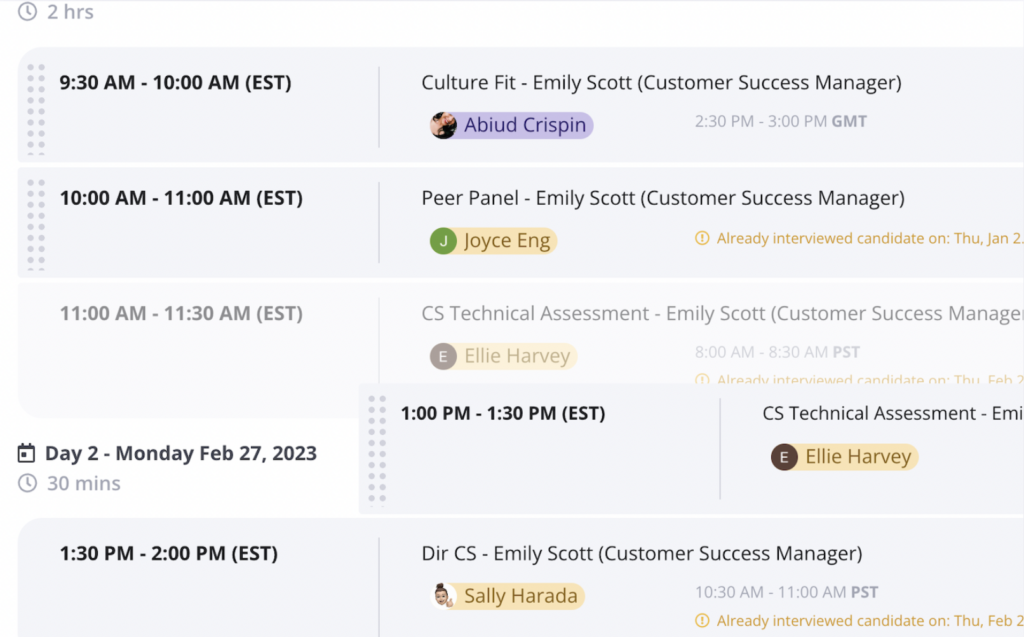
Your wish has been granted; the beloved drag-and-drop feature is now available for multi-day options. We get it, sometimes adjustments need to be made—especially to the most complicated interviews. Multi-day drag-and-drop gives you more control than ever before.

Graphic displaying GoodTime Hire's drag-and-drop capabilities.

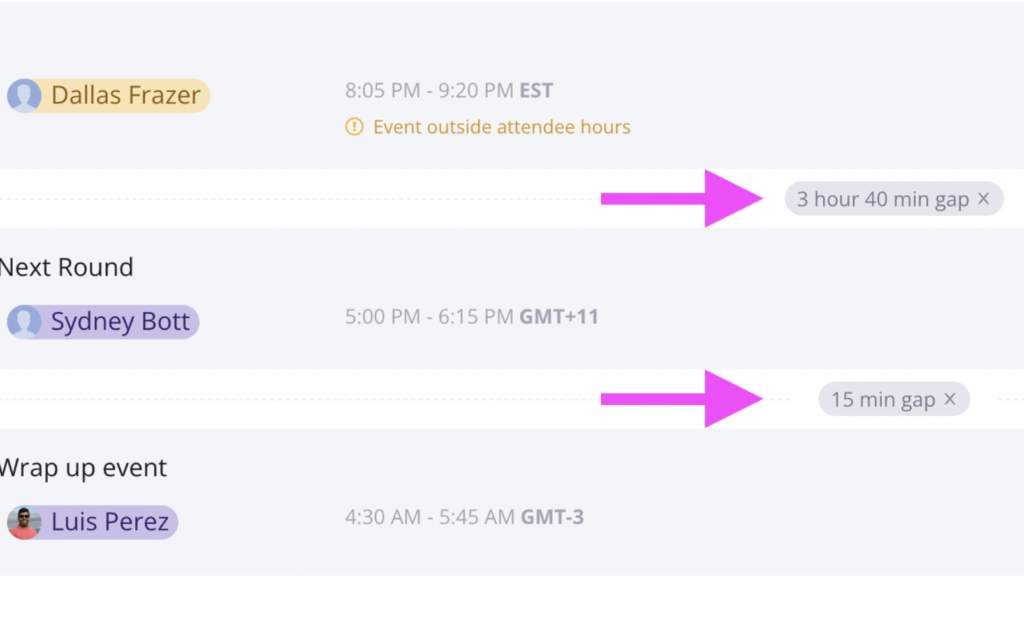
Delete Gaps

Interview gaps are sometimes required, especially when it comes to scheduling long interviews. But as with everything, there are special circumstances that require adjustments. Now you can manually delete gaps in complicated interviews and see the implications on availability in real-time.

Graphic displaying GoodTime Hire's gap deletion capabilities.

Other Notable Updates

  • French, Polish & Japanese Language Support: Request Availability and other candidate-facing communications are now available in three more languages
  • Upgraded Options Counter: The options counter now has improved accuracy and separates single versus multi-day options
  • Dashboard Experience Upgrades: GoodTime will now remember your preferred number of rows and keep the status dropdown open until you’ve made all your selections

GoodTime Hire for High Volume Updates

We’ve introduced bulk messaging and scheduling to SMS/WhatsApp, added a communication tab, and more. 

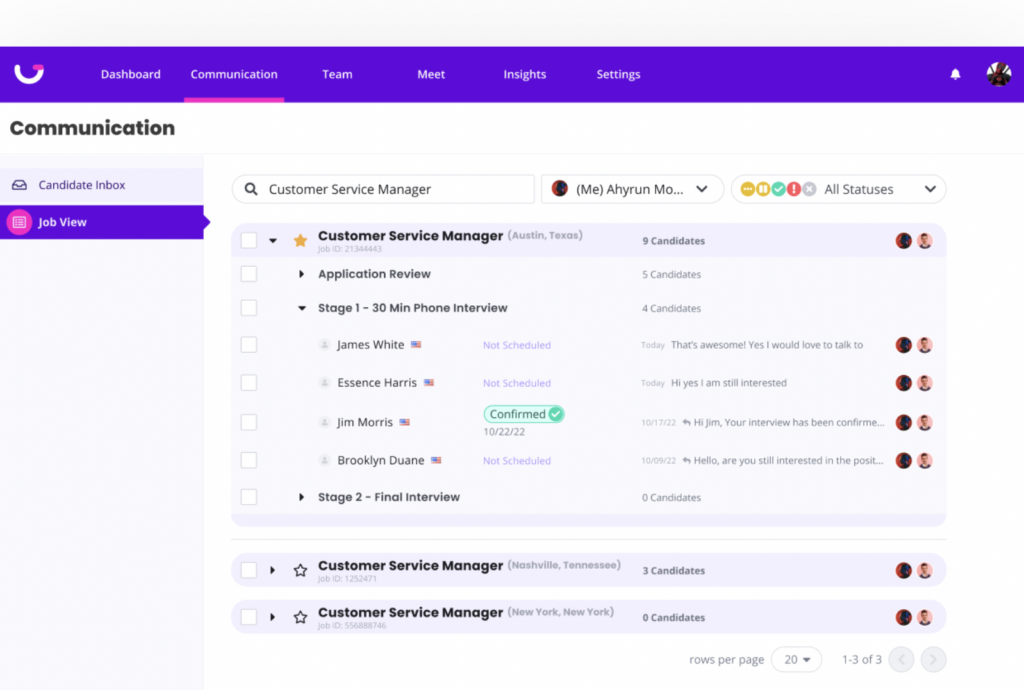
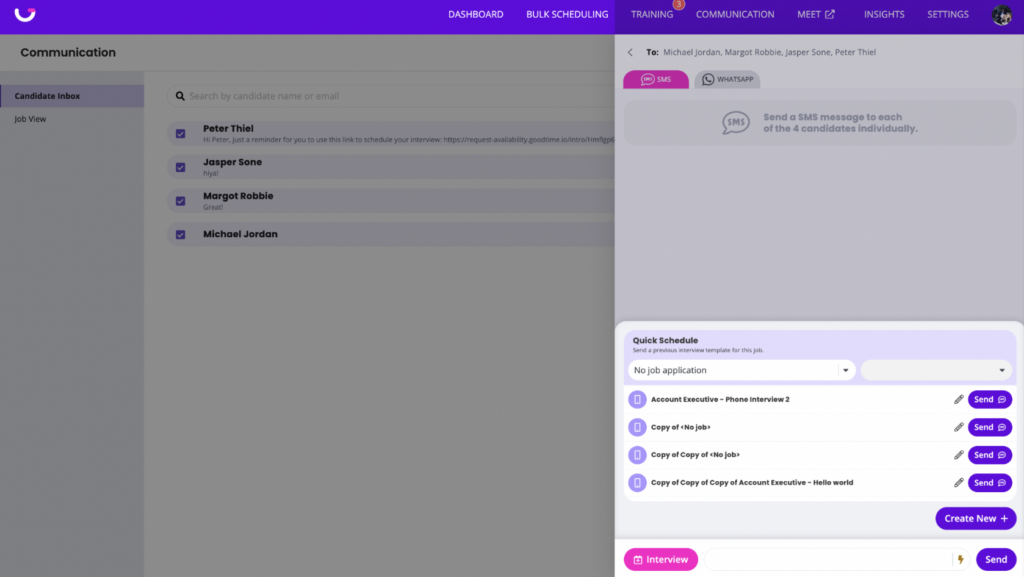
Communication Tab

Consider this a recruiter’s command center. See when candidates enter new jobs and stages, receive notifications when candidates respond, and take action by  communicating and scheduling with just the click of a button. Your communication tab is personalized just for you, pre-filtered for your jobs and candidates so you are up to date on all your requisitions.

Graphic displaying GoodTime Hire's communication tab.

Bulk Messaging & Bulk Scheduling

SMS and WhatsApp coordination just got an upgrade. Now you can respond to dozens of candidates at once and send interview requests all in a few button clicks.

Graphic displaying GoodTime Hire's bulk scheduling and messaging capabilities.

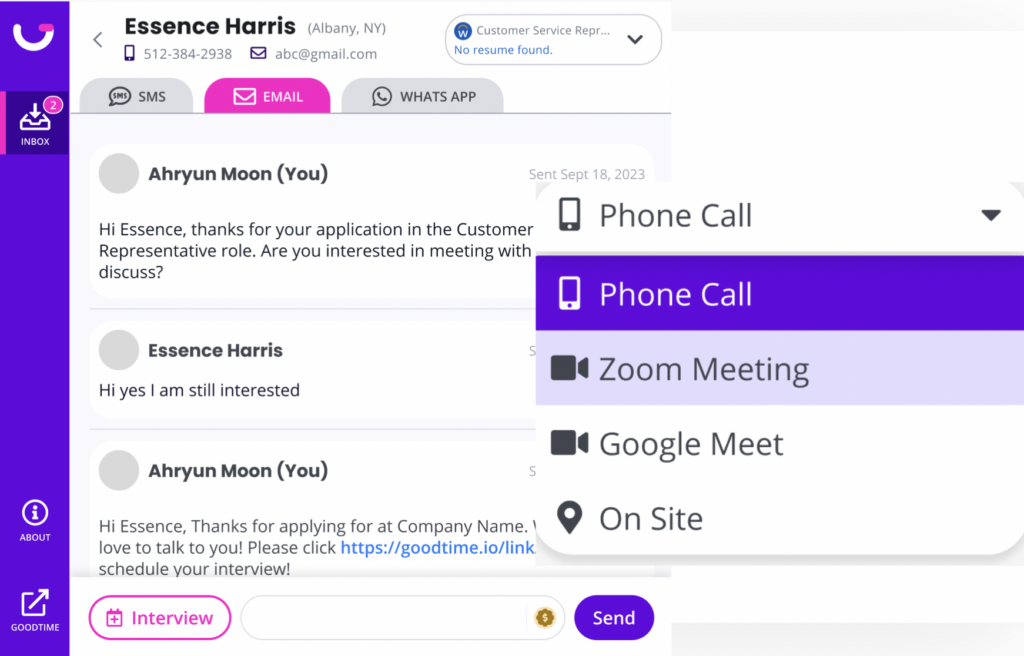
Email Communication & Video Interviews

Communicate and interview with your candidates however they (and you) prefer. Quickly send email communications to candidates and get notified when they respond. If your company prefers interviews over video, we now support scheduling video interviews over MS Teams, Google Meet, and Zoom.

Graphic displaying GoodTime Hire's communication capabilities.

GoodTime Meet Updates

Connect and Teams are now available for everyone. Plus: there’s a new way to share the GoodTime Meet love.

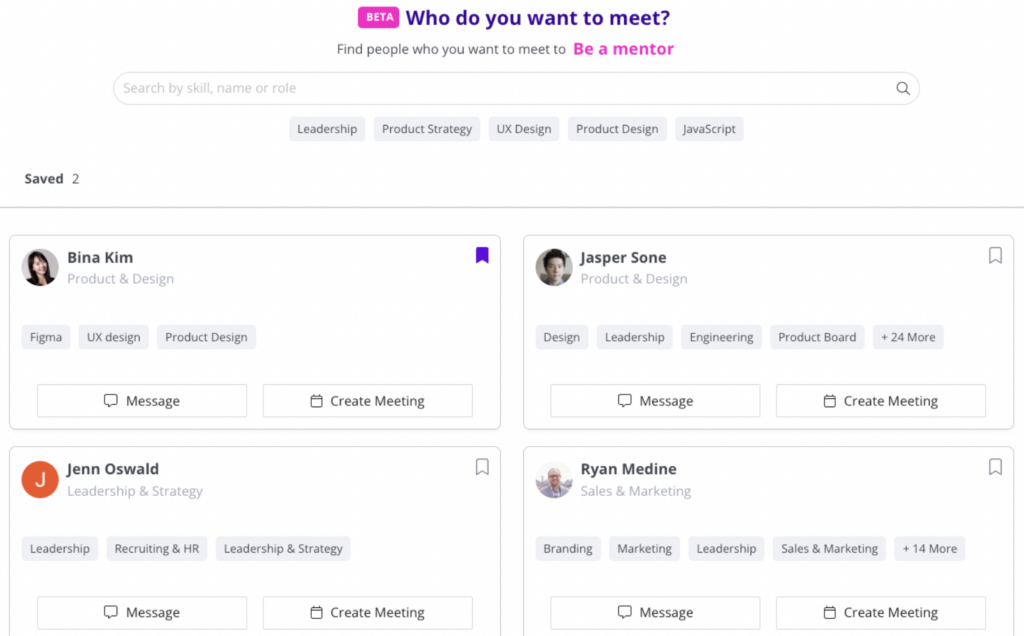
Connect for Everyone

Get pumped: Connect is now available for everyone at your company, whether they are on a free or premium subscription. Connect makes it easy for your teammates to find others who share the same interests or skill sets. Quickly search and schedule time to meet with peers and mentors.

Graphic displaying GoodTime Meet Connect.

Teams for Everyone

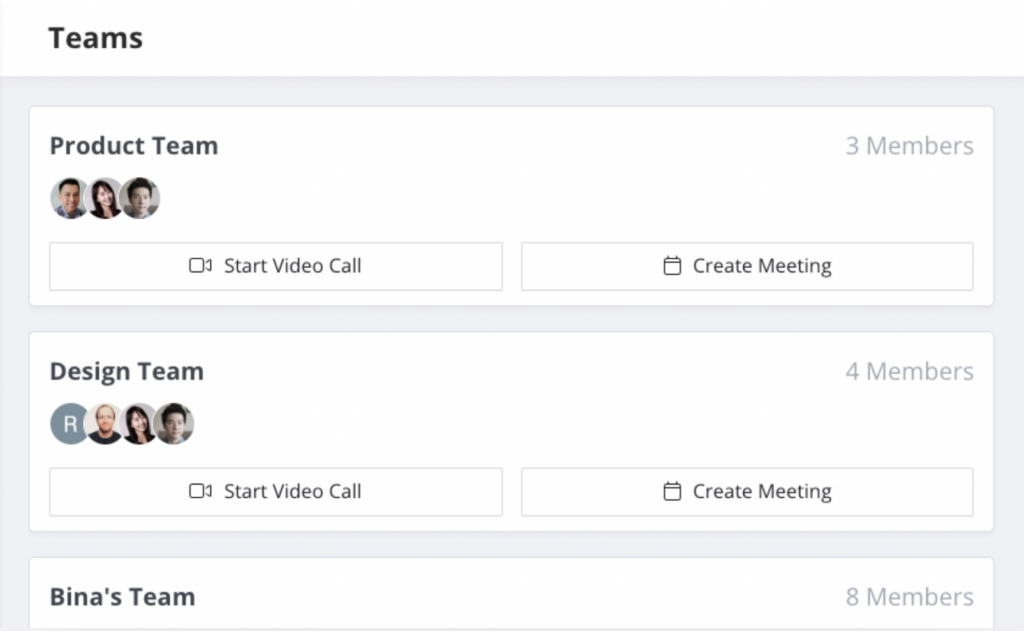
Just like Connect, Teams is also now available for everyone at your company. You can now instantly find time to meet with your team as well as send out quick video huddle links to jump on a call immediately.

Graphic displaying GoodTime Meet's Teams.

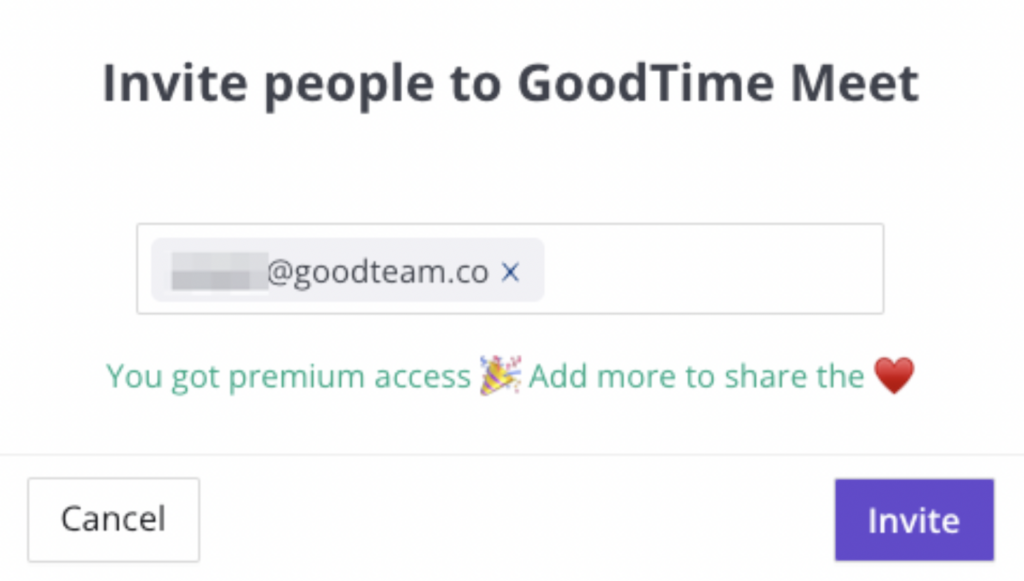
Invite Peers

Share the love and get some back. Invite people you meet with frequently to join GoodTime Meet and get a month of GoodTime Meet Premium access for free.

Graphic displaying inviting peers to GoodTime Meet.

Other Notable Updates

  • Search Links in Chrome Extension: Save time scrolling by quickly searching for your links by name in the Chrome Extension
  • Create Recurring Meetings in Calendar: Meetings scheduled in the GoodTime Meet calendar can now be recurring

Not Part of the GoodTime Family Yet?

It’s time to change that. With GoodTime, you can get better outcomes from your company’s most important meetings. For interviews, GoodTime Hire helps you schedule 40% faster, hire 50% more efficiently, and 5x team productivity. (Seriously.) For every other meeting, GoodTime Meet allows you to take complete control over your calendar with free, flexible scheduling for hybrid and remote teams.

Learn more about how Hire can transform your interview scheduling.
Learn more about how Hire for High Volume can revolutionize your high-volume hiring.
Learn more about how Meet can revamp your meeting scheduling.