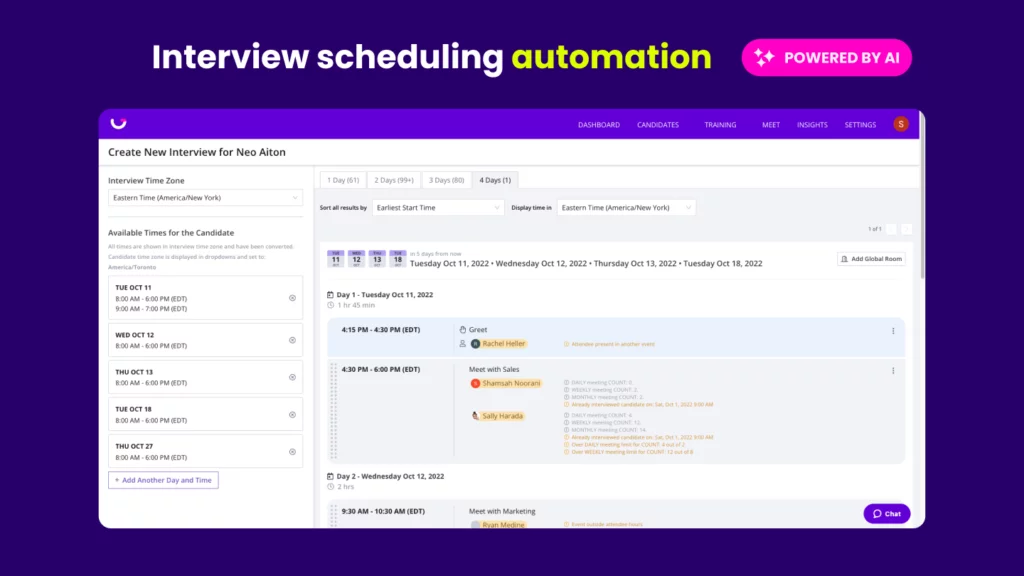
We’re hitting the ground running in 2024 and already crossing some major items off your wishlist! In our latest round of product updates, we’re excited to share:
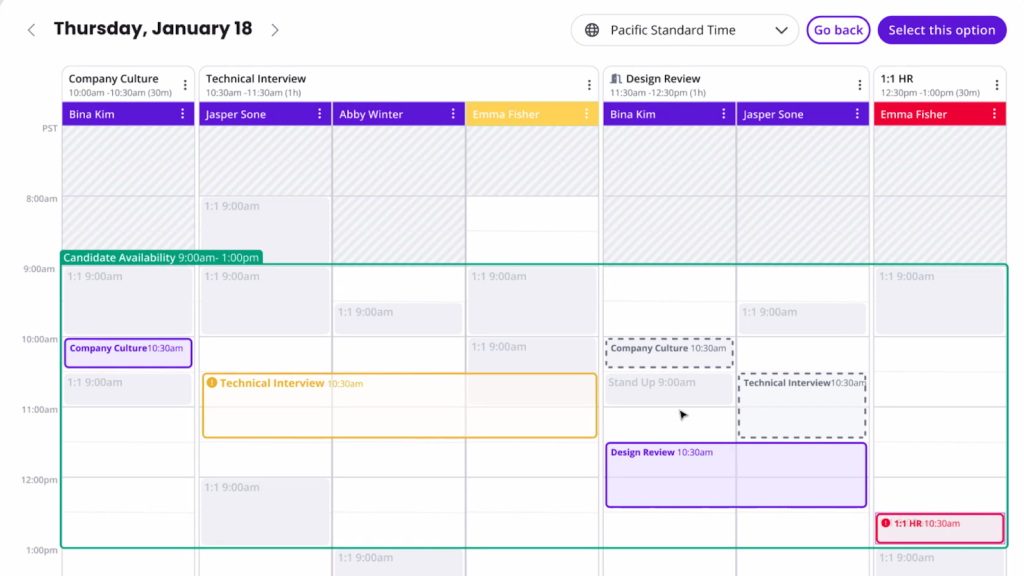
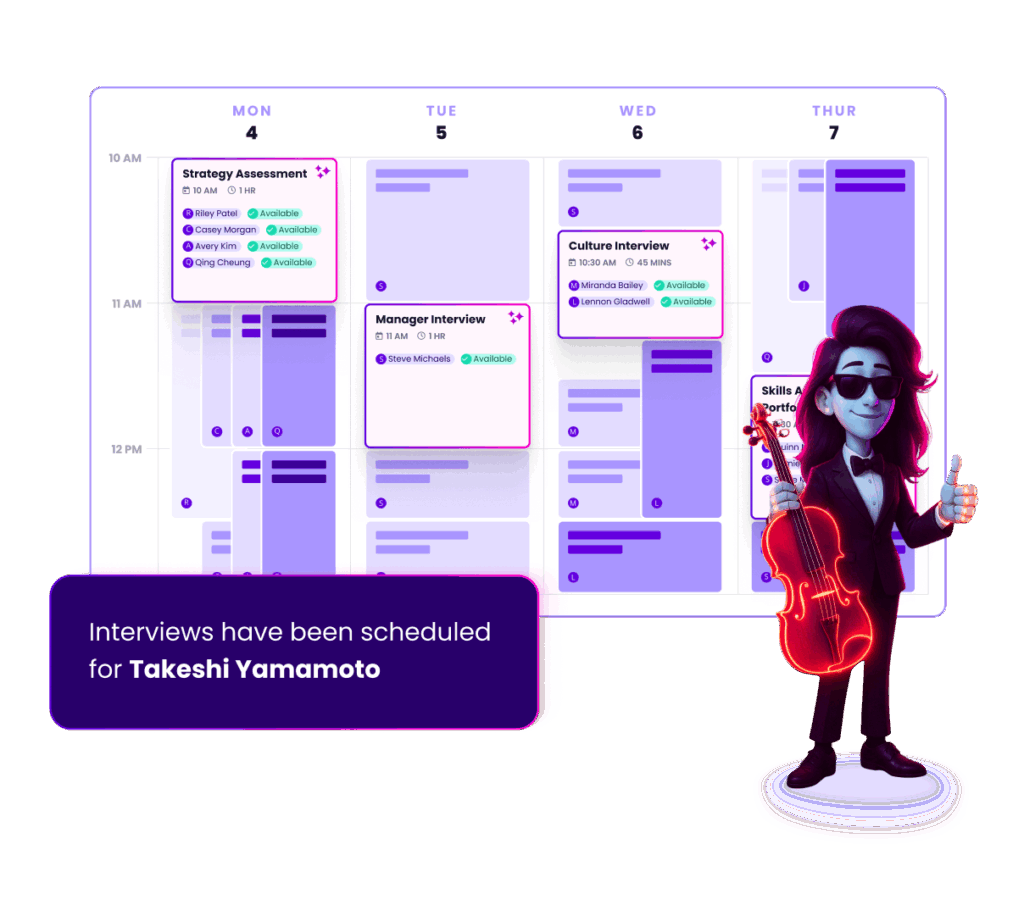
Calendar View: Review your schedule options & plans on a complete calendar spread before confirming your interviews.
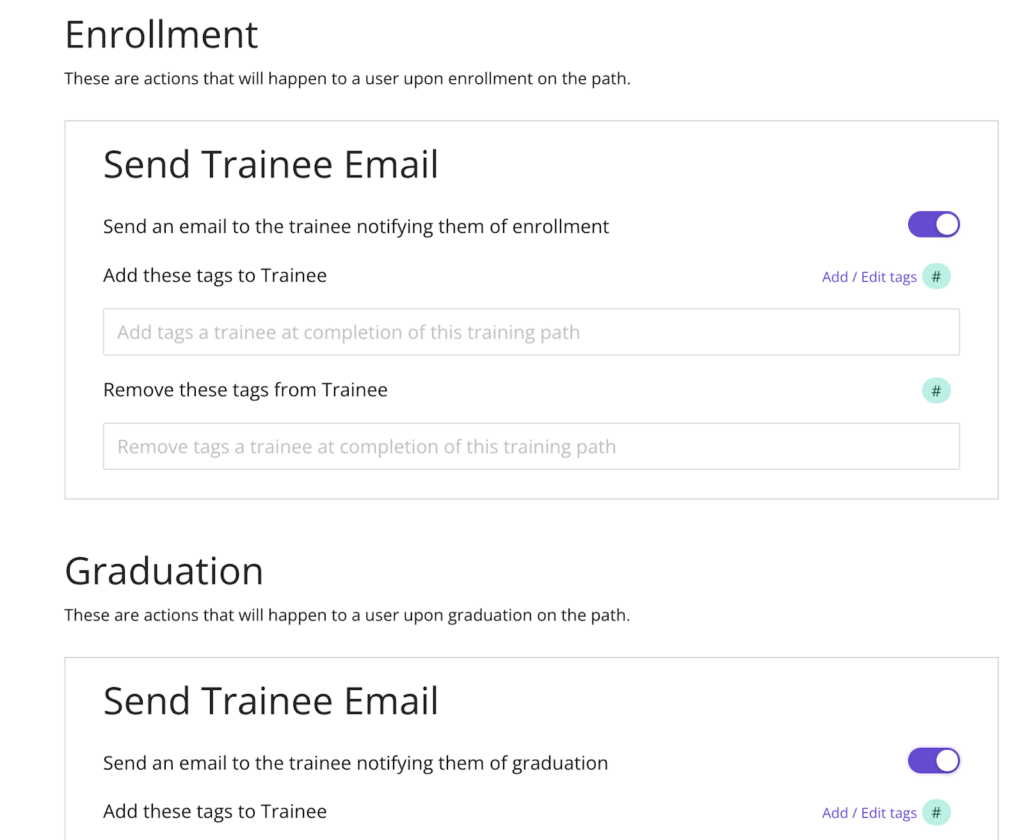
Auto Graduation: Take your training efficiency to the next level by automating the graduation of completed trainees.
Candidate Portal 2.0: Flex your Candidate Portal with embedded YouTube videos, attachments, and complete customization settings.
Plus, we’ve got a sneak peek at Hire for High Volume’s new dashboard and company-wide scheduling links for GoodTime Meet. Let’s dive in!
Watch the January 2024 GoodTime product updates webinar or keep scrolling for highlights
Candidate Portal 2.0: YouTube, files, new settings, and more
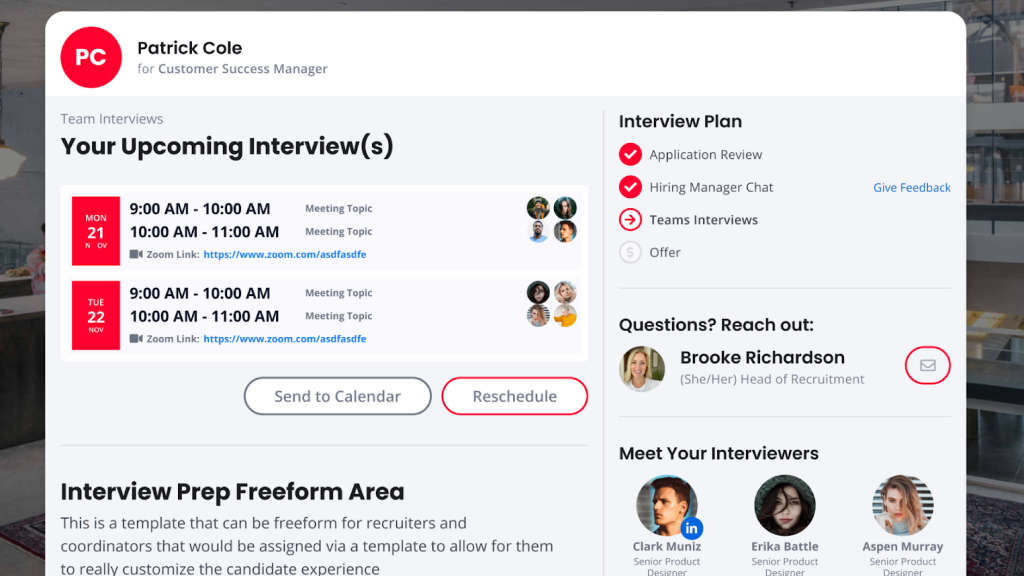
Last month, GoodTime launched the Candidate Portal and this month we have taken it to the next level with custom settings, YouTube integration, and file attachments.
Why this is awesome: With these enhancements, there is no content of the portal you can’t control and with video, attachments, URLs and text, the candidates will have every opportunity to succeed!
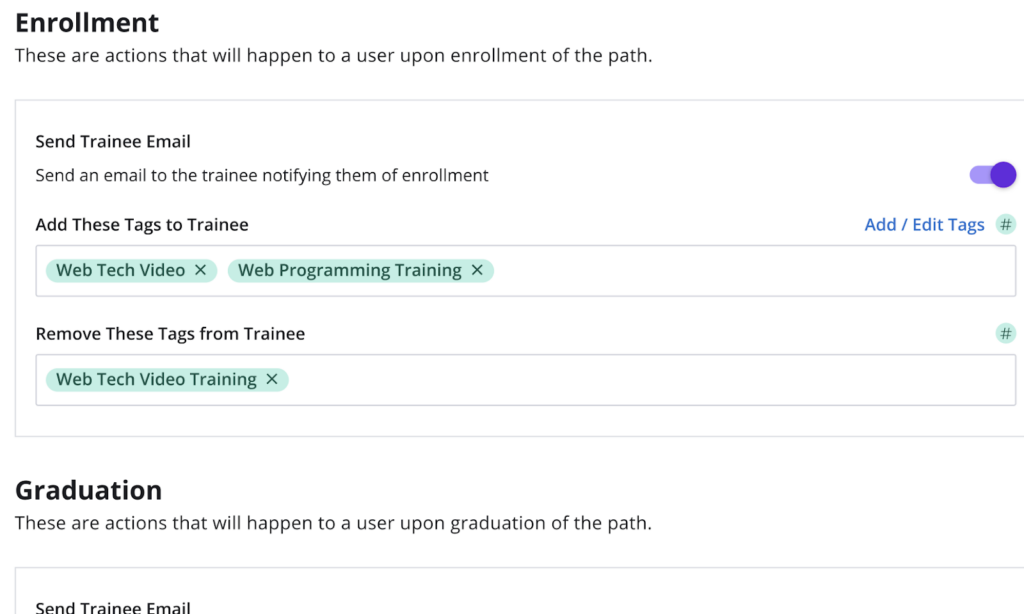
Auto Graduation from training paths
GoodTime’s interviewer training module now offers the option for trainees to automatically graduate after completing their training paths.
Why this is awesome: One of the easiest ways to hire better talent is to schedule faster and that means having more interviewers. Auto Graduation does just that!
Introducing Calendar View!
After extensive research with our users, GoodTime is elated to announce the first version of our Calendar View in the scheduling flow.
Why this is awesome: See the whole scheduling situation in one frame, rearrange options to suit your exact needs, and get conflict updates in an instant! Creating the perfect interview has never been faster or required fewer clicks.
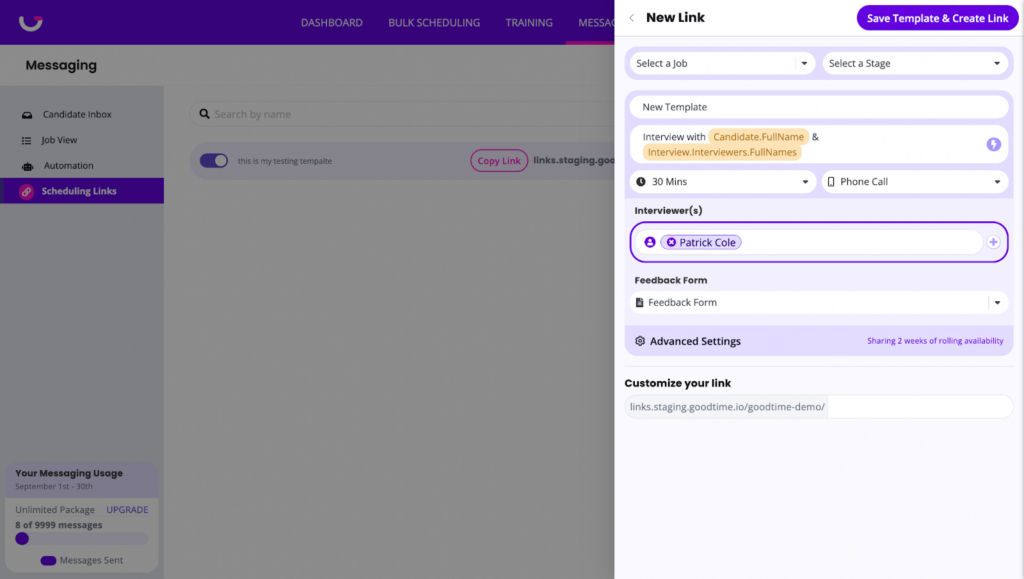
Company-wide scheduling links in GoodTime Meet
Enterprise users can now remove their name from their link URL. These links can be shared as “read only” with your entire organization.
Why this is awesome: Not tying a link to a specific user’s identity makes for a more versatile and shareable link. Your guest does not need to access the name of the link owner, especially when the link may be a round robin for many different attendees.
What GoodTime features will you take advantage of next?
We want to help you evolve and take full advantage of the latest upgrades and improvements to our platform. Check out the GoodTime support center for tutorials and tips to help you stress less and get more done!
Before we wrap up for a short winter break, we want to update you on some last-minute gifts we dropped for GoodTime users. This year, you made the nice list and we’re crossing a ton off your wishlist, including:
Candidate portal — Keep candidates engaged and provide information they need to feel confident for each interview
CSV / Excel Downloads — You asked, we listened. You can now download all reports to CSV. Happy spreadsheeting!
Customized Scheduling Flow — You can now brand and fully customize your scheduling flow!
Bulk Uploading Tool — You now have the ability to bulk update your data for Tags and users right inside the platform
Plus a whole lot more. Watch our full video walkthrough of this month’s new features below, or keep scrolling for a quick look at the highlights.
Watch the December 2023 GoodTime product updates webinar
First, a quick look back at 2023
We’re proud of what we were able to accomplish with you this year. We want to take a quick moment to shoutout some of the highlights!
429 customer feedback sessions
The GoodTime Product Team went to work, attending 429 customer feedback sessions to focus on building products that help teams do more with less. We took one of our core pillars #put-the-customer-first to the next level, meeting with 8+ customers a week to better understand their needs and prioritize products that will help teams hire the right candidates faster with more efficiency.
Why this is awesome: Every single feature we released this year had multiple points of feedback from customers starting from prioritization, design, and research all the way to post-launch feedback. As a result, we were able to release faster with fewer wasted cycles.
88 product releases and 81 updates
One of our mottos going into 2023 was #build-fast. Based on amazing customer feedback, we launched 88 product releases like High Volume, Automation, Interview Days and Candidate Portal as well 81 refreshes and updates to major portions of our products like Insights (Benchmarking, New Reports), Core Scheduling (Algorithm improvements, Interview Blocks, Improved Error Messaging), Training (Trainee Distribution, Reporting, Auto-Tagging / Untagging), support for 11 languages and so much more.
Why this is awesome: The economy shifted suddenly in 2023 and with the change came new needs. Releasing quickly and iteratively helped us identify new problems and build products to solve them. This allowed our customers to schedule over 1.8 million interviews with an average of 22.1% fewer people to help on their teams.
150+ hand raisers for early access
Thank you so much! The response from customers to our product release announcements was overwhelming. This year we had over 150 teams volunteer to try out products in early access and provide critical feedback to help us improve our products prior to launching. Not only was this a show of general excitement but proved that the investment in early customer feedback sessions paid off.
Why this is awesome: Expert-level feedback from excited customers allowed the Product Team to focus on features that really mattered and allowed us to uncover issues prior to launching to production. #fix-fast.
Now, on to this month’s updates!
Introducing the Candidate Portal!
Candidates now have a one-stop shop to access all the essential information in the new GoodTime Candidate Portal. Here they can see how to prepare, who to speak to, points of contact and so much more.
Why this is awesome: Candidate experience is key to locking down top talent and the Candidate Portal takes this experience to the next level.
CSV/Excel downloads
Now you can download all of your report data as a CSV!
Why this is awesome: You’ve been asking for this one for a while. Now you can slice and dice your data in any way you like. Happy spreadsheeting!
Customized scheduling flow for high volume
With our new brand themes feature, you can now customize your scheduling flow and apply different customizations at a template level.
Why this is awesome: Customize the logo, background images, colors, and individual content of your scheduling flow to provide the right information to your candidates.
Bulk Uploading Tool
Our new Bulk Uploading tool allows you to import .csv files and update data for users, meeting rooms, and tags.
Why this is awesome: This new uploading process makes it quick and easy to update a large amount of data. We also provide a visual review process to ensure your upload is accurate and notify you when the update is complete so you don’t need to wait around in the platform.
Even more updates to Hire and Hire for High Volume!
For Hire:
Summary row for Lead Time Report
A summary line for all values has been added to the Lead Time Report so that a total overview is more accessible.
For Hire for High Volume:
Update pending interview automation
When updating interview templates associated with workflows, you can choose to update all pending interviews with your new template changes.
Bulk message via last communication channel
When bulk messaging with many candidates, you can utilize the Last Channel tab to send your message through both SMS and Email (whichever channel you last communicated on).
Internal candidate scheduling enhancements
Added Lever Support for this feature and enhanced our Internal flagging logic for Greenhouse and Workday to be more accurate.
Paste message blurbs and interview scheduling requests
You can now ‘paste’ message blurbs into the messenger and modify the message before sending to your candidates. Similarly, we now offer ‘Send without Sending’ which allows you to make one-time adjustments to your interview or message to send to the candidate, but not override your current template.
GoodTime Meet updates
Company default scheduling links
Company Admins can now create default scheduling links that everyone at the company can automatically start with.
Why this is awesome: New teammates are ready from the moment they log in to start utilizing scheduling links. This makes the platform even easier to get started as well as gives Company Admins the control they need to maintain consistent experiences.
Delegated account access
GoodTime Users can now assign someone else at their company to delegate their account. This gives the delegate access to create, edit, and update links as well as update common settings like business hours.
Why this is awesome: Allows for complete management of accounts, allowing EAs and coordinators to help manage scheduling links on behalf of others.
Multi-duration links
Scheduling links can now share multiple time duration options for guests to search from.
Why this is awesome: Your prospect, customer, or candidate may not have the full 45 minutes to chat with you this week, but 30 minutes will work. Now you can provide guests the ability to choose the amount of time they want to meet for.
Are you making the most of GoodTime’s latest features?
We want to help you evolve and take full advantage of the latest upgrades and improvements to our platform. Check out the GoodTime support center for tutorials and tips to help you stress less and get more done!
The end of 2023 is approaching fast, but our Product team isn’t showing any signs of slowing down. We’re pushing out plenty of GoodTime updates for you to be thankful for, including:
Lead Time Report – Move fast to secure the strongest talent! The Lead Time Report shows you how close in time interviews are booked and how rescheduling affects the wait.
Training Report – Training Paths are used to maximize your organization’s interviewing capacity. With the all-new Training Report, you can track the performance of each path to understand where focus needs to be placed and be better prepared for upcoming demands.
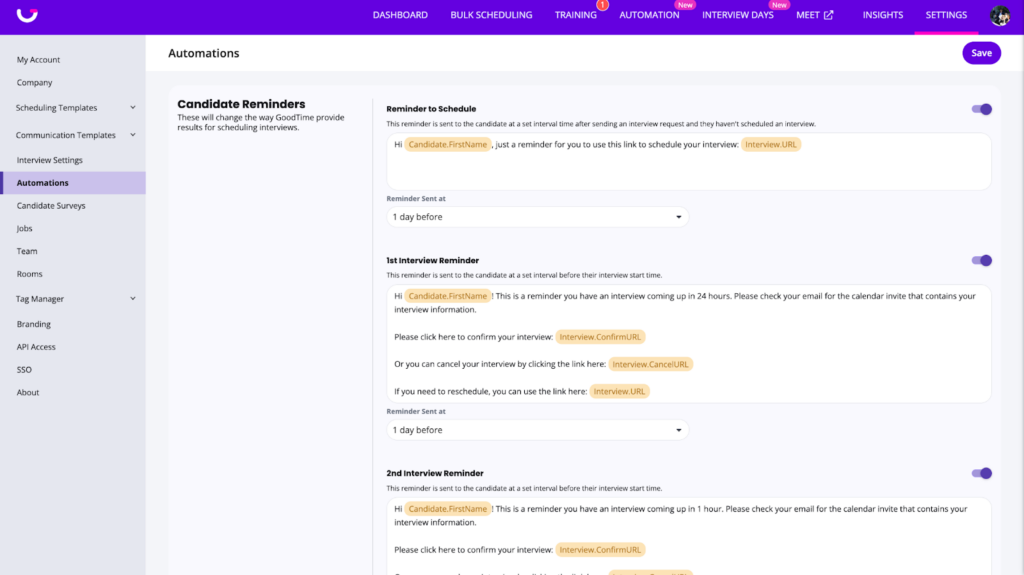
Customized Automations– Customize the default automations to meet the needs of your organization!
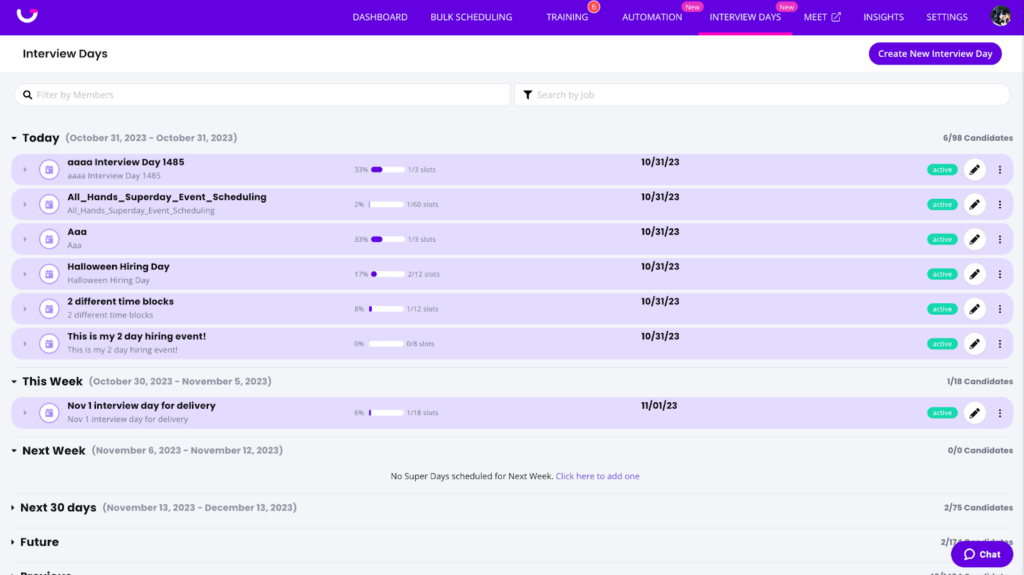
Event & Interview Day Scheduling – Our dashboard has gotten an overhaul along with more functionality to support more types of events.
Internal Candidate Scheduling – Visually see when you are communicating and scheduling with internal applicants.
Plus a whole lot more. Watch our full video walkthrough of this month’s new features below, or keep scrolling for a quick look at the highlights.
Watch the November 2023 GoodTime product updates webinar
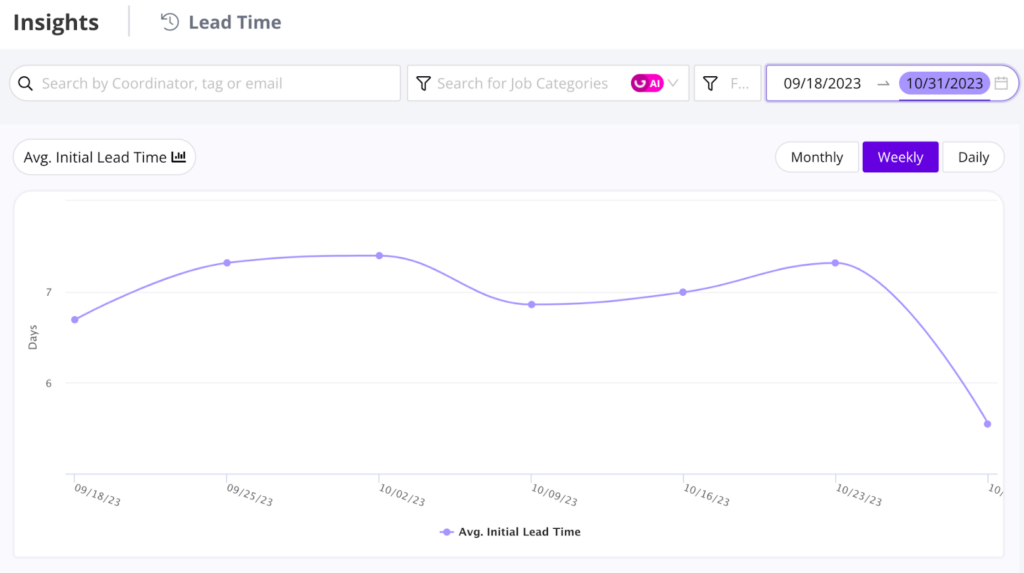
Lead Time Report
The GoodTime Lead Time Report helps you track how far into the future your confirmed interviews are scheduled.
Why this is awesome: The number 1 way to lock down top talent is to schedule fast. Monitor the lead time by job type, coordinators, and specific roles to identify areas where improvement is needed.
Training Report
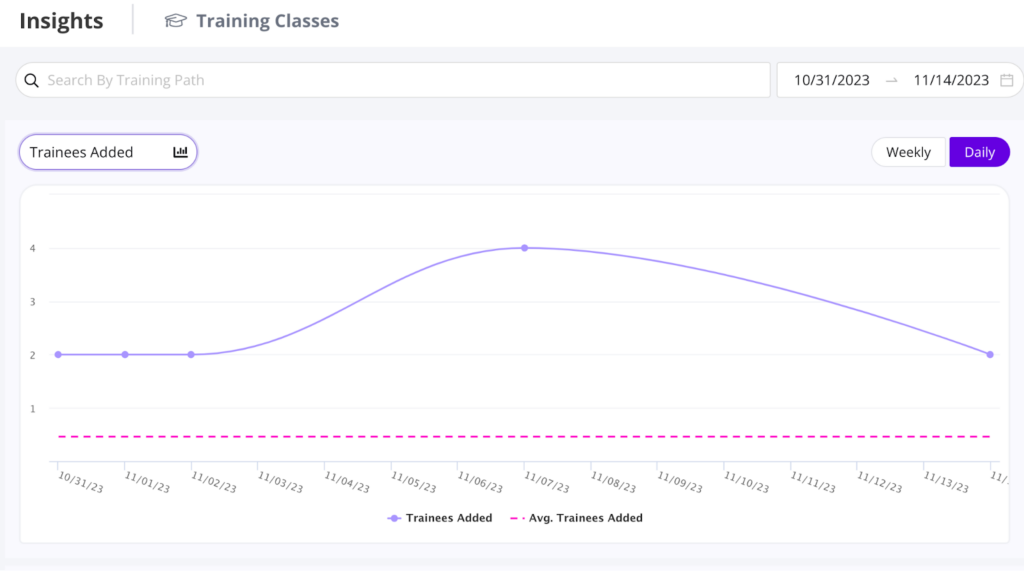
The Training Report is finally here – a one-stop shop to track enrollments, graduations, path volume, and average time to graduate!
Why this is awesome: If you want to plan accurately for hiring the right people, it all starts with training the right interviewers. The Training Report ensures that you monitor the progress and react properly in order to meet your hiring goals.
Enrollment and Graduation emails
We are all about automating your work for you! Now you can let GoodTime automatically notify your trainees when they are enrolled in your program, and when they graduate!
Why this is awesome: With automated tagging & untagging, enrollment emails, graduation emails, and auto-enrollment into the next path! All it takes is that first enroll and your company is on its way to fully autonomous & perpetual training. In other words, endless opportunity!
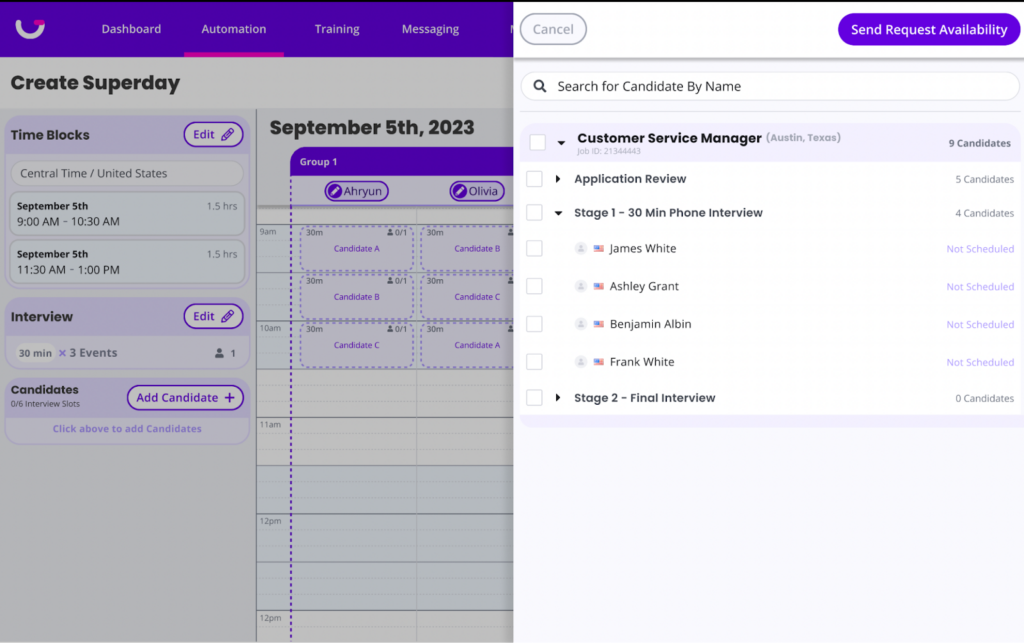
Event & Superday scheduling
The Interview Day dashboard has gotten an overhaul along with more functionality to support more types of events!
Why this is awesome: Dashboards are now personalized to individual users running events. We also now support multiple interview blocks for presentation interviews and removing interviewer groups from blocks.
Internal candidate scheduling
See inside the scheduling workflow when you are communicating and scheduling with an internal applicant.
Why this is awesome: Tailor your communication and scheduling based on whether a candidate is a current employee or an external applicant.
Customized automation
You can now customize the default automations to meet the needs of your organization!
Why this is awesome: Adjust the content, timing, and if a certain automation is disabled/enabled to cater to the unique needs of your workflows.
Even more updates!
For Hire:
Automatic fallback to current user as coordinator if none is specified
If no coordinator is specified in your ATS and you start scheduling an interview, GoodTime will auto-select you as the coordinator to save time.
New variable: $interview.interviewlength
With this new variable, you can insert the total length of a multi-panel interview into your communications.
Revamped Replace Trainee sidebar
The sidebar for switching trainees has been completely revamped and now shows important information such as which tag the interviewer came from, load limit status, and better functioning conflict control.
For Hire for High Volume:
Text forwarding to email
When candidates send SMS or WhatsApp messages, users receive emails notifying a candidate has sent a message. We’ve also made our messenger mobile-friendly so you can reply to messages right from your phone. This setting can be disabled if you do not want to be notified via email.
Workday Chrome Extension
Workday ATS users can now use our GoodTime Chrome Extension to open candidates up directly inside of the ATS. Workday users can also now message candidates and schedule interviews without having to leave the ATS
Are you making the most of GoodTime’s latest features?
We want to help you evolve and take full advantage of the latest upgrades and improvements to our platform. Check out the GoodTime support center for tutorials and tips to help you stress less and get more done!
Recruiting pros, when you think about AI, what’s the first tool that comes to mind? If you’re like most people, it’s ChatGPT. From the moment it surfaced, it dominated headlines, causing a frenzy of positive and negative opinions.
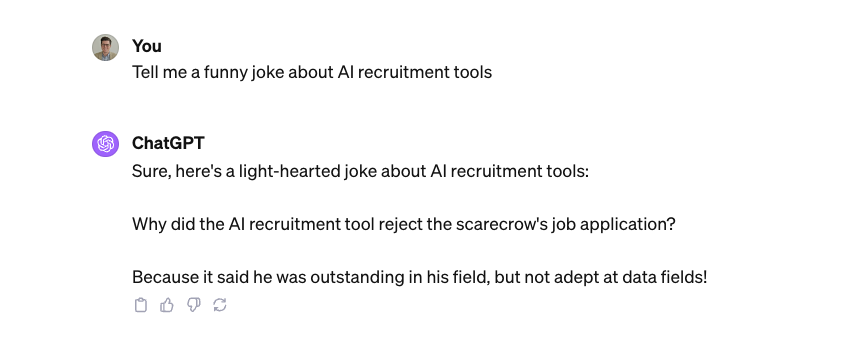
It’s certainly the most prevalent and accessible AI tool out there, but it also has its limits. For example:
Not bad, but not great either. Don’t worry — this article is written by a real human being.
Yet, even before the ChatGPT craze, AI recruiting tools had already made their way into businesses across the globe. And it continues to grow at lightning speed. In 2017, only 20% of businesses used AI in some sort of capacity in their business according to McKinsey’s Global Survey on AI. Today, that number has more than doubled.
While Forbes reports that only 26% of companies have leveraged AI to support talent acquisition, for those who have, the results speak for themselves.
85% say it saves time and increases efficiency
44% say it helps them find top candidates
30% say it helps reduce biased decisions
18% say it increases diversity among candidates
If this tells us anything, it’s that more talent teams need to jump on board with tech and automation to help them find their best workers.
And this is truer now than ever before. Our 2024 Hiring Insights Report shows that on average, talent teams are hitting just half of their hiring goals. Likely due to recent team reductions and leaner budgets, talent teams are struggling to do the same amount of work with fewer resources.
They need extra hands — a problem technology can solve. AI won’t replace recruiters, but help them hit their goals with less time and resources. But when it comes to tech for recruitment, it can be hard to tell what’s beneficial and what’s just a good marketing ploy.
So where do talent teams begin?
Stay tuned as we cover the top 6 AI recruitment tools every talent team should know about.
Unlock 2026’s top hiring strategies: Insights from 500+ TA leaders
Be the first to uncover deep hiring insights specific to your sector — straight from the highest-performing TA teams.
We may be biased, but for good reason. With GoodTime Hire’s AI-powered interview scheduling, teams hire up to 50% faster. And in today’s hiring landscape, faster is always better.
But that boost in efficiency comes from much more than basic scheduling. GoodTime offers quick communication through text and WhatsApp, workflow automation, candidate screening questions, actionable insights, and interviewer coordination so teams can scale and fill high-volume roles in half the time.
But don’t take my word for it. Allie Scheu, Recruitment Coordination Manager at Hubspot can back me up. After implementing GoodTime for her team, she stated, “GoodTime makes the process so much easier for the recruiting coordination team because it really eliminates a lot of the back-and-forth that we would have been previously going through between interviewers, candidates, and hiring managers.” You can read HubSpot’s full story for more details.
Want to see GoodTime in action? Check out our on-demand product tour.
Top 3 benefits
Easily handles high-volume hiring: In a world where teams are trying to do more with fewer resources, GoodTime offers a solution. By providing seamless automated solutions, teams can focus less on the cumbersome details and more on getting talent through the door faster.
Prioritizes relationships: While GoodTime’s intelligent automation takes care of tedious tasks, such as back-and-forth scheduling, talent teams now have more time to focus on creating relationships with the candidates that matter. Speeds up hiring: GoodTime Hire greatly reduces time-consuming work, allowing talent teams to hire at a much quicker rate. And with the average time-to-hire sitting at 44 days, there’s no better way to get ahead of the competition than this.
You know as well as I do that it takes hours and hours to screen resumes, just to find one well-matched candidate.
SmartAssistant’s AI-powered recommendation service does this for you. Using powerful custom algorithms, SmartAssistant easily finds and scores talent, recommending the best match at lightning speed.
It also helps eliminate subjective opinions. Yes, even the most well-intended recruiters can let bias seep in. When reviewing information, this tool does not analyze personal data (such as name, age, gender, etc). Nor does it factor past hiring decisions into the algorithm. Instead, it focuses on the competencies that matter.
Top 3 benefits
Increases productivity: With rapid applicant screening, SmartAssistant discovers talent in just minutes — giving recruiters more time to work on other important tasks.
Boosts discoverability of candidates: Sometimes good candidates get lost in the weeds. With SmartAssistant, every candidate is evaluated the same way, giving everyone a fair chance to be seen and heard.
Expands team diversity: When biased opinions are not a part of the sourcing decision, your company gets a better chance at well-rounded, diverse hires. And this is critical for company success.
3. Search queries, prep, and drafting emails: ChatGPT
You know I had to include this one on the list. Only surfacing in November of 2022, ChatGPT is still in its early days. Yet, it’s created ripples across every industry. Hopefully optimistic, recruiters joined the crowd to see how ChatGPT could help them speed up their efficiency.
And it didn’t disappoint. While ChatGPT is certainly not perfect (keep in mind that many still use the free version), it’s certainly eliminated extra steps for the recruiter. Here are a few ways recruiters use Chat GPT to speed up their hiring process:
To level up search queries: Using ChatGPT, recruiters can generate Boolean search strings to help them find the best candidate.
To prep for an interview: Based on a specific prompt, ChatGPT can generate a list of interview questions for a specific role.
To draft email communication: ChatGPT can act as an email subject line generator, and even create entire emails for a variety of scenarios, making candidate communication quick and seamless.
Top 3 benefits
Saves time: ChatGPT creates answers to prompts in seconds and helps talent teams speed up their time-to-hire.
Reduces manual effort: Many talent teams spend hours writing emails or developing interview questions. Now talent teams can use ChatGPT to do their tedious tasks. And while ChatGPT is still not perfect, talent teams can quickly make edits and move on to the next task.
Minimizes cost: ChatGPT offers three plan options. Many businesses choose to stick with the lowest plan, which is free. Even the next plan level is very affordable, coming in at $20 a month. For talent teams who are trying to do more, but reduce costs, ChatGPT is a great option.
Curious how a real TA leader uses ChatGPT? We spoke with Dubi Ben-Shoham, Head of Talent Acquisition at Socotra, and he shared how he utilizes it for repetitive or templated candidate emails. You can watch a clip from our conversation below.
Before offering a job, it’s important to verify that a candidate is who they say they are. That’s where Checkr comes in.
This AI-powered platform saves hours of administrative work by verifying employee information — in just seconds. While traditional employment verifications can take up to 10 days, Checkr can complete it in less than 90 seconds. Checkr processes a mind-blowing 1.5 million + background checks per month, without sacrificing accuracy or compliance.
For Jackie McKewon, HR Generalist at Deploy HR, Checkr has been a huge time saver. “As a result of bringing Checkr on board, our team has more time back in their days to focus on candidate retention programs, improving the onboarding experience, and the candidate onboarding process,” she raves.
Top 3 benefits
Improves accuracy: When records are processed manually, there’s a greater risk of mistakes. Checkr’s tool categorizes data clearly and consistently so records are always accurate and up to date.
Maximizes time: Checkr saves talent teams time by doing the hard work for them.
Lessens Administrative burden: Talent teams can spend days getting background checks, drug testing, and verifying reference checks. Checkr greatly reduces the administrative workload so teams can focus on hiring faster.
HackerRank AI makes technical hiring a dream. It provides screening and interview technology that is solely focused on the technical hire. With skills-based assessments, developers can prove their capabilities using the latest technologies. And talent teams can adopt an extensive library of technical skills, giving them the insights they need to make the most informed decisions.
But there’s more. HackRank AI also provides a live coding option. This way, developers can show off their skills in real time. This is especially important since a growing number of developers and technical recruiters we speak to say technical interviews aren’t effective.
For talent teams focused on technical hires, HackerRank AI makes finding and interviewing candidates seamless. Here’s what Jon Duggins, Director of TA at DraftKings, had to say: “Screening candidates through HackerRank has helped us rapidly and accurately identify the skills of candidates, and therefore find and hire the technical talent our team needs to innovate.”
Top 3 benefits
Mitigates bias: Certified assessments are built to ensure fairness. Unlike subjective evaluations that may be influenced by biases, technical skills assessments focus solely on the performance of the candidate.
Ensures honesty in performance: When assessing candidates, this AI-powered tool automatically detects plagiarism, making sure that only those with the best skills get through.
Discovers most in-demand tech skills: HackerRankAI has an extensive library of tech skills, helping talent teams assess and hire with confidence.
Although SeekOut offers many recruiting services, it focuses on one, main theme: using data to discover talent.
One benefit of SeekOut is its ability to quickly identify and close skills gaps. Their AI-powered search engine uses data to understand current employee skills, experiences, or career goals. Then, using this data, talent teams can make targeted decisions around their sourcing strategy, like planning for new roles or training existing employees.
Beyond that, SeekOut gives access to 800 million public profiles and matches applicant competencies with the roles they best fit. Then, it sorts these applicants based on how qualified they are for the role.
Top 3 benefits
Improves efficiency: With SeekOut, talent teams quickly get the insights they need to hire the best-matched candidate for the role.
Increases diversity: This powerful search tool finds the most diverse, hard-to-find talent. And talent teams have total control over how they filter candidates, helping them focus on what truly matters — skills.
Creates unity across teams: Finding top talent is always easier when every member of the talent team is on the same page. With SeekOut, teams can easily share and discuss insights.
What AI recruiting tools does your team need?
Now it’s your turn. What AI recruitment tools would best benefit your team’s specific needs? Begin by asking questions like, “What is our ultimate goal this year?” or “What are our current challenges?” Then find the tool that works best for your team’s specific needs. It’s a challenging time to hit hiring goals right now with leaner resources, and adding recruitment automation is your best bet to getting ahead.
If you’re still not sure where to begin, try GoodTime Hire. Our interview scheduling software gives teams the edge they need to hire up to 50% faster.
Upgrade your hiring journey with AI
GoodTime’s AI agents orchestrate the entire hiring journey — screening, scheduling, messaging, and more — so talent teams hire faster with a better candidate experience.
We need to talk about the modern recruitment funnel. And we will. But I explain the stages and steps you can take to optimize your funnel, let’s take a brief look at the state of recruitment in general.
Here’s an uncomfortable truth: GoodTime’s 2024 Hiring Insights Report found that for years, TA teams have struggled to hit just half of their hiring goals.
There are no convenient excuses for this underperformance, either. Numbers of job seekers have remained roughly the same, while job openings have dwindled. So in theory, hiring goal attainment should be ticking upward, right?
But of course, it’s not quite that simple. The report also speaks to skills gaps in available candidates and increased demands of potential hires as significant obstacles.
So how can companies turn things around? What “secret sauce” can ensure you meet your hiring goals while ensuring your candidates are of the highest quality?
Let’s take it back to the basics: A well-defined, fine-tuned recruitment funnel.
Unlock 2026’s top hiring strategies: Insights from 500+ TA leaders
Be the first to uncover deep hiring insights specific to your sector — straight from the highest-performing TA teams.
When it’s working correctly, your recruiting funnel is a self-replenishing candidate pipeline to ensure top-quality candidates can fill roles in your organization as needed. Typically, the recruitment funnel can be broken down into seven stages:
Awareness
Interest
Application
Consideration
Interview
Offer
Hire
Below, I’ll break each of these down in more detail.
The 7 stages of the recruitment funnel
A recruitment funnel can’t help you achieve your goals unless all seven stages are clearly defined and you have a shared understanding within your TA team. You might want to adjust these definitions a little to suit the unique hiring process steps of your organization, but for the most part, your recruiting funnel should look something like this:
1. Awareness
This stage involves creating and spreading awareness about a job vacancy and the organization among potential candidates through various marketing and advertising channels.
Here, you’re introducing visitors to your Employee Value Proposition (EVP) and your organizational mission, whether candidates are suitable for the role or not.
You’ll want to go beyond just the basic job posting and actually inform candidates about your organization, sell them on your company, and convince them they’ll be an ideal fit.
This is also an opportunity to capture names, emails, phone numbers, and other basic candidate information to bolster engagement further.
Use social media – especially LinkedIn – to make your employer brand more visible and transparent. For instance, the banner on your LinkedIn Company page can spread general brand awareness to promote upcoming events, celebrate awards, or use other ways to project/promote your identity.
Make sure to highlight the benefits that are a priority to your target candidate group (e.g., parental leave, childcare subsidies, and student debt relief).
You can also use platforms like LinkedIn to show off your employee experience and attract new applicants. HelloFresh does a great job at this. Take for example, their “day in the life at HelloFresh” video series, which lets users see what the offices actually look like, what perks they can expect, and what the general vibe of the company is, all before they even have an intro meeting.
2. Interest
In this stage, candidates express initial interest in the job opportunity or the organization by engaging with content or outreach efforts.
Drive interest by crafting compelling job descriptions. Techniques include addressing candidates in the 2nd person (referring to them as “you” instead of “they” to make it more personal).
Call your company “we” to make your candidate feel like part of the company.
Use active voice. Make your candidates feel like they’ll be part of the action. “The objective is to convert sales and satisfy customers” isn’t clear about who will do what. Conversely, “You’ll interact directly with customers, build relationships, and convert sales” is more direct and impactful.
Make sure to also write clear, descriptive job titles, craft an honest and transparent “About us” blurb, and be precise about role responsibilities.
3. Application
The application stage is when candidates formally apply for the position by submitting their resumes or applications, indicating a strong interest in the role.
A simplified application process is one of the best ways to keep potential candidates engaged and interested. Note how 60% of job seekers quit while they’re completing applications due to complexity and length.
These days, it’s crucial to make the application process mobile-friendly is crucial since 52% of job-seekers look for roles on their phones. You want to be where your top candidates are.
User-friendly application interfaces are a must. Select typography and color schemes carefully to align with your company’s brand. Colors and thoughtful formatting should be used to highlight the most important elements of an application and establish a visual hierarchy. Make sure to keep things simple visually. You want the process to be as easy as possible to avoid any confusion or unnecessary labor for the applicant.
4. Consideration
At this stage, recruiters review applications and qualifications to determine which candidates merit further consideration for the position.
48% of candidates claim employers failing to communicate with them about their candidacy is a top-five frustration when seeking a job. Regardless of a candidate’s chances for landing a role, don’t ghost them – word spreads. While you’re at it, always send confirmation emails to show candidates you’ve received their applications. It prevents unnecessary back-and-forth over email and helps them see you as an engaged employer.
As discussed in our article on tech hiring challenges, AI tools can streamline personalized communication, showing consideration to candidates without bloating your workload.
In the consideration phase, it’s important to set clear expectations about your hiring process from the start. Consider publishing a FAQ section on your careers page, answering queries of would-be applicants proactively.
5. Interview
Candidates who pass the consideration stage are invited for interviews, where they are assessed further for their fit and suitability for the role.
Conduct interviews with your shortlist of candidates. While three interviews should be enough, this number can change based on who you’re hiring and for what position.
Interview scheduling software like GoodTime closes the gaps between hiring stages, making communication and interview scheduling with candidates much more efficient. In fact, it can help TA teams reduce your time-to-hire by up to 50%. Read Pinterest’s story to learn more.
Ensure a positive candidate experience by giving them information about the process. Prepare your hiring team to ask the most effective questions that help avoid unconscious biases.
And never ever skip an intake meeting. Trust me. That’s your chance to align with the hiring manager on what a good fit for the role looks like. An efficient intake meeting sets the entire process up for success.
Just as important is the post-interview debrief. Debriefs are how you make sure you’re evaluating candidates against the right criteria and are an important opportunity to coach and align with hiring managers.
Want to learn more about coaching hiring managers for interviews? We asked Socotra’s Head of Talent Acquisition, Dubi Ben-Shoham, about his process for coaching and training interviewers, including behavioral interviewing techniques. Watch his advice in the clip below.
6. Offer
After successful interviews, a job offer is extended to the chosen candidate, outlining the terms and conditions of employment.
The first thing your chosen candidate will read in your offer is the compensation. Be transparent with the starting base salary in either pay-per-period or hourly amounts, payment frequency, payment methods, and stock options/bonuses.
Next on your chosen candidate’s priority list will be your benefits. Include anything pre-negotiated (e.g., healthcare plans, relocation assistance, insurance, vacation time, and wellness benefits).
If you do end up negotiating on compensation, Indeed suggests these employer negotiation strategies:
Research industry standards
Set a range
Determine candidate expectations
Spearhead the negotiations yourself
Expect a counter
Consider a signing bonus
Understand the significance of your benefits
7. Hire
Once the candidate accepts the offer and completes any required background checks or paperwork, they officially become an employee of the organization.
Your new hire onboarding process – and its overall soundness – will dictate whether your new hire succeeds and sticks around. Nearly 70% of employees will stay with a company for three years when the onboarding experience is on point.
Forbes suggests “Preboarding” new hires. This effort entails engaging and communicating with soon-to-be-starting employees before they begin, keeping them excited about the new opportunity. Send company swag (e.g., notepads or water bottles with your logo) and encourage them to ask questions. Email them an onboarding schedule to ensure the smoothest first day possible.
Also, get the initial paperwork out of the way ASAP. Include other team members as “welcoming crews” to help new hires immediately feel part of the team. Job shadowing is another suggested onboarding tactic, as is making the first day an exciting event (consider taking the new employee out for lunch).
Optimizing the recruiting funnel
Conceptually, optimizing your recruiting funnel sounds excellent. But getting from concepts and hypotheticals to concrete results is no simple task.
For one, you wouldn’t be alone if you felt like the net you’re casting in the marketplace isn’t wide enough. Moreover, gaps often exist in available data to help find specific candidates.
While we’ve established the benefits of brand recognition, enhancing this organizational and recruiting facet has its obstacles.
Choosing the right Applicant Tracking System (ATS) — along with the right add-ons and integrations — helps you overcome all these challenges.
Data-driven decision-making will prove crucial in developing a high-functioning recruitment funnel. The ideal tech stack allows you to view and analyze complex recruitment data, identifying the differentiating skills of top performers within your organization.
Isolating success factors within your data enables you to create more targeted and well-defined postings. It also allows you to assess skills and screen candidates more granularly.
This information will also shed light on recruiting funnel weaknesses. Your dashboards should paint more thorough and specific pictures of your preferred candidates, developing a more personalized and headache-free experience for potential hires.
Seeking constant improvement and feedback through the hiring and recruitment funnel will help cultivate long-term success.
4 key challenges in recruitment funnel management
1. Attracting best-fit candidates
We discussed in the introduction how skills gaps are increasingly prevalent in potential candidates. Yes, plenty of job-seekers exist, but the increasing demands of today’s workplace mean fewer potential candidates are qualified for the roles to which they apply.
When you’re pressed for time and need to hire someone ASAP, you’re in a position where you can’t make an optimal hire.
Avoid this lose-lose situation by following the tips above. For instance, investing in your employer brand might not feel like a priority, but it really pays off in the long run.
At a basic level, writing more engaging job postings highlighting attractive benefits and compensation will go far. The truth is you’ve got to be prepared to shell out some cash for quality hires at the end of the day.
These individuals keep their ears to the ground, are typically highly skilled (they already work somewhere, after all), and are in high demand. They have all the leverage and have a long line of recruiters chasing after them.
How do you differentiate yourself from all other recruiters? A bolstered employer-brand identity and sterling reputation will go far in attracting passive talents.
Moreover, employee referrals can make a massive impact. Passive candidates don’t respond much to job ads since they aren’t actively looking. So, a connection through an employee and their network can catalyze your recruitment efforts in this area.
3. Implementing data-informed decision making
Recruitment metrics and data are vital to your hiring process. However, many recruiters and hiring managers find themselves stuck using spreadsheets and manual calculators that stifle progress more than provide insights. It’s important to establish a realistic recruiter capacity model to make sure your plans are attainable.
Data-driven recruitment strategies will ensure you hire the best people, and you can streamline these efforts with automated or AI technology. This way, HR workloads won’t skyrocket, and everyone can work with quality data that helps make informed hiring decisions.
4. Hiring fast enough
The clock keeps ticking when a position is vacant. The company loses money every second you haven’t hired someone.
Unfortunately, making snap decisions increases the likelihood of an ill-informed hire when you must recruit top-performing people to stay ahead of your competitors. Moreover, stretching out the recruitment funnel can make quality candidates disinterested.
So–you must hire quickly, but you can’t rush your decision. That’s a conundrum if we’ve ever heard one.
Implement text messaging in your recruiting funnel
Use pre-screening questions to fast-track quality candidates
Incorporate automation to expedite the interview process
Recruitment funnel metrics and benchmarks to watch
Time-to-hire efficiency has proven itself a pain point for many hiring professionals trying to foster a thriving recruitment funnel.
In a recent chat we had with Skyla Lambeth, Recruiting Operations Manager for Collective Health, she shared “It’s crucial to monitor candidate time-to-hire data. Pay close attention to pass-through rates, understanding how many candidates are required at the top of the funnel to make a job offer. Additionally, it’s vital to assess how many candidates successfully progress from the on-site stage or panel interview, especially when multiple people are involved in the interview process.”
The GoodTime 2023 Hiring Insights Report points to 71% of industry leaders claiming an increase in time-to-hire in 2022, an uptick from 60% in 2021.
43% of respondents spoke to heightened candidate demands. Then, when unicorn candidates are discovered, the competition is fierce.
Consider this statistic: Three-quarters of hiring managers say reputation impacts their recruiting ability. Moreover, 83% of potential candidates are hesitant to work with companies with bad reputations.
Jackie Dube, the Chief People Officer at The Predictive Index, explains that Glassdoor ratings can only be good–and stay good–if you have “a structured, efficient hiring process.”
“For your candidate experience and Glassdoor ratings to be good (and stay good), a structured, efficient hiring process is essential.”
-Jackie Dube, Chief People Officer at The Predictive Index
There’s a reason why 37% of survey respondents have prioritized upgrading automation and technology in their hiring process.
Improved efficiency in hiring will functionally enhance your recruitment funnel. It will also bolster your brand identity as an employer. Employees don’t take kindly to being victims of the runaround.
While your goal is never to treat a potential hire poorly, inefficiency and oversights in your recruitment funnel can cause these hiccups.
Turn your recruiting funnel into a recruiting flywheel
A strong recruitment funnel is great, but you know what’s even better? A flywheel.
Turning your recruiting funnel into a recruiting flywheel involves shifting from a linear and transactional approach to a continuous and relationship-centered one. In a flywheel model, candidates are not just seen as one-time hires but as potential advocates and sources for future talent.
By providing a positive candidate experience, nurturing relationships, and fostering a strong employer brand, you create a self-sustaining cycle where engaged employees refer top talent, reducing recruitment costs, and improving overall retention. This approach emphasizes the long-term benefits of building a talent community rather than simply filling immediate job openings, ultimately making your recruitment efforts more efficient and effective.
The first time I used ChatGPT, I was naive. I went to play with it expecting the same output I’d get from the AOL chatbots I used to talk to in the early 2000s. Then, like everyone else, I had that moment of “Oh. Damn. This is not a toy.”
Of course, ChatGPT and the sudden flood of AI tools that have exploded along with it aren’t without their flaws and their risks, but the reality is that AI isn’t coming to the recruiting industry. It’s here.
With 77% of companies either using or thinking about using AI, many recruiters fear that tech will eventually replace them. But will it really?
The short answer is not quite, but here’s the main thing I want you to take away: Recruiters can not afford to ignore AI.
I spoke with the experts to find out everything you need to know to ride the wave of AI recruiting without being swallowed by it, so let’s dive right in.
Why AI won’t replace human recruiters
There’s no denying that the rapid growth of tools, like ChatGPT, makes it feel like AI is positioned to take over the world. Yet despite this ominous outlook, there’s one thing that tech cannot replace: human touch.
AI is here to make recruiting more human
Jonathon Wall, a Principal at the Cassillon Group and a seasoned recruiting leader with over two decades of experience, believes that technology has the potential to make recruitment more human. How? By handling the mundane tasks that keep recruiters from doing what they love most – connecting with people.
“We should be leveraging automation and AI to do those things that aren’t fun,” he shared. Many recruiters are bogged down by repetitive tasks and system updates, often referred to as “administrivia” by Wall. By automating these, recruiters can focus on their true passion: fostering relationships.
“Recruiting is a very defined process and a lot of the what I call ‘administrivia,’ it’s the stuff that recruiters don’t like… They kind of keep us from doing the things that really are our superpowers. We’re people people.”
So yes, tech may be replacing recruiting tasks, but it’s not replacing recruiters. It’s simply assisting them so they can find top talent, fast. Here’s proof: a Mindedge study shows that 76% of employees who recently had advanced technology introduced to their office say that it made their jobs easier. Another report shows that on average, AI saves employees 2.5 hours per day.
For the recruiter, this is good news. While technology takes over tedious tasks, like back-and-forth scheduling, recruiters can focus on cultivating personal, empathetic interactions so candidates feel understood and connected.
If you’re uneasy about the boom in technology, we’d suggest reframing your perspective. It shouldn’t be “Will AI replace human recruiters?” Instead, ask yourself, “How can AI enhance what I do?”
So let’s look at the positive role AI plays in talent acquisition and how recruiters can harness it to stay ahead of modern challenges and thrive at work.
Join a community just for talent pros
GoodTime Talent Innovators is an online community for TA professionals to engage in discussions, network with one another, and discover exclusive events.
“The reality is that if you’re not upskilling, you’re not learning how to use these tools… watch out, because somebody is,” Jonathon told us, highlighting the urgency for recruiters to adapt to the technological advancements.
With many in the industry eager to sharpen their skills and leverage new tools, those who delay are at risk of being left behind. As Jonathon puts it, “All those recruiters who are sitting on the sidelines… they’re upskilling because they’re trying to future-proof their careers. And so if you’re not future-proofing right now, you’re probably falling behind.”
It’s no surprise that AI recruiting tools are at the top of the agenda for nearly all recruiting conferences in 2024. If you don’t have time to skim through all the industry publications, I’ve got you back. Here are the main AI tools recruiters should be aware of:
Interview scheduling
There’s nothing more frustrating than back-and-forth manual scheduling, especially when different time zones and work schedules come into play.
But what if you could schedule an interview in minutes with just the click of a button?
AI-powered interview scheduling software lets you do just that. They suggest the best interview times based on interviewers’ schedules and candidates’ availability.
GoodTime helps TA teams to hire up to 50% faster by automating interview scheduling. It plugs into your existing ATS, automatically shares scheduling links with candidates, and then sends calendar invites, agendas, and reminders — freeing up hours of time for recruiters and RCs. No more back-and-forth. No more wasted hours waiting for a response.
It can take hours for a recruiter to weed through job boards, social media, or networking events just to find qualified leads. Not only does it eat up time, it also limits the number of candidates recruiters have time to reach out to.
This is where AI candidate sourcing tools have helped recruiters regain hours back into their day. These tools search through endless databases and online platforms to find candidates that match specific parameters, like job skills or location.
Look at Entelo, for example. This AI-powered tool helps recruiters find candidates filtered by different groups — such as gender, ethnicity, or veteran status. It also quickly reviews candidates’ social media profiles to learn more about them. Then, it recommends candidates who are a great fit for the job qualifications and the workplace culture. Talk about hours of saved effort!
Resume screening
One job post can easily lead to hundreds of resume submissions. There’s no doubt that sifting through all those resumes can be incredibly time-consuming — up to 23 hours according to one report.
AI resume screening tools can cut that time down immensely by quickly scanning resumes and extracting relevant information (such as experience, education, skills, and certificates) to identify the top resumes that fit the job criteria.
Although resume screening is promising, it’s not 100% foolproof. Why? One report shows that a whopping 93% of people lie on their resumes — and resume screening tools are not equipped to spot a lie.
Thankfully, there’s technology that can ensure candidates have the skills necessary to do the job. This leads us to our next tool: skills assessments.
Skills assessment
Let’s take a minute to think about this practically. You would never hire a hairdresser without asking them to demonstrate a cut or color. You would never bring on a graphic designer without asking for a portfolio of their work. So why then, do so many companies hire talent without first validating their skills?
Skills assessments evaluate work performance potential rather than completely relying on resume claims. With 52% of TA leaders reporting that the hardest part of their job is identifying the right candidate, there’s no question that skills assessments are on track to quickly solve that problem. From game-based assessments to coding assessments, recruiters can have candidates prove their skills so only the most qualified candidates move forward.
Personalized engagement
While you can never fully replace human-to-human engagement, you can leverage technology to keep the conversation going when recruiters are not around.
Think about it this way. When a candidate works a full-time job, when are they able to submit a resume? Likely, not until later in the evening — when most recruiters have already left the office. So how can this candidate quickly engage with a recruiter without having to play the back-and-forth email game?
Text message recruiting platforms can create a solution to this problem. These tools engage with candidates, answer FAQs, and provide updates about the hiring process — all while minimizing the manual lift on the recruiter.
We’re a hustle culture, where immediate is now expected. Texts have an open rate of 90% and are often read in the first 3 minutes. So if you weren’t already convinced that automatic mobile-first engagement is necessary, you should be now. Companies need to provide a continuous stream of communication that keeps the candidate engaged from start to finish.
Not all interviews can, or should, be done in person. Even if a candidate is in the same geographical area, it can take a tremendous amount of time to drive back and forth to multiple interviews.
Not only do video interviews save the candidate time, they also give recruiters hours back into their day.
Video interview tools often come with a pre-recorded or a live option. With pre-recorded videos, talent teams can send pre-selected interview questions to the candidate who then responds on their own time. If they’re a good fit, talent teams will often schedule a live interview session where they can continue with a more personal interaction.
The downside? Async or AI-driven video interviewers can definitely come across as colder, so consider how they fit into your process and how you’ll maintain a personal touch.
Predictive analytics
Last, but definitely not least, is automated reporting and analytics.
When everything is said and done, recruiters want to ensure their numbers are up. Reporting tools are constantly looking at what has been successful — and what has not. Recruiters can use these analytics to identify trends, make data-driven decisions, and predict hiring success.
“If you’re not future-proofing right now, you’re probably falling behind.”
-Jonathon Wall, Principal, The Cassillon Group, Inc.
Why AI in recruitment is your golden ticket
It should be pretty obvious by now that AI plays a critical role in talent acquisition. While recruiting technology doesn’t fully replace the recruiter, it does benefit them. Here are the top three advantages recruiters will see when switching to automation:
1. Saved time
Hours drafting emails, back-and-forth scheduling, searching through pages of interview questions….it’s no wonder that the average time-to-hire is on the rise. Plus, 60% of candidates leave the hiring process because it’s taking too much time. That’s a lot of missed opportunities.
When recruiters leverage AI tools, they automate and optimize various tasks that would otherwise require significant manual effort — and in turn, greatly speed up the hiring process. This is a win-win for both candidates and recruiters alike.
2. Improved candidate experience
We’ve said it before and we’ll say it again — hiring tech does not remove human touch. It enhances it. When a recruiter can offload their most time-consuming tasks to automation, they have the bandwidth to connect with the most desired candidates.
And it benefits candidates too. A quick and seamless process — where they feel seen and heard — creates an atmosphere that says “You matter.”
Jonathon emphasized this point to us, saying “By leveraging AI and automation… you can have better quality human interaction, automate the mundane so that you can have more face time with people.” The crux of his belief is paradoxical yet profound: to make the recruitment process more human, one might need to automate more of it.
3. Reduced bias
Even the most well-intended person can unintentionally form biased opinions. Technology reviews candidates based strictly on skills and qualifications, reducing the risk of subjective decisions. This means everyone gets a fair chance, no matter who they are or where they come from.
Win talent faster with AI-powered, human-driven recruiting
Ahryun Moon, CEO of GoodTime, summed up our conversation with Jonathon Wall perfectly saying, “It may sound counter-intuitive, but if you automate more, you can actually make your process even more human because you can have that time back to spend with your candidates.”
Embracing AI and automation in recruitment is not about replacing the human touch, but rather enhancing it. As the landscape continues to evolve, recruiters equipped with the right tools and the right mindset are set to revolutionize the industry, one meaningful connection at a time.
AI is poised to take over much of the recruitment process. But it’s not something we need to fear. Instead, let’s accept technology and evolve with it. Let’s explore what AI has to offer and how it can make the hiring process easier — not just for recruiters but for candidates as well.
Schedule a demo to learn how Hire can level up your AI game so you’re free to focus on hiring the best possible talent.
We did it again. GoodTime just got smarter, better, faster, and stronger — so you can do the same. This month, we’ve crossed more features off your wish list and made them a reality, including:
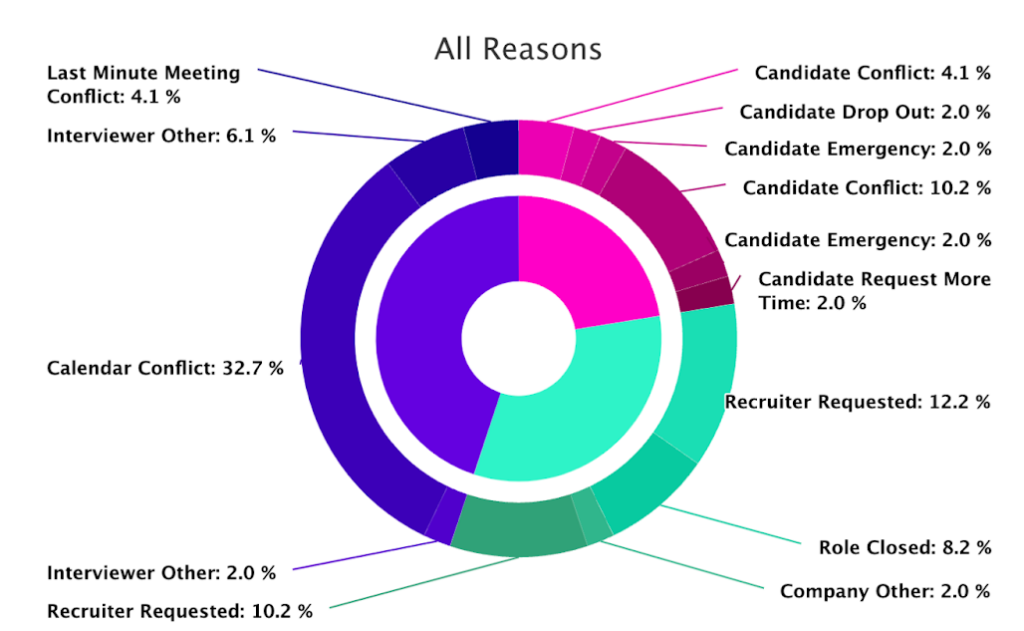
Cancellation & Reschedule Reasons Report – Last month, we introduced the ability to record the reason for the rescheduling and canceling of interviews. Now, you can access the results in a super simple, but powerful report.
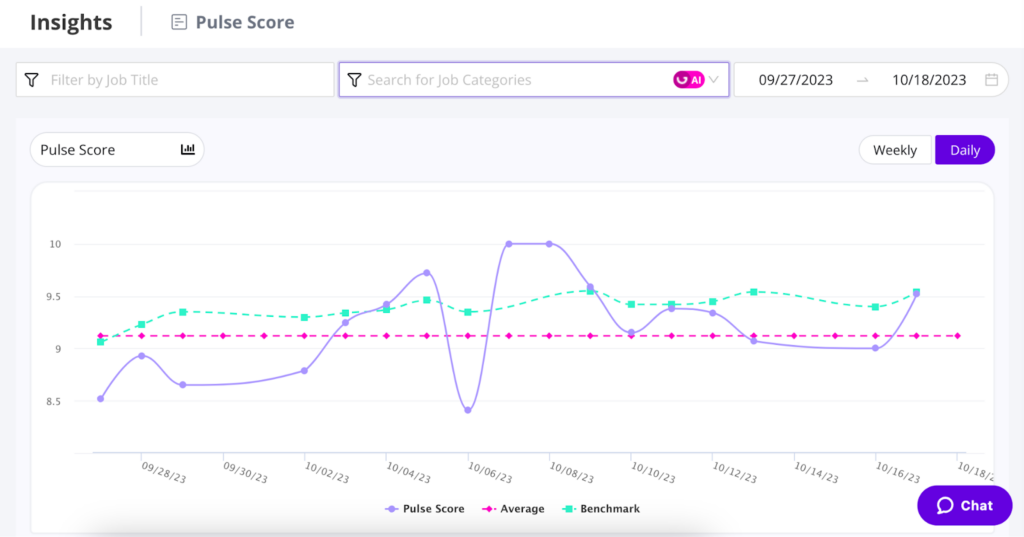
Pulse Benchmarking – The brand new Pulse Report now offers benchmarking! GoodTime is now the only objective way to measure & compare candidate satisfaction against the true industry standard.
Training Revamp – The Training module has been overdue for a refresh, and with the help of trusted customers, we have made a series of powerful improvements.
Event and Interview Day Scheduling – Candidates can now self-schedule for events and Interview Days. Utilize our new request availability workflow to automate scheduling these types of interviews.
Screener Questionnaires – Leverage knock-out questionnaires to pre-screen candidates before scheduling.
Plus, there’s more! So let’s dive right into it. As always, you can catch our full video walkthrough of this month’s new features below, or keep scrolling for a quick look at the highlights.
Watch the October 2023 GoodTime product updates webinar
Cancellation & Reschedule Reasons Report
The GoodTime Cancellation & Reschedule Reasons Report shows a precise breakdown of what caused both actions. You can dissect the data by high-level reasons, and detailed reasons.
Why this is awesome: Anyone can agree that reschedules and schedules are necessary, but not great. Drilling down to what causes them is the first step to improving your process.
Auto-tag trainees upon enrollment
Now you can configure your training paths so that trainees are automatically assigned a tag upon enrollment.
Why this is awesome: Trainees are best nominated for interviews through the use of tags. Auto-tagging trainees when they enroll eliminates a whole step of the training process by automating it according to your specific needs.
Pulse benchmarking
The brand new GoodTime Pulse report now offers benchmarking!
Why this is awesome: The Pulse score is the most objective and standardized way to track candidate experience and helps you improve over time. But only GoodTime benchmarking allows you to measure that improvement objectively against the true industry standard.
Event & Superday scheduling
Candidates can now self-schedule for superday and interview day interviews using the same Request Availability flow they love and know!
Why this is awesome: Even more automation is brought to our Interview Day scheduling flow! No more Excel spreadsheets and manual emails to get scheduling done.
Screener questionnaires
You can now create custom questionnaires that exist in the scheduling flow! Use this to collect important information from candidates and disallow candidates who are not a good fit from scheduling their interviews.
Why this is awesome: Save a ton of time for recruiters, hiring managers, and candidates by pre-screening them before scheduling!
Even more improvements!
For Hire:
Custom labels for Interview Blocks
Now you can label your blocks “GTIB…” or “GoodTime Interview Block..” followed by anything you need.
Improvements to tag-picking logic for Request Availability
– Increased randomization
– Increased pool size
Specific Time for 4 days or more
While multi-day options were historically limited to 3 days or less, now you can configure the most complex interviews over however many days & weeks you need.
Training Path names
Now you can easily see the training path names for alternates when pulling out the “change trainee sidebar”.
For Hire for High Volume:
Multiple candidate creation
We now support multiple candidates with the same phone number and email address. This supports creation and messaging to these candidates instead of a popup alerting you a candidate already exists
Interview day enhancements
You can now update interviewers after an interview has been scheduled. This will automatically update the interviewer across all interviews.
You can also schedule with empty interviewers and update after scheduling.
Enhancements for Settings & Templates
Leverage variables to place the candidate’s resume and interviewer scorecard wherever you want in the calendar invitation ($Candidate.Resume.URL and $FeedbackForm.URL)
Use the new Zoom Meeting ID variable to provide interviewers with the Zoom ID when in meeting rooms ($Interview.Zoom.MeetingId)
Generate the video links inside of the location field with our new setting
Now display OR and AND between pills across the application
Are you making the most of GoodTime’s latest features?
We want to help you evolve and take full advantage of the latest upgrades and improvements to our platform. Check out our support center for tutorials and tips to help you stress less and get more done!
If the pumpkin iced coffees are upon us, that means so is the holiday hiring season.
Retail talent leaders, this is your sign to push forward with your holiday hiring plan if you haven’t done so already. I know that with a (still) unstable economy and fewer resources to meet hiring goals, talent teams are worried that they’re up against another hard holiday hiring year.
But not to worry — I’ve got your back. I gathered tips from experienced TA leaders and we’re going to spill their secrets and show you how to achieve holiday recruiting success this year.
The truth is, things aren’t going to be easy. Similar to last year, the U.S. labor market remains tight with 1.6 jobs available for every unemployed worker.
However, it’s not all doom and gloom. The good news is that we’re seeing signs of gradual cooling and a 35% increase in job searches this year compared to last year. With continued inflation, interest-rate hikes, and resumed student loan payments, people may be feeling the pressure to find jobs.
Even so, it’s still the worker’s market in retail. As retail TA leaders continue to face hiring headwinds, how can they set themselves up for a successful holiday hiring season in 2024? Read on to find out what the experts are saying.
Unlock retail’s top hiring strategies in 2025
Our study of 105 retail TA leaders reveals how to hit your hiring goals in a challenging market.
Don’t wait another second to plan for holiday hiring
So yes, the best time to start your holiday hiring strategy was in September, but the second-best time is now.
Talent teams are up against a growing set of unique challenges (from tech advances to an unpredictable economy to shifting candidate expectations). Knowing this, it’s critical to have an adaptable plan in place so you can start attracting job seekers right away.
Speed is the name of the game when it comes to hiring, especially in retail. If you’re slow to offer the job, the store across the street will sweep in and grab your candidates.
To make sure your competition doesn’t strike first, you need to start your hiring strategy early. Elizabeth Konkel, U.S. Department of Commerce economist agrees. “My advice for employers looking for seasonal workers is start now,” she says. “Don’t wait later in the season because you may really feel a big crunch.”
We repeat: don’t wait. Not only will this set you up to hire the right people for the right roles, but you’ll also have more job applicants than if you waited.
“My advice for employers looking for seasonal workers is start now. Don’t wait later in the season because you may really feel a big crunch.”
Elizabeth Konkel, Economist, U.S. Department of Commerce
Vary your recruitment methods during the holiday season
Need to attract seasonal hires, but aren’t sure where to begin? Get creative.
There are a variety of platforms that can be leveraged to spread the word. Of course, first, you’ll want to make sure your basics are covered and that you’re advertising your seasonal jobs on your company website, social media platforms, and online job boards.
Then, think beyond digital ads.
Remember — not all “creative” recruitment methods need to be tech-forward. Sometimes, old-school approaches are the most effective. We spoke with Craig Pyke, currently the Director of Talent Acquisition at Rivian and a hiring leader with nearly 20 years of experience hiring high-volume roles. When we asked him about innovative approaches to hitting hiring goals, he advised going back to basics:
“I actually posted a billboard. In my background, that was like the craziest thing to do. You know, we would source talent on all these different channels, but in volume recruiting, you have to get in front of people, right? And sometimes just doing a simple thing like that — getting back to basics and in front of folks — is one good way to go about it.”
Try a company referral program, attend job fairs and hiring events, or even hand out old-school fliers at your local campus. It may seem outdated, but it’s a great way to get in front of college students who need a bit of work while school is out of session. Even better, include a QR code on your flier that allows students to quickly scan and apply directly from their phones. And speaking of mobilized applications, this brings us to our next point.
Make your seasonal job application process mobile-friendly
Where are you most likely to browse the internet? Is it at your home office on your desktop computer? Or, is it on your phone or tablet while you’re waiting in line at the bank, taking your work lunch break, or riding public transportation?
Most likely, it’s the latter. And when it comes to retail applicants, this especially holds true. ICIMS reports that 70% of retail applicants used a mobile device to apply for a job. This is compared to 53% of other applicants.
To get in front of these quick-paced candidates, retail talent leaders need to make their application process mobile-friendly. While you’re at it, make sure to keep the application process fast and efficient, especially since 73% of applicants abandon the application process if it takes longer than 15 minutes.
Famous Footwear recently implemented text-to-apply and is reaping big benefits — a 50% increase in applicants per job opening to be exact. With that kind of applicant increase, you can’t afford to not mobilize your application process.
Human-centric AI to crush your high-volume hiring goals
Engage candidates immediately via SMS and WhatsApp, harness instant bulk scheduling, and automate hiring workflows.
There’s nothing worse than applying for a job, then waiting…and waiting…and waiting for a response. And a same-day response? That’s almost unheard of according to an Indeed report. Only 4% of job applicants hear back that same day and only a few more (37%) hear back in one week.
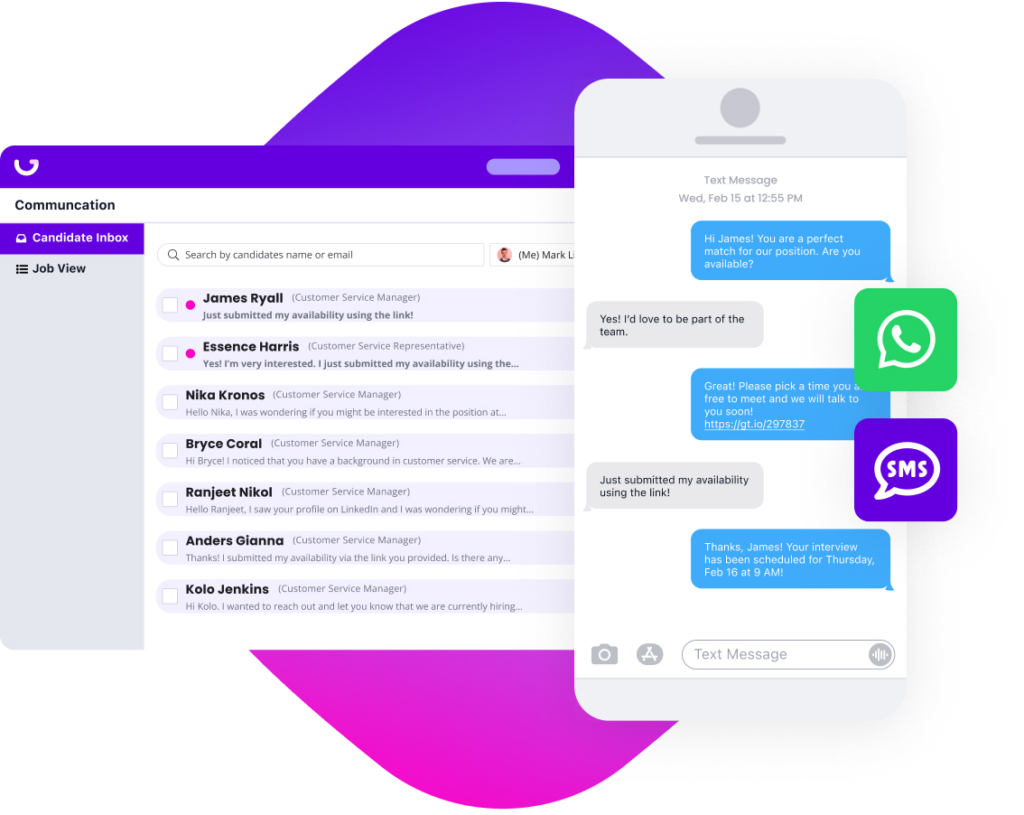
So if you’re looking to impress candidates, incorporate texting into your recruitment process. With the right platform, you can upgrade your current ATS to contact candidates directly through SMS and WhatsApp and move them to the next stage of the hiring process — in just seconds. Curious about what it looks like in action? Check out the SMS and WhatsApp featurette from our Product Tour.
When you engage instantly, candidates feel valued. And you get to find the right people, faster.
GoodTime enables SMS and WhatsApp messaging and scheduling directly from your ATS or web browser.
Streamline your process as much as possible to reduce time-to-hire
Speed really is the name of the game this year. When I speak to recruitment leaders hiring for high-volume roles, nearly all of them say they’re looking to streamline or even completely eliminate steps from their hiring process.
Brenda Purvis knows high-volume hiring. She’s led recruitment efforts for high-volume roles for 15 years and is currently the Principal Consultant for Enterprise Talent Strategy at Kaiser Permanente. In a recent executive roundtable, she urged TA pros to prioritize them in their hiring process:
“Time is truly the name of the game… time is the element that we can have some control over,” she told us.
“How do we make sure that we’re looking at our recruiting teams and equipping them to really reduce the time in all of those processes? Some of that is technology, and some of that is procedures and efficiency, but it’s also trying out new things. Instead of three or four panel interviews, can we get this done in two? Or, in certain roles where we have a higher volume of roles, and we really do know what it takes to be successful, would a recruiter be able to make some of those hiring decisions?”
“Time is truly the name of the game… time is the element that we can have some control over.”
Brenda Purvis, Principal Consultant for Enterprise Talent Strategy, Kaiser Permanente
Look for transferable skills
A large majority of retail seasonal workers will come from Gen Z. And as newbies in the working world, it’s likely that they may not have all the experience you’re looking for.
But just because they don’t have retail experience doesn’t mean they won’t be a good fit for the job. In fact, 50% of talent teams are no longer considering just experiences and instead, are looking at skills.
So, rather than relying on resume qualifications, consider candidates who show potential. Do they possess essential retail skills, like teamwork or initiative? If so, they’re likely a great fit — even if their resume doesn’t say so.
But how, exactly, do you evaluate skills?
Skills assessment tests are becoming the go-to tool to discover if candidates have the capability to get the job done. These tests can measure everything from technical skills to cognitive abilities and personality traits. They’re truly a game-changer when it comes to matching candidate skills to job requirements.
Invest in high-volume scheduling and interviewing tools
Still, it’s days too slow for holiday recruiters who need help now. To get your best candidates through the process fast, consider automating your interview scheduling and offering virtual interviews. Both work around the candidate’s schedule, making the entire process seamless.
Here’s how it works: Once talent teams have engaged with candidates, they can send pre-built screening questions that will assess who can move to the next stage of the process. Then, with the simple click of a button, the most qualified candidates can schedule their interview right then and there. And with in-person and virtual interview options, the candidate can choose one that aligns best with their schedule.
When done right, this process can cut that 16-day time-to-hire in half.
Getting budget for hiring tools in a tight economy
But how do you choose the right platform for your needs? And how are you supposed to get a budget for a new tool when resources are tighter than ever?
We asked Valeria Stanga, a seasoned retail TA leader who previously served as a TA Partner for Zalando and now works as a Senior Talent Acquisition Partner at HelloFresh. She told us, “You have to start with why. Why are you looking for something? What problem are you trying to solve?” Answering these questions, she says, will not only make it easier to select the right platform, but will also help you set up a case for procuring budget later on.
Then, it becomes about being able to clearly calculate the ROI of a recruitment platform. In Valeria’s case, when she procured GoodTime, they were looking to do 2 specific things:
Improve the speed of scheduling interviews
Reduce rescheduling rates
“Before the implementation of GoodTime, it took me 25 minutes to schedule a final interview with 3 separate interviewers — 1 hour each,” she said. “After, it was just over 3 minutes. It was such a huge change and that was still during the pilot phase!”
Watch the video below for more advice from Valeria on securing a budget for hiring technology.
Think beyond short-term opportunities
In 2022, Vicki Salemi, a career expert at Monster, said in an interview with Human Resource Executive that 36% of applicants wanted to turn a seasonal position into a full-time role. And USA Today reported that 44% of Americans currently work in (or plan to work in) seasonal jobs.
What’s happening here? It’s likely due to an increased cost of living over the last few years. In fact, according to the 2023 Global Workforce Survey, 69% of people say they’re working multiple jobs because they need extra income.
Retail TA leaders, this is your chance to turn your best seasonal workers into full or part-time employees. Admittedly, retail has traditionally gotten a bad rap when it comes to employee turnover. But it’s time to change that narrative.
Investing in your employee experience now (not just your candidate experience!) will pay off long-term. Start by creating an atmosphere that appreciates the hard work employees contribute. If seasonal hires love where they work, the ones interested in long-term work won’t want to leave.
The average hourly wage for retail workers sits at just $15 per hour. And many job seekers are no longer okay with trading hard work for subpar pay — especially in today’s economy. Employees are up against high cost of living and a low hourly pay just won’t cut it anymore.
Do you want to attract and land quality candidates? Then check your compensation offers to make sure they’re enticing. A Salary.com report shows that half of employers planned better budget increases in 2023 compared to the previous year. Another report shows as many as 80% of employers upped their compensation in 2023.
So before you start hiring, make sure your pay is competitive. This will likely be a big driving force behind your candidate acceptance rate.
And I get it — you have a limited budget and resources for seasonal hires. You can’t just raise compensation indefinitely. But think about it this way — what is the cost of all the time you and your hiring teams have to put into the process to fill a low-pay role? How much faster would it be to fill a role if the compensation was a little higher? How many of those employees would you be able to retain instead of spending more time addressing turnover? Pretty quickly, pay raises start to make sense budgetarily.
Build a network of seasonal hires
Think about all the connections you’ve made as you’ve interviewed and hired seasonal workers over the years. If you’ve made a good impression, past seasonal hires would likely be open (and even excited!) to come back next year.
This will ensure you have a pool of qualified seasonal candidates every year — cutting hours of recruiting, assessing, and training time.
Once the season is done, create a database of your best seasonal workers. Include details about their skills and past performance. Then, stay in touch.
Take it up a notch and create private social media groups for your seasonal workers, and send regular company updates and newsletters to keep them in the loop. To go a step further, consider hosting alumni events. This maintains healthy relationships and keeps them engaged, even in the off-season.
Make this your best holiday hiring year yet
If there’s one takeaway you get from me today, it should be this: the best seasonal hiring strategy will include a variety of recruitment methods — from newer tech-based platforms to the old in-person standbys.
To reach (and serve) seasonal hires in today’s modern world, consider starting with a comprehensive hiring solution that boosts your team’s productivity so you can hire faster in a competitive market.
Start by checking out GoodTime’s retail recruitment software. It attracts and engages candidates with SMS and WhatsApp — so you can quickly push candidates to the next stage of the process (the interview). It will also automatically send these candidates an interview scheduling link so they can pick the best time for their busy schedules. And yes, it’s all done in a matter of minutes. All you have to do is focus on interviewing and hiring the best possible seasonal candidates.
Even with an unstable economy and leaner resources, you can still meet your hiring goals this year. With the right combination of strategy, processes, and tech, you can make 2024 your best seasonal hiring year yet!
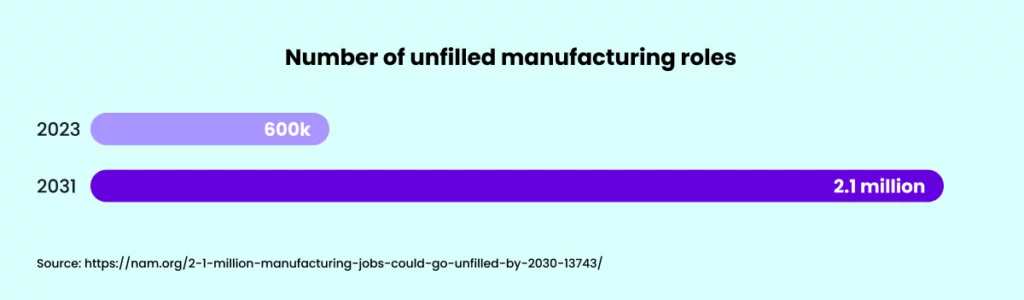
It’s no secret that the manufacturing industry has been through the wringer in recent years. Despite efforts to bounce back after the pandemic, the industry has faced an uphill battle in refilling vacancies. The numbers don’t lie: as of August 2023, a staggering 616,000 manufacturing jobs remained wide open, according to the US Bureau of Labor Statistics.
Our most recent Manufacturing Hiring Insights Report found that manufacturing companies, on average, are attaining only 44.3% of their hiring goals. If alarms aren’t going off in your head, they should be — these stats paint a concerning picture of the labor shortages and talent acquisition and retention struggles towering over the industry.
But still, not every manufacturing organization is struggling to stay afloat — some talent teams have learned how to navigate the turbulent waters. So, the question remains: what manufacturing recruitment strategies can still drive results?
We sat down with Craig Pyke, Director of Talent Acquisition at Rivian, and Michael Case, Head of Partnerships at Meshd, to shed light on manufacturing’s ongoing labor shortage and discuss adaptive recruitment strategies to power through these difficulties and start hitting your hiring goals again. We leveraged their combined 35+ years of recruitment experience to examine how software plays a pivotal role in addressing the ongoing manufacturing labor shortage.
Let’s dive in.
Unlock manufacturing’s top hiring strategies in 2024
Our study of 105 manufacturing TA leaders reveals how to hit your hiring goals in a challenging market.
You’re likely all too familiar with “The Great Reshuffle,” where the US labor market saw more than 50 million workers quit their jobs in 2022. Despite this mass exodus, hiring rates have consistently outpaced quit rates since November 2020, indicating that workers are transitioning to new opportunities rather than leaving the workforce altogether.
In addition to employees transitioning from manufacturing jobs to other careers, young people’s interest in learning trades or manufacturing skills has decreased.
“We’ve been focused on educating a whole generation that college is the answer,” says Michael. “That has come with a certain cost now that we’re trying to bring back manufacturing to the US.”
But that’s not the full story for manufacturing. After losing 1.4 million jobs at the onset of the pandemic, the sector has consistently struggled to attract and retain candidates for these job vacancies, with over 600,000 positions still unfilled.
There’s no straightforward solution. Even if every unemployed person with experience in durable goods manufacturing were employed, the industry would fill just 65% of the vacant jobs. As companies strive to attract skilled workers from the same shallow candidate pool, the talent competition shows no sign of cooling off.
And unfortunately, it’s not the kind of problem that time alone can solve. The National Association of Manufacturers anticipates that as many as 2.1 million manufacturing roles could go unfilled by 2031.
In this ultra-competitive environment, manufacturing recruitment needs to be faster and more proactive than ever. Recruiting leaders affirm that the teams that operate swiftly and communicate proactively are most likely to secure top candidates.
In response, manufacturing companies are evolving to adapt to the labor crunch. Let’s take a look at some game-changing strategies the experts have adopted to drive effective manufacturing recruiting in the face of labor shortages.
5 ways to improve manufacturing recruiting amid labor shortages
When you’re grappling with a shortage of skilled talent, traditional recruitment methods just won’t cut it. Here are a few strategies that can transform your manufacturing recruiting efforts:
1. Leverage technology to streamline recruitment
As competition for manufacturing talent continues to increase, speed and efficiency are critical in securing top candidates. This is where leveraging technology comes in. High-volume hiring platforms like GoodTime can help speed up the recruitment process by automating interview scheduling, allowing teams to connect with candidates instantly via text, and even scheduling interviews at scale.
The simple truth is that an ATS alone isn’t enough. You need to build from your ATS and supercharge it with additional tech built to solve the unique challenges of the manufacturing industry.
“If we start with the ATS as our most basic tool, there’s an entire tech stack on either side: outreach, sourcing, and interview scheduling platforms like GoodTime.” Says Michael. “There are so many tools. What do I really need, and what is nice to have? That’s what I think about when I design a system end-to-end.”
Click here to watch our full conversation with TA leaders from Rivian and Meshd.
2. Prioritize candidate experience
Providing a positive and engaging candidate experience can set you apart from other companies. This includes clear and timely communication, a smooth application process, and showing respect for the candidate’s time.
Technology can also be a huge asset here — for example, you’ll want to be able to easily send 1:1 messages to candidates via email and SMS, and even bulk message groups of candidates for faster interview scheduling.
So, how do you make the process more fun and engaging for candidates? Craig says it’s all about who’s running the show: “What it comes down to is hiring the right person to do those different recruiting events. And sometimes, they may not have a traditional recruiting resume. People that are really fun and can work a room and bring people together to do different activities are the best fit, even if they don’t have a traditional recruiting profile.”
3. Optimize and streamline your interview process
To improve your time-to-hire, streamline your interview process as much as possible. That might also mean reducing the number of rounds a candidate completes.
Reducing time to hire doesn’t mean you need to eliminate important candidate assessments or rush through the process. It means streamlining or condensing the steps when it makes sense to do so.
“One of the ways to reduce that amount of assessment time is to have candidates do an activity where you can observe some of their behaviors and skills,” says Craig. “If you have them do an activity, oftentimes with other candidates, you can assess their ability to assemble a project, follow instructions, and work as a team. That way, you’ll be evaluating multiple skills at once rather than individually, which can save a ton of time.”
For deeper screening, we recommend tools like SmartAssistant and Checkr that can quickly remove unqualified candidates and help you find the right match for each position more efficiently.
Additionally, as more manufacturing jobs are starting to involve robotic technology and utilize computer and coding skills, consider a tool like HackerRank that can assess candidates’ programming skills.
5. Integrate with existing tools and processes
To avoid disrupting your existing workflow, choose technology that integrates with your current processes and systems. GoodTime, for instance, allows you to text candidates directly from your ATS, send messages from any website right from your browser, and sync data back to your ATS or other databases. When considering a new tool, make sure it seamlessly integrates with your existing tech stack so that it actually helps you, rather than causing more headaches.
By adopting these strategies, you can turn the current labor shortage into an opportunity to boost your recruitment process and attract the talent your manufacturing company needs to thrive in 2024 and beyond.
How recruiting tools can revolutionize your manufacturing recruiting strategy
While there are a ton of strategies out there to improve your recruitment process, the biggest opportunity to make progress on your hiring goals is by leveraging the latest recruitment technology. Consider using recruiting and interview scheduling software that’s built specifically for high-volume roles. Look for a solution that provides a comprehensive solution designed to meet the unique needs of the manufacturing sector.
Let’s break down a few features of recruiting technology that can help you ramp up your manufacturing recruiting process:
High-volume recruiting
The key to overcoming labor shortages is making your recruiting process as efficient as possible. Use a platform that enables high-volume recruiting via text and email messaging, allowing you to connect with candidates instantly and schedule interviews faster. Getting in front of in-demand candidates before other companies can make a big difference.
Automation is the future of recruitment. A great recruiting tool should help you schedule multiple candidates at once with the click of a button, view the current scheduling status of all candidates, and automatically send calendar invites, agendas, and reminders. This streamlines the process, cuts down on paperwork, and ensures a seamless candidate experience.
Hiring automation built for manufacturing
Re-ignite your interview process and schedule candidates up to 67% faster.
Recruitment tech lets you set up all sorts of automation, from simple to complex, based on various criteria. You can auto-send messages to job seekers and hiring folks, like invites, reminders, and friendly pokes, which makes your hiring process smoother and more personal.
Effective screening
Pre-built screening questionnaires and knockout questions help you quickly screen out unqualified candidates and focus on those who are right for the job. This leads to a more efficient hiring process and better matches between candidates and job roles.
Integration with existing processes
Ideally, any new recruiting technology in your tech stack should integrate seamlessly into your existing processes, allowing you to send messages to candidates from any website, send interview requests, view conversations, and get notifications.
Connection to your ATS
A great platform should bring candidate and job data from out-of-the-box integrations to your ATS when needed. This ensures a smooth flow of data and maintains the integrity of your recruitment process.
See all of this in action: GoodTime’s high-volume hiring features were built specifically with the manufacturing sector in mind. You can see them for yourself in our on-demand product tour.
Looking ahead: A brighter future for manufacturing recruitment in 2024 and beyond
As manufacturing recruiters roll with the punches of the post-pandemic world, it’s clear that the industry’s destiny hinges on how good they are at tackling today’s hurdles. As they continue to grapple with labor shortages, the focus of recruitment leaders in 2024 will be on improving time-to-hire in their interview process. This means a shift towards more efficient and streamlined recruitment strategies.
Innovative recruitment technologies are pivotal players in this transformation. By automating and optimizing the recruitment process, these platforms can help manufacturing companies effectively combat labor shortages and meet their hiring goals. The effective use of technology can provide a crucial competitive edge against companies that are stuck in the past.
The current labor shortage is a chance for manufacturing companies to revamp their recruitment strategies, innovate, and come out stronger on the other side. It’s time to seize this opportunity and revolutionize manufacturing recruitment for the future.
FAQs about recruiting in a manufacturing labor shortage
What tools and strategies can be used to source candidates during a manufacturing labor shortage?
While traditional recruiting platforms are great tools, in an extremely competitive hiring landscape like manufacturing, talent acquisition teams need to think outside the box.
“I actually posted on a billboard recently,” says Craig. You have to get your company and your jobs in front of people, and sometimes just doing a simple thing like getting back to basics and physically getting in front of folks is one good way to go about it.”
Consider what platforms and mediums are going to most widely reach ideal candidates, and make sure your team has a presence there. That might also mean doing in-person presentations to high school students or other groups that are considering career options.
How can you make the hiring process more engaging for candidates?
During the hiring process, it’s important to make candidates feel comfortable and valued. They won’t want to work for your organization if they aren’t excited about potential opportunities. For manufacturing companies, that might look like interactive tours, gamified skill assessments, panel discussions, team assessments, and more.
How will manufacturing hiring change in 2024 compared to 2023?
Both Craig and Michael predict that manufacturing hiring will increase in 2024 compared to 2023. “I think there’s a big push to bring manufacturing back to the United States,” says Michael. “There are US startups that we haven’t even heard of yet that are raising money to build and do more things. And then, you know, sitting here in East Asia, I can guarantee that in Taiwan, in Seoul, in Tokyo, everyone is talking about moving more of their stuff to the US, so I think we’re going to see a lot of that.”
Bad hires are expensive. Not only do they take up valuable time and resources for companies, but the problems only get worse the more senior-level the hire is. To avoid costly mistakes, it’s essential for recruiters and hiring managers to facilitate an efficient hiring process with clear and open communication. However, many hiring teams overlook a crucial step: the intake meeting.
Outlining expectations between recruiters and hiring managers in an intake meeting is a surefire way to hire the best talent, all while preventing the wasted time, frustrations, and headaches that result from choosing the wrong candidate.
Unlock 2026’s top hiring strategies: Insights from 500+ TA leaders
Be the first to uncover deep hiring insights specific to your sector — straight from the highest-performing TA teams.
An intake meeting is when hiring managers and recruiters align on what the ideal candidate for a position looks like. This meeting takes place at the very beginning of the hiring process and should cover:
Goals for the recruiting process
A profile of the ideal candidate
Job requirements
Job title and salary
Stages of the hiring process and touchpoints
Sourcing strategies
The intake meeting occurs before the role is posted to ensure hiring managers and recruiters have a thorough understanding of how the hiring process should pan out. When done correctly, intake meetings help the interview process run smoothly by minimizing confusion down the road.
How effective intake meetings accelerate recruiting
1. Sharpens your shared understanding of the ideal candidate
The first step to a fast, efficient hiring process is to create an in-depth profile of the ideal candidate for the role. Before any interviews even take place, the entire hiring team should have a clear image of the skills, experiences, and traits they’re looking for.
Intake meetings offer the perfect opportunity for recruiters and hiring managers to carve out these expectations together. After developing an optimal candidate profile, the profile can be used to write a well-defined job description that attracts the applicants the hiring team is looking for.
Armed with a defined image of the best possible candidate, hiring teams can use this plan to easily identify applicants who do not meet the basic requirements discussed in the intake meeting.
2. Strengthens the recruiter-hiring manager relationship
An intake meeting acts as the glue that’s needed to hold the recruiter-hiring manager relationship together. The stability of this relationship heavily dictates whether a hiring process succeeds: studies show that a strong relationship between recruiters and their hiring managers is one of the biggest drivers of talent acquisition performance.
In our recent conversation with TA leaders about tech hiring challenges, Ahryun Moon, Co-Founder and Head of Company Strategy at GoodTime, emphasized the importance of intake meetings for creating a shared understanding with the hiring manager of what a “top performer” actually looks like. Amanda Richardson, Head of People at Coderpad, backed this point up, saying, “Being transparent and clear along the way really goes a long way to align the recruiting team and the business team around what our objectives are.”
Jenny Jongejan, an experienced professional in talent acquisition, presented 4 things she always seeks to hash out clearly in intake meetings:
1. The reason for hiring: Which goal will this position influence?
2. The type of person you’re seeking: Which abilities, past experiences, and behavioral traits are you after?
3. The methodology for candidate assessment: How will you evaluate candidates at each interview stage to determine if they’re a good fit?
4. The benchmarks for evaluation: How do you differentiate between an average response and an outstanding one?
You can see Jenny’s full remarks in the clip below.
Setting aside ample time to meet with one another streamlines the hiring process by ensuring that all parties agree on realistic objectives. In turn, this prevents any future miscommunication or confusion that might prolong the hiring process or result in a costly bad hire.
For instance, rather than facing difficulties down the line with trying to fill a role within too short of a time period, intake meetings allow recruiters to candidly discuss if a hiring manager’s expectations on the hiring process are actually attainable.
The trust, rapport, and mutual support that intake meetings foster between recruiters and hiring managers bolsters the hiring process with a solid foundation for success.
3. Reduces your time-to-hire
Intake meetings play a key role in reducing time-to-hire. Nearly every aspect of an intake meeting — from the way that they eliminate potential roadblocks to the way that they reduce back-and-forth communications between the recruiter and the hiring manager — is engineered to promote a quick hiring process.
In a time when competition for the best talent is more intense than ever before, companies with the most efficient hiring come out on top. Intake meetings boost recruitment efforts with exactly the speed that hiring teams need. While 55% of organizations do not utilize intake meetings, 30% admit that the hiring process takes longer without them.
When recruiters collaborate with hiring managers in intake meetings, they’re able to fine-tune their sourcing and drastically reduce their screening time. Some teams even review LinkedIn profiles that demonstrate who their ideal candidate is to further reduce their time-to-hire and establish how they can identify the best matches for the job.
Join a community just for talent pros
GoodTime Talent Innovators is an online community for TA professionals to engage in discussions, network with one another, and discover exclusive events.
10 questions to ask in your intake meeting or recruiting intake form
An intake meeting serves as your compass, helping you map out the journey to successful recruitment. To ensure you’re on the right path, consider these crucial questions to raise during your intake meeting, or include them in the intake form so you can discuss them together with the hiring manager in your meeting:
1. What are your goals?
Let’s start by setting the destination. What are your objectives for this hiring process? Understanding the bigger picture will guide our efforts and ensure we’re all moving in the same direction.
2. Who’s the ideal candidate?
Paint a vivid portrait of the candidate you’re seeking. What skills, experiences, and qualities should they possess? This shared vision will shape our search strategy and ensure we’re all on the same page.
3. What’s non-negotiable?
Let’s identify the must-haves. What are the essential qualifications, certifications, or experiences required for the role? Pinpointing these criteria upfront will help us sift through candidates effectively.
4. What’s the job’s scope and impact?
Understanding the role’s significance is vital. How does it fit into the broader team and company goals? This insight will help us attract candidates who are aligned with the role’s purpose.
5. How does the team collaborate?
Let’s dive into the team dynamic. How does this role interact with other departments or team members? This understanding will help us identify candidates who can seamlessly integrate and contribute.
6. What’s the timetable?
Time is of the essence. What’s the expected timeline for sourcing, interviewing, and onboarding? Aligning expectations here will help us maintain a steady pace and avoid any unnecessary delays.
7. How can we showcase the company in the hiring process?
Candidates are looking for a match beyond just skills. What aspects of the company culture and mission should we highlight to attract the right talent? This insight will help us craft compelling job descriptions.
8. How do you evaluate success?
Defining success is crucial. How will we measure the impact of this hire? Establishing clear recruitment metrics will guide our assessment process and ensure we’re all working towards the same outcome.
9. What’s the interview process going to look like?
Let’s map out the journey for potential candidates. What stages will they go through? Who will be involved in the interviews? Clarity here will streamline the selection process.
10. What can we learn from past hires?
Drawing from experience can be enlightening. What lessons have you learned from previous hires in similar roles? We want to both hire and retain top talent, not just initially get them on board. This wisdom can guide our approach and refine our strategy.
Asking these fundamental questions during your intake meeting can help lay a solid foundation for a streamlined and effective hiring process. Each response acts as a building block, constructing the path toward finding the right candidate for the role.
Don’t skip the recruiting intake meeting
As the recruiting world continues to change, one constant remains: the significance of the intake meeting.
This often underestimated step has the potential to redefine your hiring process. By collaboratively charting the course, clarifying expectations, and fostering a strong recruiter-hiring manager partnership, the intake meeting sets the stage for efficient hiring and a better candidate experience.
And while you’re at it, make sure you’re also regularly holding quality interview debrief meetings with hiring managers as well. This is your chance to examine candidates against the qualities you identified in your intake meeting. So quality intake and debrief meetings really go hand-in-hand.
Ready to learn more about streamlining your recruiting processes? See how GoodTime’s interview scheduling software can help you decrease your time-to-hire.

 Efficiency
 Experience
 Intelligence